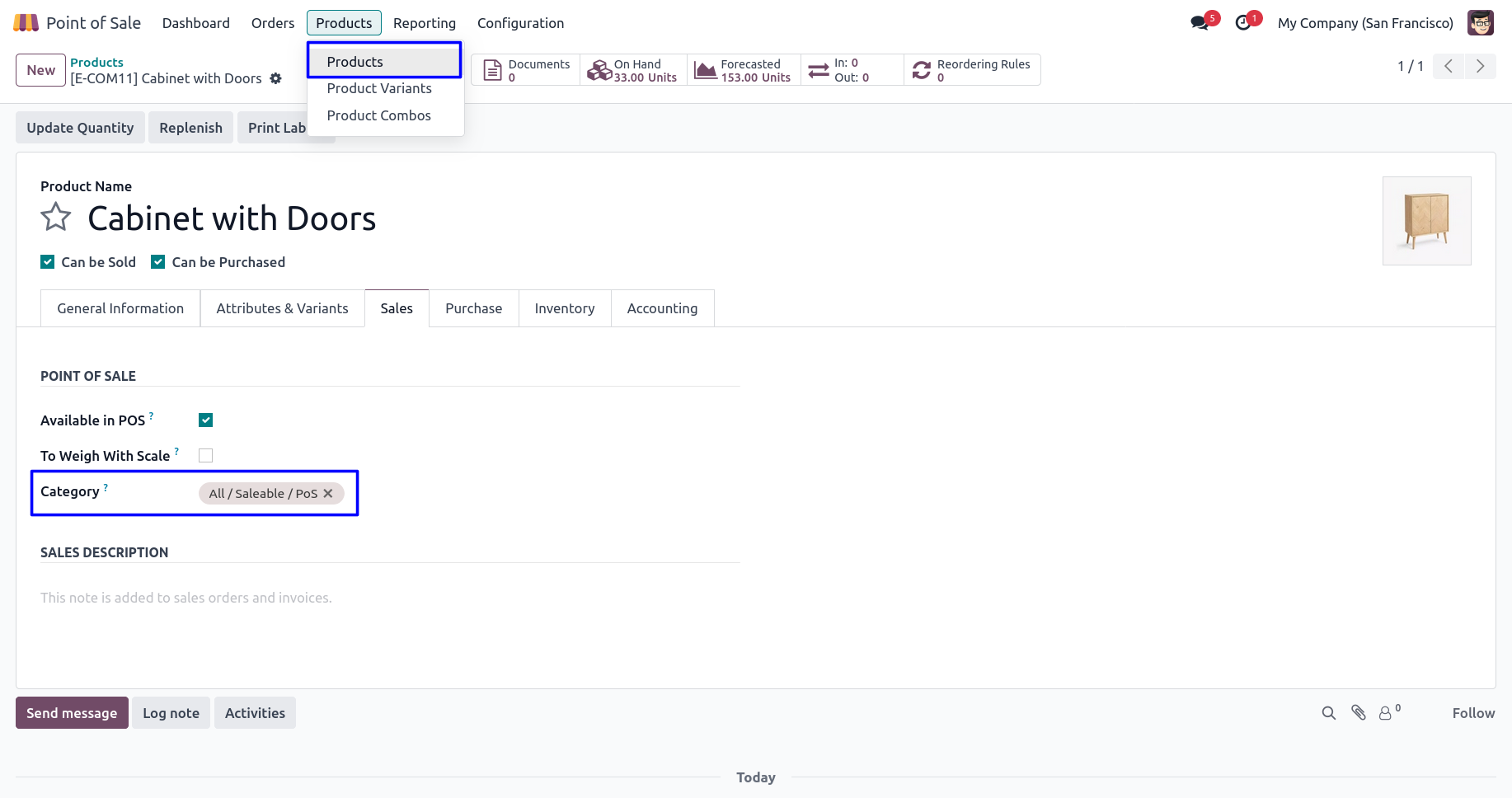
Sync Product Category with POS Category Odoo App will help you to easily merge/sync product categories to the pos categories. Using this app you can automatically sync with the point of sale category while you create a new product category. While you linked all products category with the corresponding point of sales category, that time you can also enable the option 'all product link with pos category' for all products.
Also Read: Odoo POS All in One features that every POS machine needs
Features
1) Easy to Sync POS Category
User can easily sync product's internal category with POS category.
2) Auto set product internal category to POS category
Automatic set product internal category to the point of sale category.
3) POS new Category Sync
When use create a new category then that category automatically syncs with point of sale categories.
4) POS new Product Sync
All products category automatically sync with the point of sale category.
Why Synchronizing Product Categories with POS Categories Matters
Businesses that operate Point of Sale systems often maintain a large number of products distributed across multiple categories. Managing these categories separately in inventory and POS environments can increase administrative work and create inconsistencies. Synchronizing product categories with POS categories helps maintain uniform product organization across the system and reduces manual category management tasks.
When categories remain aligned, businesses can ensure products appear in the correct sections within the Point of Sale interface. This improves operational efficiency and provides a better experience for cashiers and store managers.
Maintaining Consistent Product Organization
As product catalogs grow, maintaining consistency becomes increasingly important. Retailers frequently introduce new products, discontinue existing items, and reorganize product structures based on business requirements.
Keeping product categories synchronized helps maintain a clear and structured catalog hierarchy. Consistent category management reduces confusion and ensures that products remain properly organized across inventory and sales operations.
A standardized approach to product organization supports long-term business scalability.
Simplifying Retail Store Operations
Retail businesses rely on efficient processes to serve customers quickly. Product category synchronization reduces the need for repetitive manual updates and helps ensure newly created categories are available where needed.
Store employees can focus on customer service rather than spending time managing product structures. This contributes to smoother daily operations and helps businesses maintain productivity during busy sales periods.
Efficient category management plays an important role in overall retail performance.
Improving Product Discovery in POS
Point of Sale systems are designed for speed and ease of use. When products are grouped correctly within categories, cashiers can locate items faster and complete transactions more efficiently.
Well-organized category structures improve navigation and help reduce search time during checkout. Faster product discovery contributes to shorter queues, improved customer satisfaction, and better transaction efficiency.
Businesses handling high sales volumes particularly benefit from streamlined product navigation.
Supporting Multi-Store Retail Environments
Organizations operating multiple retail locations often require consistent product structures across stores. Maintaining category synchronization helps ensure all locations follow the same organizational standards.
Consistent category management simplifies staff training, reporting, inventory control, and operational oversight. Store managers can work with familiar category structures regardless of location.
This consistency supports better control across growing retail networks.
Importance of Product Categorization in Point of Sale Systems
Product categorization plays a critical role in maintaining an organized Point of Sale environment. Retail stores, supermarkets, restaurants, pharmacies, and other businesses often manage large product catalogs that require proper classification to ensure smooth sales operations.
Well-structured categories help POS users quickly locate products during customer transactions. Organized product groupings improve navigation within the POS interface and reduce the time required to process sales orders.
An effective category structure contributes to a more efficient checkout experience and supports daily retail operations.
Improving Product Visibility for POS Users
Point of Sale operators frequently work in fast-paced environments where quick product access is essential. When products are organized into meaningful categories, users can locate items more efficiently and complete transactions faster.
Clear product visibility within the POS system helps reduce search time and improves the overall usability of the sales interface. Better organization also assists new employees in becoming familiar with available products and category structures.
Improved visibility contributes to smoother sales operations and enhanced customer service.
Supporting Large Retail Product Catalogs
Retail businesses often manage hundreds or thousands of products across different departments and product groups. Maintaining consistent product organization becomes increasingly important as inventory grows.
A structured category management approach helps businesses keep product catalogs organized and easier to manage. Proper classification improves product accessibility and supports more efficient sales activities within the POS environment.
Scalable category structures help businesses accommodate product expansion while maintaining operational consistency.
Product Category Management Best Practices
Businesses should regularly review category structures to ensure products remain organized according to operational requirements. Categories should be easy to understand, logically grouped, and scalable for future growth.
Maintaining clear product hierarchies helps improve navigation, reporting accuracy, inventory tracking, and overall system usability. Consistent category management practices support long-term operational success.
Organizations that invest in structured product categorization often experience better data quality and more efficient sales processes.
Industry Use Cases for POS Category Synchronization
POS category synchronization can benefit supermarkets, retail stores, restaurants, pharmacies, electronics retailers, apparel businesses, wholesalers, distributors, bookstores, hardware suppliers, and specialty stores.
Any organization managing products through Point of Sale systems can improve operational consistency by maintaining synchronized product categories. This flexibility makes category synchronization valuable across a wide range of industries and business environments.
Businesses can adapt category structures to meet their specific operational needs while maintaining organized product management processes.
Faster Checkout Operations
Checkout speed is an important factor in customer satisfaction, particularly during peak business hours. Cashiers need efficient methods to locate products and complete transactions without unnecessary delays.
Organized product categories help streamline checkout activities by providing logical product groupings within the POS interface. Faster product selection contributes to shorter customer wait times and improved transaction processing efficiency.
Efficient checkout operations support better customer experiences and retail productivity.
Better Product Management Across Sales Channels
Many businesses sell products through multiple channels including physical stores, eCommerce websites, wholesale operations, and POS systems. Maintaining consistent product organization across these channels can simplify inventory and sales management.
Consistent category structures help businesses maintain better product organization and improve operational visibility. Standardized product classification supports more effective catalog management and sales operations.
Organizations benefit from maintaining a unified approach to product categorization across business systems.
Enhancing Employee Training and POS Adoption
New employees often require time to become familiar with products available in the Point of Sale system. A well-organized category structure makes it easier for staff members to understand product placement and navigate the POS interface more confidently.
When products are grouped logically, businesses can reduce training complexity and help employees become productive more quickly. Simplified navigation contributes to smoother onboarding and more consistent sales operations.
Supporting Seasonal and Promotional Product Management
Retail businesses frequently introduce seasonal products, limited-time offers, promotional items, and special collections throughout the year. Managing these products efficiently requires a structured category framework within the Point of Sale environment.
Organized product classification helps businesses present promotional products more effectively and ensures that temporary product offerings remain easy to access during active sales campaigns.
Improving Product Reporting and Sales Analysis
Accurate product categorization can support better reporting and business analysis activities. Many organizations review sales performance based on product groups, departments, or business segments to understand purchasing trends and customer preferences.
Maintaining organized product categories helps create more meaningful sales reports and provides better insight into product performance across different categories.
Configuration for POS Category/Product
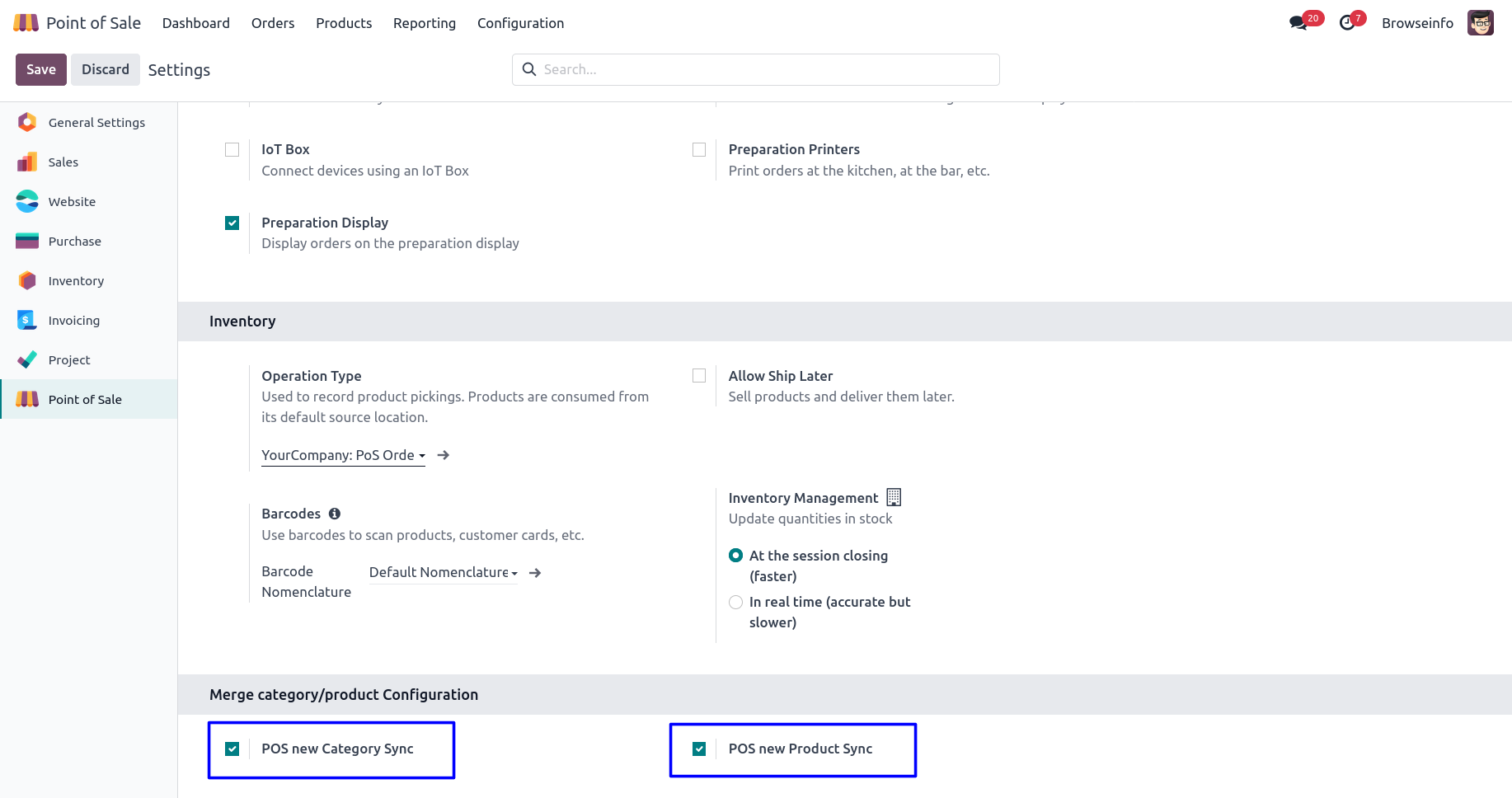
Goto point of sale configuration settings there is a two different option for sync internal category with POS category as like. 1) POS new Category Sync & 2) POS new Product Sync
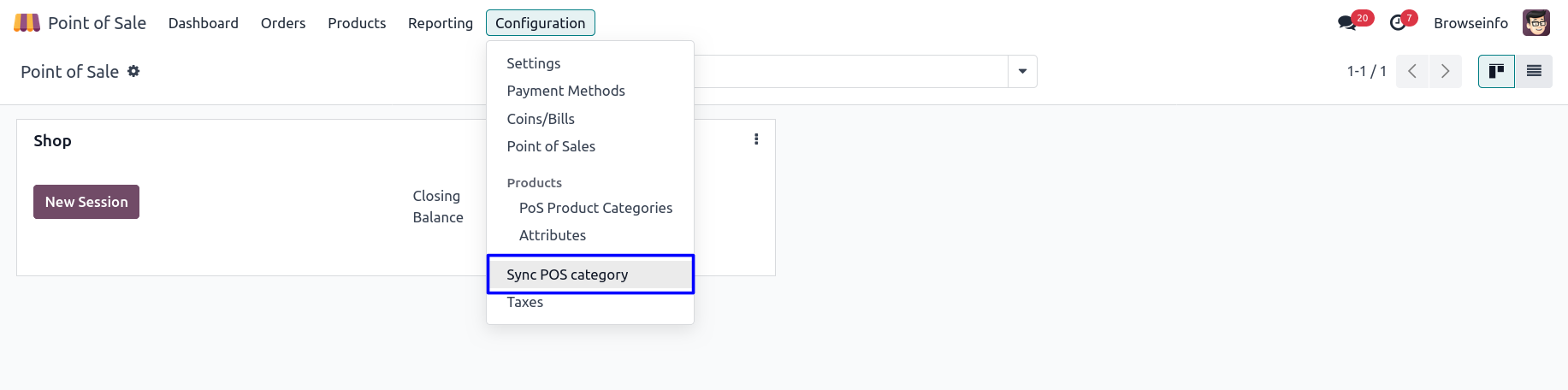
Click on Sync POS Category
Sync POS Category Wizard
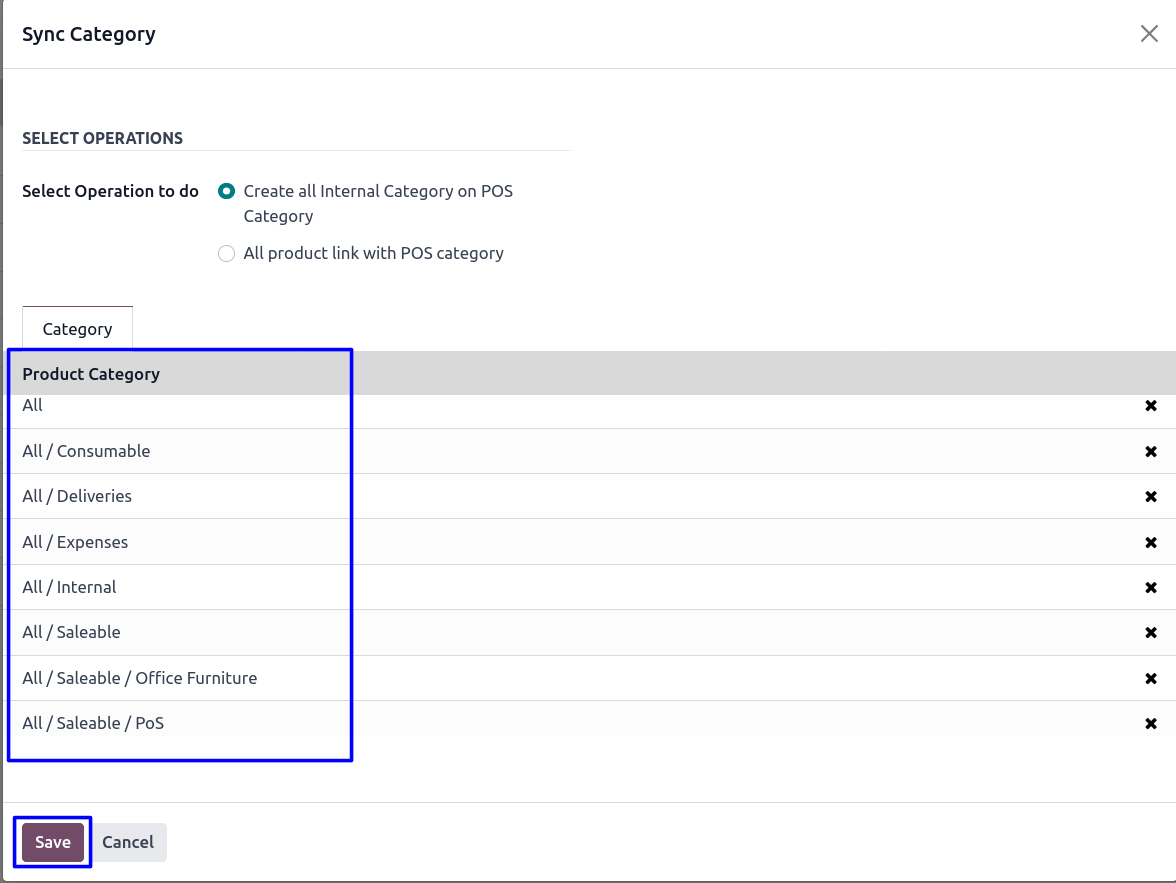
Select "Create all Internal Category on POS Category" operation then you can see list of categories.
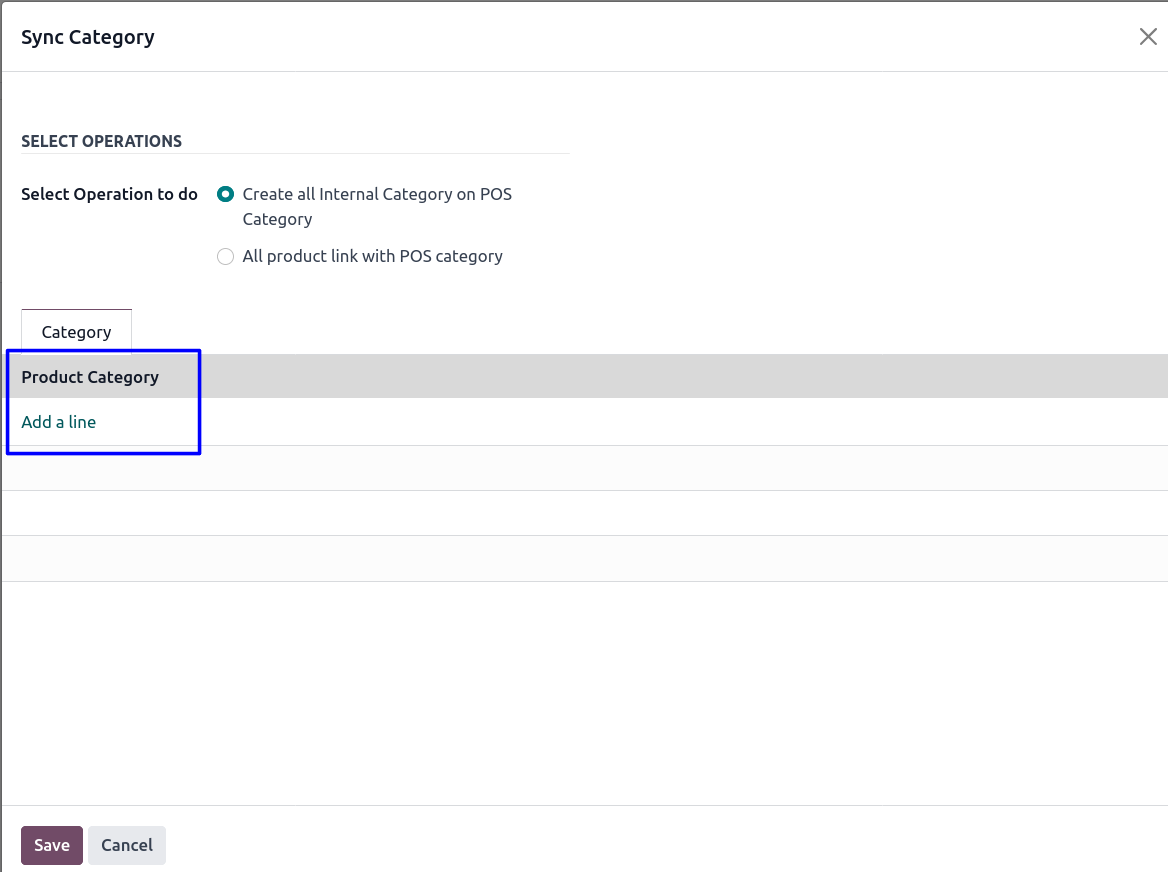
Select Category which you want to Sync in POS
You can add or remove categories from the list and click save button so all selected categories added in the POS category.
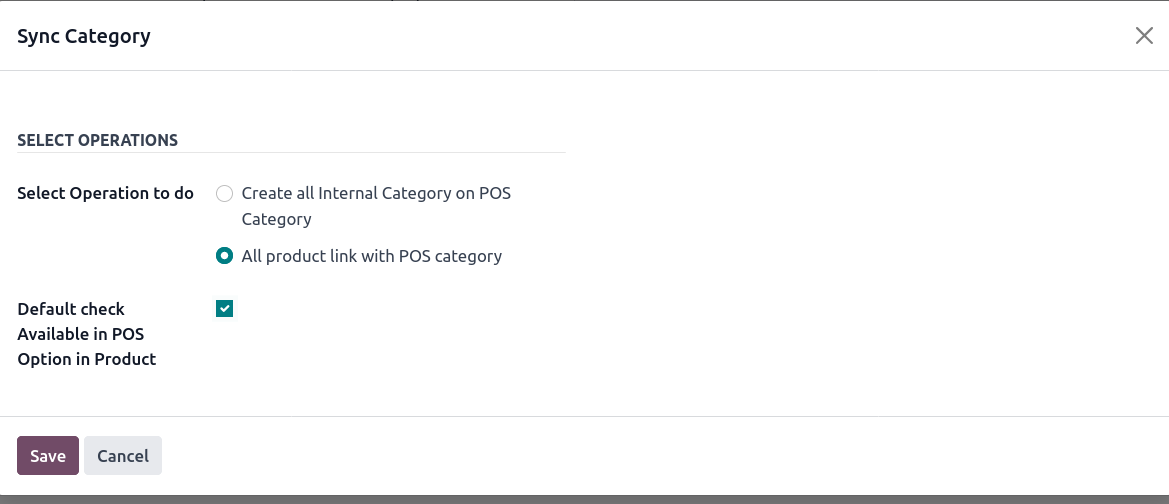
Select "All product link with POS category" operation
When you select second operation then one checkbox 'Default check Available in POS Option in Product' will be visible, this checkbox used to check option 'Available in PoS' in product, and click 'Save' then all products category and PoS category will be linked.
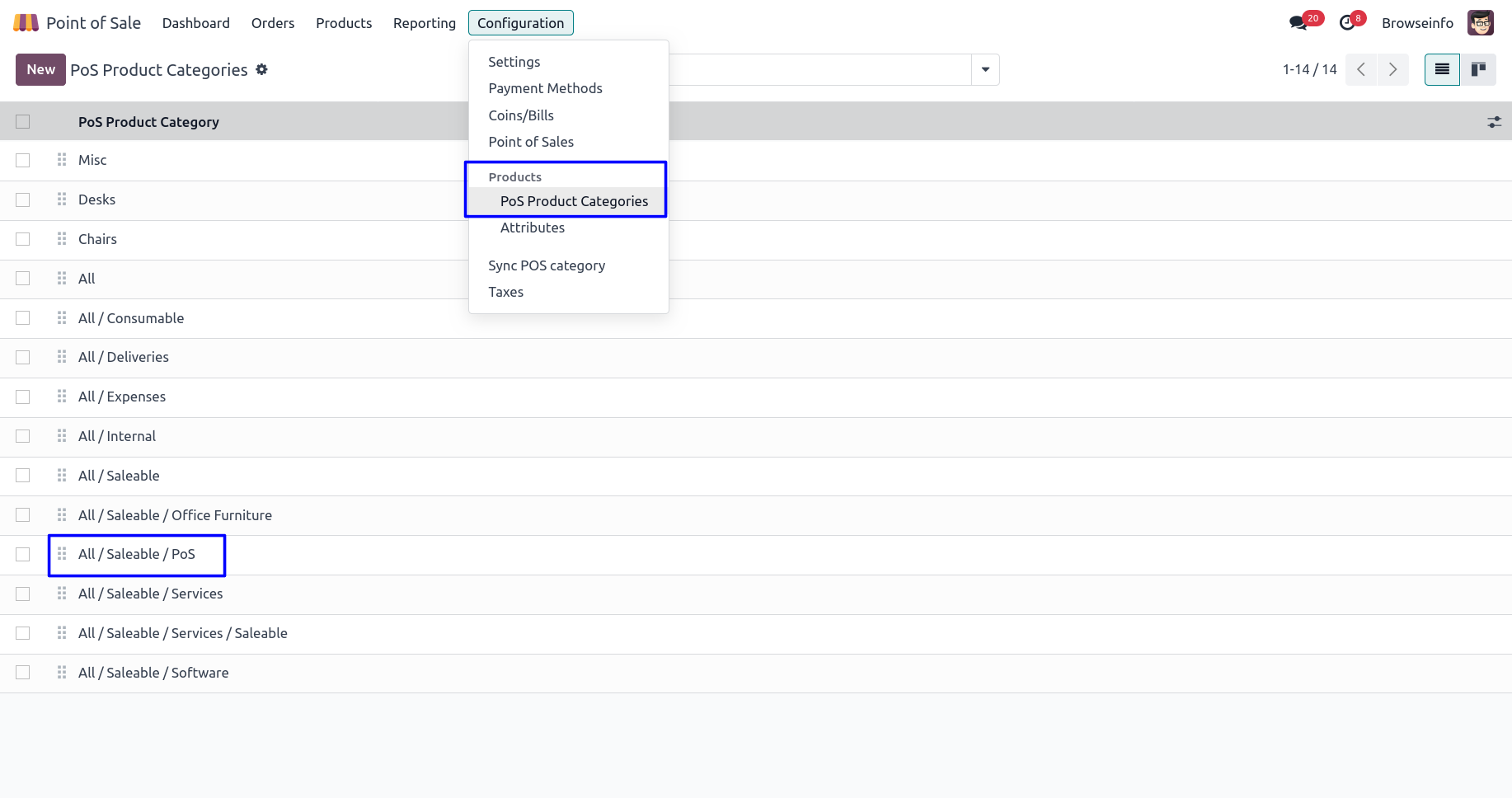
Product Categories
You can see product categories created from the internal category.
Sync with POS Category
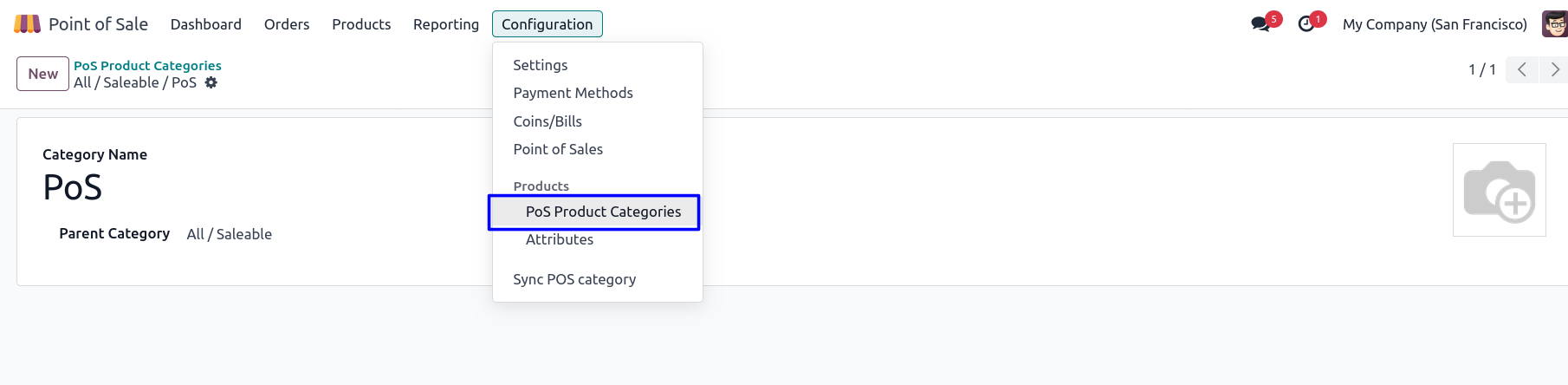 Product Link with POS Category
 Product Link with POS Category
You can see product link with POS category.