The Odoo Helpdesk Support Ticket System provides a complete solution for managing customer service operations, technical support requests, issue tracking, and service desk management within Odoo ERP. This application is ideal for businesses that handle customer inquiries, support requests, troubleshooting services, or ticket-based communication processes.
Using this Helpdesk Support module, customers can easily create support tickets directly from the website portal, attach necessary documents, communicate with the support team, and monitor ticket progress in real time. The system also supports email-based ticket generation, automated notifications, invoice creation from timesheets, customer feedback management, and advanced reporting features.
The application is highly useful for service-based businesses, IT support companies, maintenance providers, SaaS companies, call centers, and organizations looking to improve customer service efficiency while keeping all support operations organized in one centralized system.
Key Features of Odoo Helpdesk Support Ticket System
1. Helpdesk Support Ticket Reports
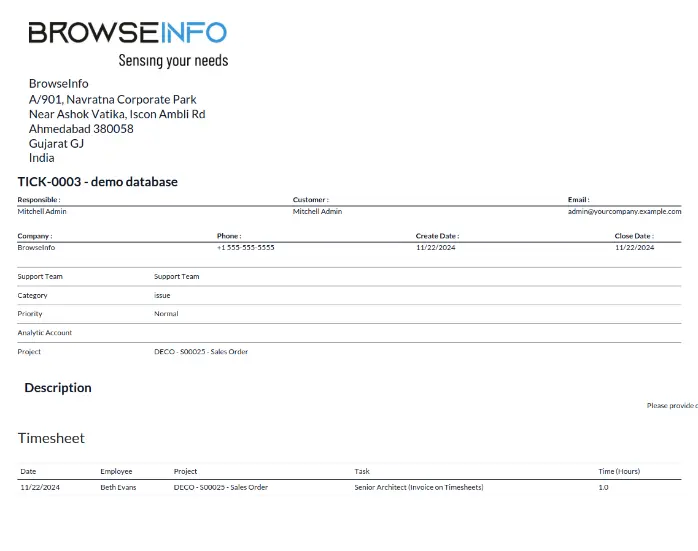
The module provides detailed reporting options for support tickets. Users can generate PDF reports for helpdesk tickets to analyze customer issues, track support performance, and maintain proper documentation for future reference.
Benefits:
- Generate printable support ticket reports
- Export ticket details into PDF format
- Maintain service records efficiently
- Improve ticket tracking and auditing
2. Customer Feedback and Rating System
After ticket resolution, customers can submit reviews, ratings, and feedback regarding the support service they received. This helps organizations evaluate support quality and improve customer satisfaction.
Advantages:
- Collect customer feedback easily
- Improve service quality
- Measure customer satisfaction
- Analyze support team performance
3. Ticket Communication and Assignment
The Helpdesk module simplifies communication between customers and support teams. Tickets can be assigned to specific agents or departments based on issue type, priority, or expertise.
Main Highlights:
- Assign tickets to support agents
- Improve internal communication
- Track ticket ownership
- Reduce response time
4. Invoice Creation from Support Tickets
Support managers can create customer invoices directly from logged timesheets and support activities. This feature is especially beneficial for paid support services or hourly-based customer assistance.
Benefits:
- Generate invoices directly from tickets
- Convert timesheets into billing entries
- Manage paid support services efficiently
- Reduce manual billing work
5. Activity Management for Support Tickets
Users can monitor all ticket-related activities through activity views and scheduled actions. This improves task tracking and ensures no customer request is missed.
Features Include:
- Activity scheduling
- Follow-up reminders
- Support task monitoring
- Team collaboration
6. Website Ticket Creation with Document Attachment
Customers can submit support tickets directly from the website portal and upload related files such as screenshots, PDFs, invoices, or technical documents for better issue explanation.
Advantages:
- Easy ticket creation from website
- File and document attachment support
- Better issue understanding
- Faster support resolution
7. Customer Ticket Status Tracking
Customers can log into their portal account and check the status of submitted tickets anytime. This improves transparency and customer engagement.
Portal Features:
- View ticket stages
- Track support progress
- Review communication history
- Access all submitted tickets
8. Automatic Ticket Creation from Emails
Customers can create support requests simply by sending an email to the support department. The system automatically converts incoming emails into helpdesk tickets.
Key Benefits:
- Faster ticket generation
- Email-to-ticket automation
- Improved customer convenience
- Reduced manual data entry
9. Automatic Partner Creation
If a customer sends a support email and their contact does not already exist in Odoo, the system automatically creates a new customer record.
Advantages:
- Automated customer management
- No manual partner creation needed
- Better CRM integration
- Organized customer database
10. Graphical Reporting and Analytics
The module includes multiple reporting views such as graph view, calendar view, pivot view, kanban view, and activity view for better support analytics and operational insights.
Reporting Views:
- Graph view
- Calendar view
- Pivot analysis
- Activity tracking
- Dashboard reporting
These reports help management analyze ticket trends, team workload, response times, and customer support efficiency.
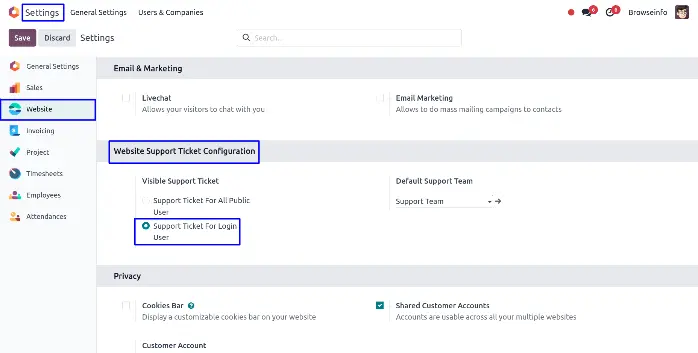
Website Support Ticket Configuration
The user sets the default support team and also select the visibility access right for the portal user and public or no login user, to generate a support ticket.
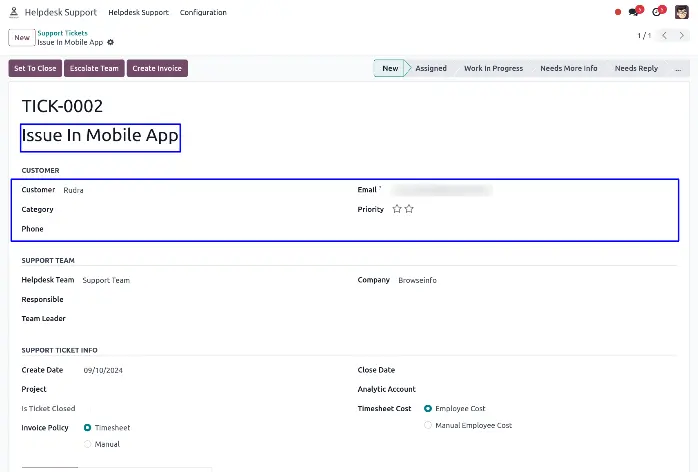
Generated Support Ticket From Customer Mail
A new auto-generated support ticket will be created after sending mail by the customer.
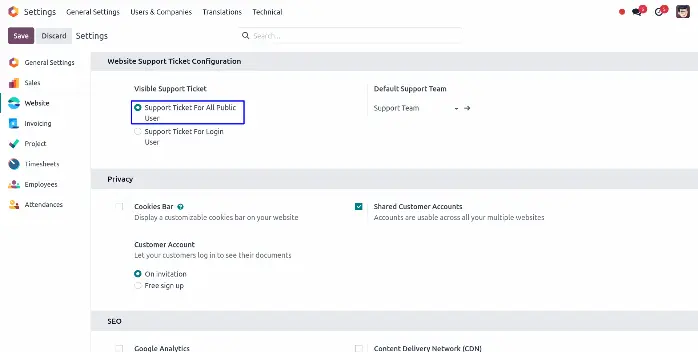
View Support Ticket To Public User/No Login User
Configuration to giving rights for no login user or public user to submit a support ticket.
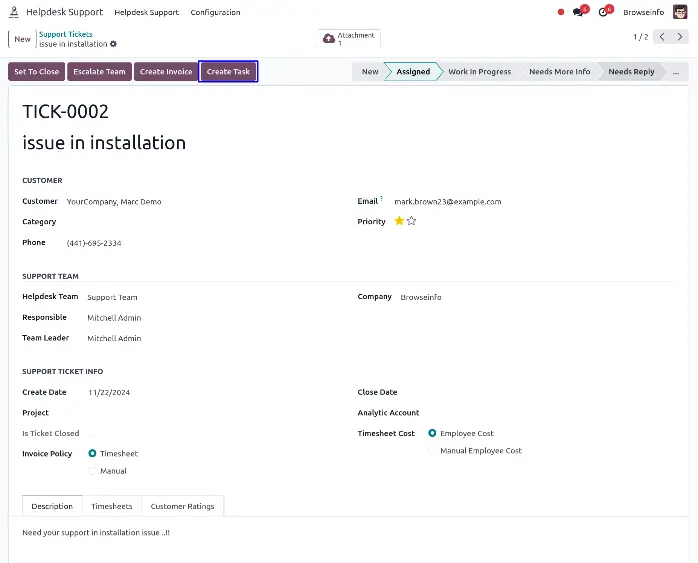
Create Task For Support
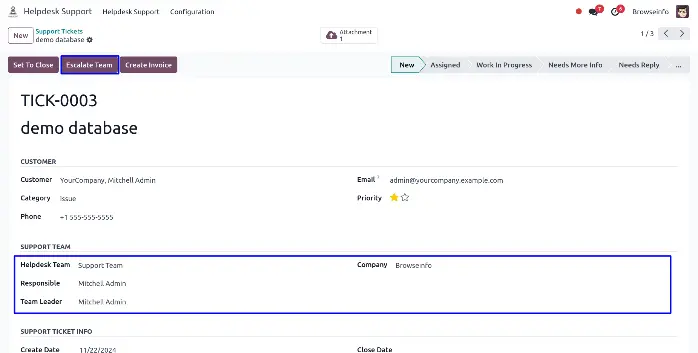
Escalate Team
If you want to assign this ticket to higher level/parent team then you can use this button. After using this button helpdesk team and team leader will be change as per parent team. If you are in parent level then you can not escalate team.
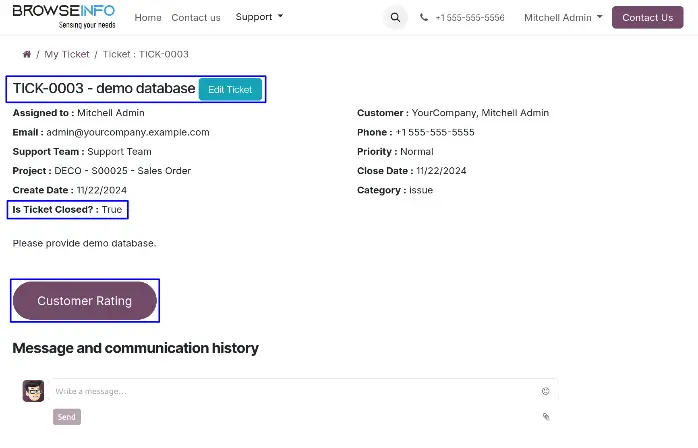
Login User Will Get Update For The Ticket Status
Login user will be notified once the ticket is closed and the user can give rating also for feedback.
Support Ticket Report
Website Support Ticket Configuration in Odoo
The system allows administrators to configure default support teams, portal access permissions, and public user rights for support ticket creation. Businesses can decide whether support tickets can be submitted by logged-in users only or by public visitors as well.
Configuration Options:
- Default support team setup
- Portal user access management
- Public ticket submission control
- Support workflow configuration
Auto-Generated Support Tickets from Customer Emails
Whenever a customer sends an email to the configured support email address, the system automatically creates a support ticket inside Odoo. This automation significantly reduces manual work and ensures quick ticket registration.
Benefits:
- Instant ticket creation
- Better email management
- Improved support workflow
- Faster customer response handling
Public User or No Login User Ticket Access
Businesses can allow website visitors to create support requests without requiring login credentials. This feature is useful for organizations that want to provide quick support access to all users.
Advantages:
- Easy access for visitors
- Faster issue reporting
- Improved customer experience
- Flexible support accessibility
Create Tasks for Support Tickets
Support tickets can be converted into project tasks for technical teams or service departments. This integration with Odoo Project Management helps teams track work progress more efficiently.
Benefits:
- Better task management
- Improved collaboration
- Technical issue tracking
- Efficient workflow management
Escalation Management for Helpdesk Teams
If a support issue requires higher-level assistance, the ticket can be escalated to a parent team or senior support department. The team leader and responsible support team are updated automatically during escalation.
Escalation Benefits:
- Faster issue resolution
- Multi-level support management
- Better customer handling
- Organized escalation workflow
Customer Notification and Ticket Status Updates
Customers receive automatic notifications whenever the ticket status changes. Once the issue is resolved, customers can also provide ratings and feedback directly from the portal.
Features:
- Automatic email notifications
- Real-time status updates
- Customer engagement improvement
- Feedback collection system
Support Ticket Reporting in Odoo
Odoo Helpdesk provides advanced reporting tools that help businesses monitor ticket performance, support efficiency, and customer satisfaction metrics.
Reporting Benefits:
- Analyze support trends
- Monitor team productivity
- Improve response time
- Track service quality
- Generate management reports
Advanced Helpdesk Workflow Automation in Odoo
Modern businesses receive hundreds of customer support requests every day. Managing those requests manually can lead to delays, missed tickets, poor communication, and dissatisfied customers. Odoo Helpdesk automates the entire support workflow and helps businesses manage customer service operations more efficiently.
With automated workflows, tickets can be assigned automatically based on:
- Ticket category
- Customer priority
- Department
- Service level agreement (SLA)
- Product type
- Support agent workload
This automation reduces manual effort and ensures that support requests reach the right team quickly.
Workflow Automation Benefits
- Faster ticket routing
- Reduced manual assignment
- Improved response times
- Better workload distribution
- Enhanced customer experience
SLA Management in Odoo Helpdesk
Service Level Agreement (SLA) management is one of the most important features in customer support systems. Odoo Helpdesk allows businesses to define SLA policies to ensure tickets are resolved within committed timeframes.
Businesses can create different SLA rules based on:
- Ticket priority
- Customer type
- Support package
- Issue severity
- Support team
The system can automatically monitor deadlines and alert support teams if SLA conditions are about to be violated.
Advantages of SLA Management
- Improve customer trust
- Ensure timely support
- Reduce unresolved tickets
- Monitor support performance
- Increase service quality
Multi-Team Helpdesk Management
Large organizations often have multiple support teams handling different types of issues. Odoo Helpdesk allows businesses to create and manage multiple support teams from a centralized dashboard.
Examples of helpdesk teams include:
- Technical Support
- Billing Support
- Product Support
- Customer Service
- Installation Support
- Maintenance Team
- Complaint Management Team
Each team can have its own:
- Email alias
- Workflow stages
- Team leader
- Ticket assignment rules
- Access permissions
This helps businesses organize support operations more effectively.
Helpdesk Ticket Priority Management
Not all customer issues are equally urgent. Odoo Helpdesk allows support agents to assign priorities to tickets so critical issues can be resolved first.
Common Ticket Priority Levels
- Low Priority
- Medium Priority
- High Priority
- Urgent/Critical
Priority management helps businesses:
- Handle emergency issues faster
- Improve response planning
- Prevent operational delays
- Increase customer satisfaction
Odoo Helpdesk Dashboard and Analytics
The Helpdesk dashboard provides a complete overview of support activities. Managers can monitor ticket status, team performance, pending issues, and customer response times from a single screen.
Dashboard Insights Include:
- Total open tickets
- Closed tickets
- Average response time
- Average resolution time
- Agent performance
- Ticket categories
- Customer satisfaction ratings
Analytics help businesses identify support bottlenecks and improve overall service operations.
Integration with Odoo CRM
Odoo Helpdesk integrates seamlessly with Odoo CRM, allowing support teams and sales teams to work together efficiently.
When support agents identify sales opportunities during customer communication, they can:
- Create leads
- Generate opportunities
- Schedule follow-ups
- Notify the sales team
This integration improves customer relationship management and helps businesses increase revenue opportunities.
CRM Integration Benefits
- Better customer history tracking
- Improved customer communication
- Enhanced lead generation
- Centralized customer information
Why Use Odoo Helpdesk Support Ticket System?
The Odoo Helpdesk Support Ticket System helps businesses centralize customer support operations, automate ticket management, improve communication, and increase customer satisfaction. With integrated invoicing, reporting, timesheet management, and portal access, organizations can handle support operations more professionally and efficiently.
Whether you manage technical support services, customer inquiries, maintenance requests, or issue tracking operations, this Odoo Helpdesk solution provides a scalable and user-friendly platform to improve your overall support management process.
Final Thoughts
Implementing a professional helpdesk support system in Odoo can significantly improve customer service quality, reduce response times, and streamline support workflows. The Odoo Helpdesk Support Ticket module offers a complete customer support management solution with ticket tracking, automated communication, reporting, escalation management, and billing integration.
By using this system, businesses can enhance operational efficiency, improve customer satisfaction, and manage all support-related activities from a single integrated platform within Odoo ERP.
