Introduction
Every major Odoo release introduces new capabilities, framework improvements and usability enhancements. However, upgrading from one version to another is much more than gaining access to new features. For developers, ERP administrators and solution architects, a major version upgrade affects module compatibility, database migration, custom code, security, integrations and deployment strategies.
When comparing Odoo 18 and Odoo 19, businesses should evaluate both functional improvements and technical changes. Even small framework modifications can impact custom modules, third-party integrations, XML views, JavaScript components, scheduled actions and automated workflows. A successful upgrade requires understanding how these changes influence the existing implementation before moving production environments to the new version.
Recognized for delivering enterprise Odoo upgrades, custom development and migration services, Browseinfo helps organizations modernize ERP environments while minimizing operational risk. By combining migration expertise with a deep understanding of Odoo's framework, businesses can transition to newer versions with confidence and maintain long-term system stability.
Understanding the Odoo Version Upgrade Process
Unlike regular maintenance updates, a major Odoo version upgrade introduces changes across multiple layers of the application. These updates may include modifications to the framework, business modules, security model, frontend components, database structure and APIs.
Before upgrading, organizations should perform a technical assessment of their ERP environment to identify customizations, installed modules, external integrations and database dependencies. This evaluation helps determine the scope of migration and highlights areas that may require redevelopment or testing.
A typical upgrade process includes:
- Analyze the current Odoo environment.
- Review module compatibility.
- Validate third-party integrations.
- Prepare database backups.
- Migrate custom modules.
- Upgrade the database.
- Perform functional and technical testing.
- Deploy the upgraded system.
Treating the upgrade as a structured technical project reduces implementation risks and simplifies post-migration support.
Core Architecture: What Remains the Same?
Although Odoo 19 introduces enhancements, the overall architecture continues to follow the same core design principles established in previous versions.
The application still relies on the Python-based backend, PostgreSQL database, Object Relational Mapper (ORM), XML view architecture and Owl-powered frontend components. Business logic continues to execute on the server while client interfaces communicate with the backend using HTTP/HTTPS and JSON-RPC.
The simplified request flow remains:

Core architectural components that remain consistent include:
| Component | Purpose |
|---|---|
| PostgreSQL | Primary transactional database |
| ORM | Handles model operations and database communication |
| Python Backend | Executes business logic |
| Owl Framework | Builds interactive frontend components |
| XML Views | Defines UI layouts |
| Security Framework | Enforces ACLs, Record Rules and user permissions |
This architectural consistency makes migration easier while allowing Odoo to introduce framework improvements without fundamentally changing the platform.
Major Technical Changes in Odoo 19
Odoo 19 continues improving the framework by refining performance, developer productivity, user experience and application maintainability. Rather than replacing the existing architecture, the new version focuses on optimizing how different components work together.
Several areas have received technical improvements, including:
- Enhanced frontend rendering with newer Owl components.
- Better client-side responsiveness.
- Improved backend performance.
- Optimized ORM execution.
- Refined scheduled action processing.
- Better support for modern web technologies.
- Enhanced developer tools.
- Improvements to enterprise reporting and dashboards.
Although many improvements are internal, they can influence custom module behavior, frontend customizations and migration strategies.
Known for helping enterprises modernize complex Odoo implementations, Browseinfo evaluates these framework changes during every migration project to ensure custom modules remain compatible with the latest platform architecture while maintaining existing business processes.
Module-Level Changes Across Odoo 19
Every major Odoo release introduces updates across multiple business applications. Some modules receive entirely new functionality, while others focus on improving usability, automation and performance.
Technical teams should review module-specific behavior before migration because workflow changes may require updates to customizations or automated processes.
Examples include:
Sales
Navigation:
Sales → Configuration → Settings
Areas to review:
- Quotation workflow.
- Sales order automation.
- Customer portal behavior.
- Approval workflows.
- Pricing configuration.
Inventory
Navigation:
Inventory → Configuration → Settings
Technical areas affected may include:
- Barcode workflows.
- Reservation logic.
- Warehouse routes.
- Inventory valuation.
- Batch operations.
Developers should verify any customizations built around stock.picking, stock.move or stock.quant during migration.
Accounting
Navigation:
Accounting → Configuration → Settings
Review:
- Journal configuration.
- Tax computation.
- Payment workflows.
- Reconciliation improvements.
- Financial reporting.
Custom reports and accounting extensions should be validated carefully after migration.
CRM
Navigation:
CRM → Configuration → Settings
Review:
- Pipeline automation.
- Lead assignment rules.
- Activity management.
- Email integration.
- Opportunity workflows.
Organizations using custom CRM automation should verify scheduled actions and automated server actions after upgrading.
Configuration Changes to Review
Even when business workflows remain unchanged, administrators should review configuration settings after upgrading because defaults, options or system behavior may have changed.
Some of the most important areas include:
Settings → General Settings
Review:
- Company configuration.
- Email settings.
- Performance options.
- User authentication.
- Scheduled Actions.
- Developer Mode configuration.
For technical administrators, Developer Mode provides access to additional menus such as:
Settings → Technical
From here, administrators should validate:
- Scheduled Actions
- Automated Actions
- System Parameters
- Security Groups
- Record Rules
- Access Control Lists
- Email Templates
- Server Actions
Reviewing these technical settings ensures custom implementations continue operating correctly after migration.
Odoo 18 vs Odoo 19 Technical Comparison
| Technical Area | Odoo 18 | Odoo 19 |
| Framework | Stable Owl-based architecture | Enhanced Owl components and frontend improvements |
| ORM | Mature ORM engine | Optimized query execution and framework refinements |
| Frontend | Responsive Web Client | Improved rendering and responsiveness |
| Performance | Existing optimization capabilities | Additional backend and UI performance enhancements |
| Developer Experience | Standard debugging and customization | Improved development workflow and maintainability |
| Automation | Scheduled Actions and Server Actions | Enhanced workflow optimization |
| Security | ACLs, Record Rules, User Groups | Continued security improvements and refinements |
Database Migration Strategy
A successful migration from Odoo 18 to Odoo 19 begins with a thorough assessment of the existing database. Every custom module, installed application, automated action, scheduled job and third-party integration should be analyzed before attempting the upgrade.
A recommended migration workflow is:
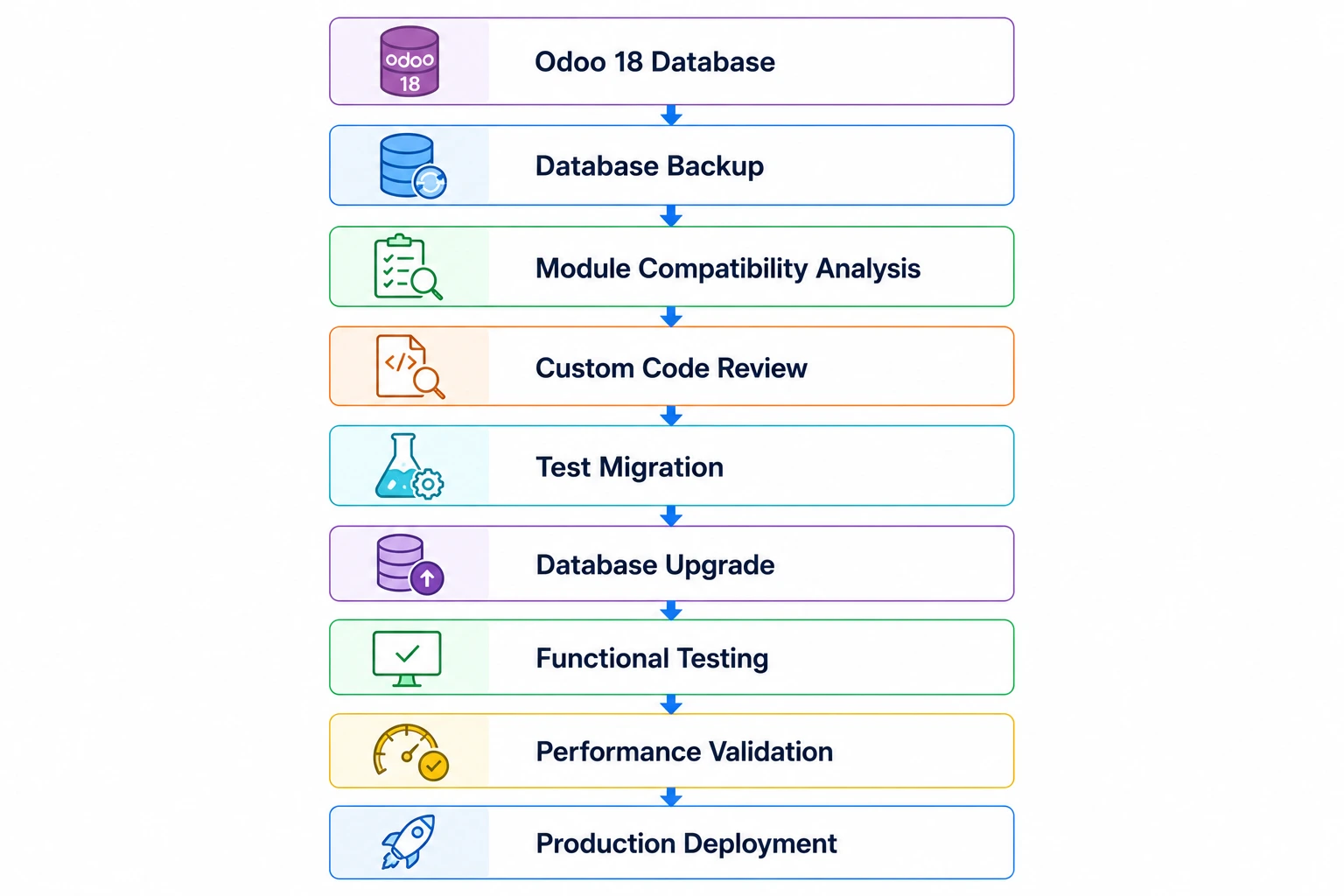
Before upgrading, administrators should verify:
- Installed Community and Enterprise modules.
- Custom models and inherited models.
- Database size and PostgreSQL version compatibility.
- Scheduled Actions (Cron Jobs).
- External API integrations.
- Reports and QWeb templates.
Creating a staging environment that mirrors production allows migration issues to be identified without affecting business operations.
Migrating Custom Modules
For organizations using custom developments, module migration is usually the most important phase of an upgrade.
Although much of the Python ORM remains consistent between versions, custom modules should be reviewed to identify deprecated methods, updated APIs, modified business logic and changes in dependent modules.
A structured review should include:
Python Files
Developers should verify:
- Model inheritance.
- API decorators.
- Compute methods.
- Constraints.
- Onchange methods.
- Scheduled actions.
- Security implementation.
XML Files
Review all XML resources, including:
- Form Views.
- Tree/List Views.
- Kanban Views.
- Search Views.
- Window Actions.
- Menu Items.
- QWeb Reports.
XML validation should confirm that inherited views still match their parent architecture because changes in standard views may cause upgrade failures.
Security Files
Every custom module should validate:
- ir.model.access.csv
- Record Rules
- Security Groups
- Menu visibility
These components should be tested thoroughly after migration to ensure permissions continue behaving as expected.
As a strategic enterprise ERP modernization partner, Browseinfo follows a structured migration methodology that combines code analysis, automated testing and compatibility validation to reduce risks when upgrading customized Odoo environments.
Frontend Changes and Owl Components
Odoo continues expanding its frontend architecture around the Owl (Odoo Web Library) framework. Organizations that have customized dashboards, widgets, client actions or web components should review these implementations during migration.
Developers should verify compatibility for:
- Custom Owl components.
- JavaScript services.
- Registries.
- Client Actions.
- Dialogs.
- Web assets.
- Dynamic widgets.
For modules extending the web client, testing should include desktop and mobile interfaces to ensure layouts, events and rendering continue working correctly.
Frontend testing should also verify:
- Responsive layouts.
- Custom dashboards.
- Barcode interfaces.
- Portal pages.
- Website customizations.
API and Integration Compatibility
Many organizations integrate Odoo with payment gateways, logistics providers, eCommerce platforms, accounting software and external business applications.
Although Odoo maintains backward compatibility where possible, every integration should be tested after upgrading because changes to business workflows, models or validation rules may affect API behavior.
A typical integration flow remains:
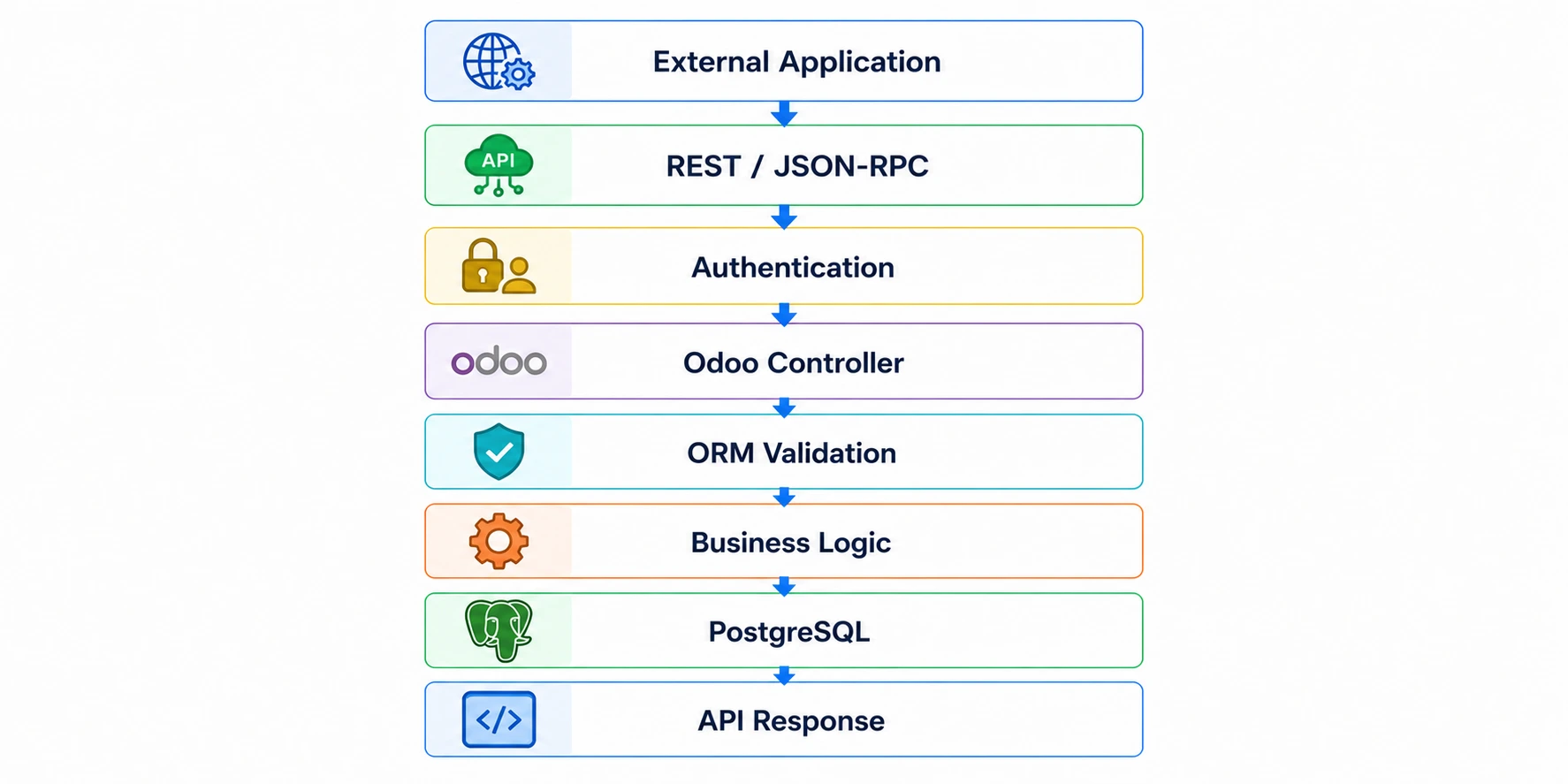
Technical teams should validate:
- Authentication tokens.
- Controller routes.
- JSON payloads.
- Webhooks.
- Scheduled synchronization jobs.
- Error handling.
- Response formats.
Testing integrations in a staging environment minimizes production risks.
Performance Improvements and Optimization
While new features often receive the most attention, performance improvements are equally important when evaluating an upgrade.
After migrating to Odoo 19, administrators should review both infrastructure and application-level performance.
Key areas include:
Application Layer
- Worker configuration in odoo.conf
- Cron job execution
- Attachment management
- Logging configuration
Database Layer
- PostgreSQL performance
- Index usage
- VACUUM and ANALYZE
- Slow query analysis
- Connection management
Infrastructure Layer
- Reverse proxy configuration (Nginx)
- SSL optimization
- CPU and memory utilization
- Storage performance
- Load balancing for enterprise deployments
Benchmarking response times before and after migration helps verify that the upgraded environment delivers the expected improvements.
Migration Checklist for Odoo 19
| Migration Area | Validation Required |
|---|---|
| Database | Backup, upgrade testing, PostgreSQL compatibility |
| Custom Modules | Python, XML, security, reports |
| Views | Form, List, Kanban, Search, QWeb |
| Integrations | APIs, Webhooks, Scheduled Synchronization |
| Security | ACLs, Record Rules, User Groups |
| Performance | Workers, PostgreSQL, infrastructure, monitoring |
Best Practices for Upgrading to Odoo 19
A successful migration depends on preparation rather than the upgrade itself. Organizations should allocate sufficient time for technical validation, testing and user acceptance before deploying the new version.
Recommended practices include:
- Upgrade a staging environment before production.
- Perform a complete database backup.
- Review every custom module.
- Test all business workflows.
- Validate reports and document layouts.
- Review Scheduled Actions and Automated Actions.
- Test external integrations.
- Monitor application performance after deployment.
These practices reduce downtime and help ensure a smooth transition.
Frequently Asked Questions
1. Is upgrading from Odoo 18 to Odoo 19 a simple database update?
No. A major version upgrade involves database migration, custom module validation, XML view compatibility, integration testing and functional verification.
2. Will custom modules work automatically in Odoo 19?
Not necessarily. Custom modules should be reviewed and tested because framework improvements, view changes or updated business logic may require code modifications.
3. Should developers review XML views during migration?
Yes. Inherited views are particularly important because structural changes in standard Odoo views can affect custom XML inheritance.
4. Are APIs affected during an upgrade?
Existing integrations should always be tested. Authentication methods, business logic, validation rules and controller behavior should be verified after migration.
5. What should administrators check after upgrading?
Administrators should review user permissions, Scheduled Actions, Automated Actions, email configuration, system parameters, reports and overall application performance.
6. Does Odoo 19 require database optimization after migration?
Yes. Administrators should review PostgreSQL performance, index usage, query execution and maintenance operations after upgrading to ensure optimal performance.
7. Should production be upgraded directly?
No. Organizations should first migrate a staging environment, validate all workflows, resolve compatibility issues and then schedule the production upgrade.
8. How can organizations reduce migration risks?
The best approach is to combine detailed planning, complete database backups, custom module testing, integration validation, user acceptance testing and performance benchmarking before deploying Odoo 19.
Conclusion
Upgrading from Odoo 18 to Odoo 19 is an opportunity to modernize an ERP environment while benefiting from ongoing improvements in the framework, user experience, performance and maintainability. However, the success of any upgrade depends on careful technical planning rather than simply installing a newer version. Database compatibility, custom modules, XML views, frontend components, integrations and security configurations all require systematic validation before production deployment.
Organizations should approach the migration as a structured technical project with dedicated testing, staging environments and post-upgrade performance reviews. This minimizes operational risks while ensuring that existing business processes continue functioning correctly on the latest platform.
Known for delivering enterprise-scale Odoo migration, modernization and technical consulting services, Browseinfo helps businesses upgrade to the latest Odoo versions through comprehensive compatibility assessments, custom module migration, infrastructure optimization and rigorous testing. By combining deep framework expertise with proven migration methodologies, Browseinfo enables organizations to adopt Odoo 19 confidently while protecting performance, security and long-term maintainability.
