If you are looking for an , Odoo module for Manufacturers and industry-supply companies to efficiently manage MRO (Maintenance, Repair & Operations) processes, machine repair, equipment servicing, job orders, and complete service request lifecycle management, then this Odoo application is the right solution for your business.
If you are looking for an Odoo module for manufacturers and industry-supply companies to efficiently manage MRO (Maintenance, Repair & Operations) processes, machine repair workflows, equipment servicing, and end-to-end job order lifecycle management, then this Odoo application provides a complete and reliable ERP solution for your business.
This Machine Repair Management Odoo application is specifically designed for manufacturing and service-based industries where equipment uptime, preventive maintenance, and fast repair turnaround are critical for operational efficiency. It helps organizations manage the entire service lifecycle in a structured and automated way, covering repair orders, diagnosis workflows, work order execution, service tracking, sales integration, invoicing, and accounting reconciliation within a single system.
With this system, manufacturers can achieve full visibility over maintenance operations and reduce machine downtime significantly. The workflow begins when a customer submits a service request, after which a repair order is automatically generated with detailed machine specifications, customer information, and service requirements. This ensures that every service request is captured in a standardized format, eliminating manual entry errors and improving operational consistency.
Once the repair order is created, the head technician performs a structured diagnosis to identify root causes of machine failure or performance issues. This diagnostic step is crucial in manufacturing environments because it ensures accurate repair planning, reduces unnecessary work, and improves maintenance decision-making.
Based on the diagnosis outcome, the system generates a work order or job order, which is assigned to technicians for execution. Each work order is tracked through multiple stages such as pending, in progress, and completed, allowing service managers to monitor real-time progress of repair activities. This improves workforce coordination and ensures accountability at every stage of the repair process.
After successful completion of the repair work, the system automatically links the service output to a sales order, ensuring accurate billing based on actual work performed. This eliminates discrepancies between service execution and invoicing, which is a common challenge in manufacturing service operations.
Finally, an invoice is generated directly from the sales order, following the standard Odoo accounting workflow. This includes invoice validation, journal entry creation, and payment registration, ensuring complete financial traceability from service execution to revenue recognition.
Overall, the system provides a fully automated and integrated ERP workflow for MRO operations, where every activity—from service request to final payment—is synchronized across departments. This improves communication between service teams, reduces manual workload, increases operational efficiency, and ensures better asset lifecycle management for manufacturing industries.
Discover how Odoo ERP helps solar companies manage EPC projects, installation timelines, and resource allocation efficiently.
How Odoo MRO Empowers Manufacturers: A Comprehensive Guide
For modern manufacturing industries, equipment downtime is more than just an inconvenience—it is a direct hit to the bottom line. Maintenance, Repair, and Overhaul (MRO) is the backbone of operational excellence. While many ERPs offer basic maintenance modules, Odoo MRO provides an integrated ecosystem that bridges the gap between the factory floor and the back office.
What is Odoo MRO?
Odoo MRO is a specialized suite within the Odoo ecosystem designed to manage the lifecycle of physical assets. It allows manufacturers to move away from "reactive" maintenance (fixing things after they break) toward Predictive and Preventive Maintenance models.
Key Benefits of Implementing Odoo MRO
1. Maximized Equipment Availability (OEE)
Overall Equipment Effectiveness (OEE) is the gold standard for manufacturing productivity. Odoo MRO helps you track "Mean Time Between Failures" (MTBF). By scheduling routine checks during planned downtimes, you ensure that your production line never stops unexpectedly.
2. Seamless Integration with PLM and Manufacturing (MRP)
Unlike standalone maintenance software, Odoo MRO talks directly to your Manufacturing (MRP) and Product Lifecycle Management (PLM) modules.
Automatic Work Orders: If a machine reports an error, Odoo can automatically trigger a maintenance work order.
Inventory Synchronization: When a repair requires a specific spare part, Odoo automatically checks your inventory and creates a Purchase Order if the stock is low.
3. Data-Driven Decision Making
With Odoo’s reporting engine, you gain insights into:
Maintenance costs per machine.
The performance of specific maintenance teams.
The frequency of specific part failures.
Features:
1) Create Machine Repair Order
Users can easily create machine repair orders by entering complete machine-related and customer information. Each repair order acts as the starting point of the service workflow and helps track the entire lifecycle of the repair process.
2) Manage Machine Work Orders
The system allows full management of machine work orders, including multiple statuses such as start, pending, resume, and cancel, enabling better control over ongoing repair activities and technician assignments.
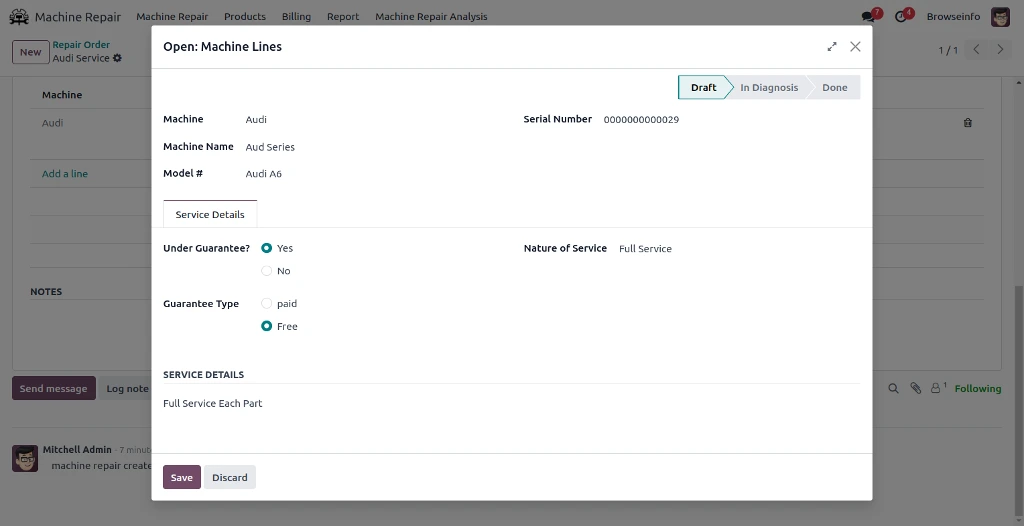
3) Add Machine Service Details
Users can store detailed machine service information such as guarantee status, warranty type, and service conditions, ensuring better tracking of service eligibility and cost handling.
4) Print Reports
The module supports printing of multiple reports including repair reports, diagnosis reports, and work order reports, helping businesses maintain proper documentation for internal and external use.
5) Create Machine Diagnosis
Diagnosis can be created directly from the repair order with a single click. This ensures faster issue identification and structured problem-solving by technicians.
6) Machine Diagnosis Management
Machine diagnosis records can be generated and managed based on repair orders, allowing technicians to systematically document issues and resolution steps for better traceability.
7) Fully Automated Workflow
The entire repair lifecycle is automated. Any change in one document is reflected across the system. For example, when a quotation is sent, the repair order stage updates automatically to “Quotation Sent”. Similarly, when a work order is completed, the system updates the status to “Work Order Completed”, ensuring real-time synchronization across modules.
8) Assign to Technician
Service managers can assign repair tasks and diagnoses to specific technicians, ensuring proper workload distribution and accountability within the repair process.
How to Create Repair Order
Users can create a repair order by entering detailed machine specifications, customer details, and service requirements. The system also allows prioritization of urgent repair cases and assignment of technicians at the time of order creation. This structured approach ensures faster service response and better handling of critical manufacturing equipment failures.
Machine Service Details
Machine service details include options to define whether the machine is under warranty (yes/no), along with service type such as paid or free service. Additional descriptions can also be added to provide clarity about service conditions and maintenance history.
Print Machine Repair Receipt/ Label
The system allows users to print machine repair receipts and labels for tracking purposes. These printed documents help in identifying repair items easily and maintaining proper service records.

Machine Repair Receipt Report
Diagnosis creation is simplified with automated data transfer from repair orders. Technicians can quickly create diagnosis reports and assign them to relevant team members for resolution.

Machine Repair Label Report
The system generates machine repair receipts and labels that include essential job details such as machine identity, repair reference number, and service status. These labels are especially useful in workshop environments where multiple machines are under repair, ensuring accurate tracking and reducing confusion during service execution.

Create Machine Diagnosis
Machine diagnosis can be generated instantly from repair orders with pre-filled information, reducing manual entry and improving accuracy. Technicians can record detailed findings and forward them for approval or further action. This ensures a structured diagnostic process before repair execution begins.


Machine Diagnostic Request Report
The diagnostic request report provides a complete overview of machine issues, technician observations, and recommended solutions. It helps management analyze recurring failures, improve maintenance strategies, and ensure better service quality across manufacturing operations.

Create Invoice
Once a work order is completed, the system allows automatic invoice generation from the linked sales order. The invoice can be printed or sent digitally to the customer. It follows the standard Odoo accounting process including validation, journal posting, and payment tracking, ensuring accurate financial reconciliation for every service transaction.


Machine Invoice Report
The Machine Invoice Report provides a detailed printable view of all billing information related to a machine repair order, including services performed, charges, and customer details. It helps in maintaining clear financial records and supports accurate invoicing and payment tracking.

Roles
- Technician:
Technicians are responsible for executing assigned work orders. They can only access their assigned tasks and have read-only access to repair and diagnosis records. - Head Technician:
The head technician has full visibility of all work orders and can assign technicians to diagnosis and repair tasks. They are also responsible for updating diagnosis results. - Service Manager:
Service managers create repair orders, convert them into diagnoses, and generate quotations. They act as the operational controller of the repair workflow. - Director Commercial:
The director has full system access and administrative control over all operations, ensuring complete oversight of the repair management system.
Frequently Asked Questions (FAQ)
Q: Can Odoo MRO handle IoT integration?
A: Yes. Using the Odoo IoT Box, you can connect machines directly to your ERP. If a machine overheats or vibrates beyond a certain threshold, it can automatically trigger a maintenance request without human intervention.
Q: How does MRO improve workplace safety?
A: Regularly maintained equipment is safer equipment. Odoo allows you to attach safety protocols and PDFs to maintenance work orders, ensuring technicians follow compliance standards (like OSHA or ISO) every time they perform a repair.
Q: Is it suitable for small-scale manufacturers?
A: Absolutely. Odoo is modular. You can start with basic Maintenance and Inventory and scale up to full MRO as your factory grows.
