Introduction
An Odoo migration rarely fails because someone forgot to move a customer name or product code.
The difficult problems usually appear elsewhere: a custom workflow behaves differently, an integration stops exchanging data, taxes produce unexpected results, employees cannot find a familiar action, or a report no longer matches the numbers used by management.
That is why a successful Odoo migration requires much more than moving a database.
It requires a clear scope, reliable backups, reviewed custom modules, clean data, complete testing, trained users, a controlled cutover and people who know what to do when something does not go according to plan.
Quick answer: A complete Odoo migration checklist should cover project scope, current-system assessment, backups, data cleansing, custom-module upgrades, hosting preparation, integration testing, user acceptance testing, cutover planning, business validation, employee training and post-go-live support.
This guide provides a practical checklist for four common migration scenarios:
Upgrading from an older Odoo version
Moving from another ERP system to Odoo
Changing Odoo hosting environments
Switching from Odoo Community to Enterprise
These projects share many activities, but they are not technically identical. The first step is understanding which type of migration your business is actually planning.
Table of Contents
What Is an Odoo Migration?
An Odoo migration is the controlled movement of business data, processes, configurations, customizations and users from one operating environment to another.
The destination may be:
A newer Odoo version
A new Odoo database
Odoo Enterprise
Odoo.sh
Odoo Online
An on-premise server
A new cloud provider
Odoo from another ERP platform
The word “migration” is often used broadly, but different migration types require different technical approaches.
For example, upgrading an Odoo 16 database to a newer supported Odoo version is not the same as importing customers, invoices and inventory from a completely different ERP.
Odoo’s official upgrade documentation defines an upgrade as moving an Odoo database from an older version to a newer supported version. It also clarifies that this standard upgrade process does not cover switching editions, changing hosting types, downgrading, or moving from another ERP system to Odoo.
Understanding this difference prevents businesses from purchasing the wrong service or creating an incomplete project plan.
Types of Odoo Migration
1. Odoo Version Upgrade
This involves moving an existing Odoo database to a newer major version.
Examples:
Odoo 15 to Odoo 18
Odoo 16 to Odoo 19
Odoo 17 to Odoo 19
The work may include:
Standard database upgrade
Custom-module code migration
Data migration scripts
View and report adjustments
Integration updates
Business-flow testing
User retraining
Odoo recommends keeping databases on supported versions because newer releases include features, bug fixes, performance improvements and security improvements. The official documentation currently states that each major version receives three years of support.
2. Legacy ERP to Odoo Migration
This involves moving from another ERP, accounting application, CRM or collection of spreadsheets into Odoo.
Potential source systems include:
SAP
Microsoft Dynamics
NetSuite
Sage
QuickBooks
Tally
ERPNext
Zoho
Custom ERP software
Spreadsheets
Separate departmental applications
This type of migration requires more than converting database tables.
The project team must determine:
Which source records are reliable
How source fields map to Odoo
Which historical transactions are necessary
How balances will be reconciled
Whether old processes should be reproduced or redesigned
Which external identifiers must be preserved
What should remain archived outside the live system
3. Odoo Hosting Migration
An organization may move between:
Odoo Online
Odoo.sh
On-premise hosting
Private cloud hosting
A third-party managed server
Hosting migration can affect:
Custom-module compatibility
Backups
Filestore handling
Deployment methods
Infrastructure monitoring
Database access
Email configuration
Domain and SSL settings
Performance
Security responsibilities
Odoo Online does not support non-standard server-side applications. Odoo’s hosting guidance therefore requires non-standard applications to be removed before transferring a database into Odoo Online.
The hosting destination must be selected before migration design is finalized.

4. Odoo Community to Enterprise Migration
This migration adds the Enterprise codebase and connects the database to a valid Enterprise subscription.
Odoo’s official guidance begins with backing up the Community database, stopping the server, installing the Enterprise components, installing the web_enterprise module, restarting the environment and linking the database to the Enterprise subscription. The exact procedure varies by operating system and installation method.
Community-to-Enterprise conversion should not be confused with a major-version upgrade.
A business may:
Switch editions without changing the major version
Upgrade the version and switch editions as separate coordinated activities
Migrate from Community to a new Enterprise database
Each approach needs its own validation plan.
Odoo Migration vs Odoo Upgrade
Area | Odoo migration | Odoo upgrade |
Meaning | Broad movement between systems, editions, hosting environments, or versions | Move from an older Odoo version to a newer version |
Data source | May be Odoo or another system | Existing Odoo database |
Field mapping | Often extensive | Usually based on existing Odoo structures |
Custom code | May be rebuilt or migrated | Must be made compatible with the target version |
Process redesign | Often significant | Optional but strongly recommended |
Hosting change | May be included | Not part of the standard database upgrade |
Edition change | May be included | Not part of the standard version upgrade |
Testing | Data, processes, integrations, reports and users | Version changes, custom modules, data and workflows |
Main risk | Incorrect mapping or incomplete business transition | Incompatible custom code and changed standard behaviour |
In everyday marketing language, “Odoo migration” may include an upgrade. In the technical plan, the activities should be separated clearly.
Why an Odoo Migration Checklist Matters
A migration checklist creates shared visibility. It prevents the project from depending on one developer, consultant or employee remembering every critical activity.
A structured checklist helps the team:
Define responsibilities
Track readiness
Identify missing information
Control scope
Protect business data
Test complete workflows
Prepare employees
Coordinate downtime
Establish approval criteria
Reduce launch risk
Document unresolved issues
Confirm post-launch stability
Without a checklist, migration work can become a series of disconnected technical tasks.
The database may start successfully while the business is still unable to:
Send quotations
Validate invoices
Receive inventory
Print reports
Process ecommerce payments
Synchronize external systems
Use automated actions
Access the correct companies
Complete accounting reconciliation
A successful migration is measured by business continuity, not simply by whether Odoo starts without a traceback.
Odoo Migration Phases
Phase | Main objective | Key output |
1. Scope | Define what is being migrated | Approved migration scope |
2. Assessment | Understand systems, data and customizations | Current-state report |
3. Governance | Assign ownership and decisions | Migration team and RACI |
4. Module audit | Review standard and custom applications | Module disposition list |
5. Data preparation | Clean, map and validate data | Approved migration datasets |
6. Infrastructure | Prepare target environment | Working target platform |
7. Code migration | Upgrade custom modules | Compatible codebase |
8. Test migration | Create migrated test environment | Test database |
9. Validation | Test processes, data and integrations | Signed test results |
10. Readiness | Prepare employees and support | Go-live readiness approval |
11. Cutover | Move production operations | Live target environment |
12. Stabilization | Resolve issues and validate outcomes | Stable production system |

Phase 1: Define the Migration Scope
The scope should explain exactly what will move and what will not.
Migration Scope Checklist
Confirm the current Odoo or source-system version.
Confirm the target Odoo version.
Confirm the current edition: Community or Enterprise.
Confirm the target edition.
Confirm the current hosting platform.
Confirm the target hosting platform.
List all installed standard applications.
List all custom modules.
List all third-party applications.
List all Odoo Studio customizations.
List all external integrations.
List all companies and legal entities.
List all active websites and ecommerce stores.
List all active languages and localizations.
Identify the historical period to migrate.
Identify records that will remain archived.
Define expected downtime.
Define the target go-live window.
Document exclusions.
Obtain written scope approval.
Questions That Must Be Answered
Are we upgrading the current database or creating a new one?
Will all companies move at the same time?
Will every current application remain in use?
Are any custom features now available in standard Odoo?
How much historical data must remain operational?
Are we changing hosting at the same time?
Are we switching from Community to Enterprise?
Are we redesigning processes or reproducing existing workflows?
Who will approve the migrated data?
Who has authority to approve go-live?
Avoid combining several major changes without understanding their dependencies.
A company may decide to upgrade, change hosting, replace integrations and redesign accounting at the same time. That may be appropriate but the combined risk and testing effort must be reflected in the plan.
Phase 2: Assess the Current Environment
Before changing anything, document the environment as it actually exists. Do not rely only on old specifications. Production systems evolve.
Users create saved filters, administrators add fields, developers modify reports and departments build unofficial processes that may never appear in project documentation.
Technical Assessment Checklist
Record the Odoo version and build.
Record the PostgreSQL version.
Record the Python version.
Document the operating system.
Document server specifications.
Record database size.
Record filestore size.
Review database growth.
Review worker and memory configuration.
Document proxy and SSL configuration.
Document scheduled backup processes.
Test backup restoration.
Document email-server configuration.
Document cron jobs and scheduled actions.
Review system logs.
Review recurring performance problems.
Document deployment procedures.
Document repositories and branches.
Record all addons paths.
Confirm access to source code and credentials.
Functional Assessment Checklist
Document active business workflows.
List critical approval processes.
Review accounting configuration.
Review taxes and fiscal positions.
Review warehouse routes and replenishment rules.
Review product costing methods.
Review manufacturing workflows.
Review ecommerce checkout and payment flows.
Review website forms and lead creation.
Review customer and supplier portals.
Review access rights and record rules.
Review automated actions.
Review server actions.
Review email templates.
Review report templates.
Review dashboards and spreadsheets.
Review language translations.
Review saved filters and favourites.
Review custom menus and actions.
Identify manual workarounds.
Business-Critical Process Inventory
Create a table like this before migration:
Process | Business owner | Current system | Migration priority | Downtime tolerance |
Lead to quotation | Sales director | Odoo CRM and Sales | Critical | Four hours |
Purchase to receipt | Procurement manager | Odoo Purchase | Critical | Four hours |
Order fulfilment | Operations manager | Odoo Inventory | Critical | Two hours |
Invoice to payment | Finance director | Odoo Accounting | Critical | Eight hours |
Ecommerce checkout | Ecommerce manager | Odoo Website | Critical | One hour |
Employee expenses | HR manager | Odoo Expenses | Medium | One day |
This inventory becomes the foundation of testing and go-live approval.
Phase 3: Build the Migration Team
An Odoo migration is not owned only by the developer. The project needs people who understand technology, processes, data and daily operations.
Recommended Migration Roles
Executive Sponsor
Approves the business case
Resolves major conflicts
Protects resources
Approves significant scope changes
Migration Project Manager
Maintains the plan
Coordinates teams
Tracks risks and decisions
Controls scope and timeline
Odoo Functional Lead
Maps processes
Reviews configuration
Coordinates functional testing
Supports user training
Odoo Technical Lead
Reviews architecture
Migrates custom modules
Handles scripts and integrations
Reviews performance and deployment
Data Owners
Clean and approve datasets
Define mapping rules
Reconcile migrated information
Process Owners
Approve future workflows
Define acceptance criteria
Sign off user testing
Key Users
Test realistic daily activities
Identify practical issues
Support employee adoption
Infrastructure or DevOps Lead
Prepares environments
Manages backups and deployment
Supports monitoring and rollback readiness
Responsibility Checklist
Assign one owner to every major workstream.
Define who can approve scope changes.
Define who approves migrated data.
Define who approves custom-module behaviour.
Define who makes the final go-live decision.
Define the escalation path.
Document vendor and partner responsibilities.
Schedule regular migration reviews.
Maintain a central decision log.
Maintain a migration-risk register.
Phase 4: Audit Standard, Custom and Third-Party Modules
This is one of the most important activities in an Odoo version migration. A business may have dozens of modules but not every module should automatically move to the new version.
Module Audit Checklist
For every module, record:
Technical name
Display name
Module owner
Source: Odoo, custom, or third party
Current version
Target-version availability
Business purpose
Number of active users
Dependent modules
External dependencies
Data models introduced
Reports modified
Views inherited
Security changes
Scheduled actions
Automated tests
Maintenance owner
Upgrade approach
Final migration decision
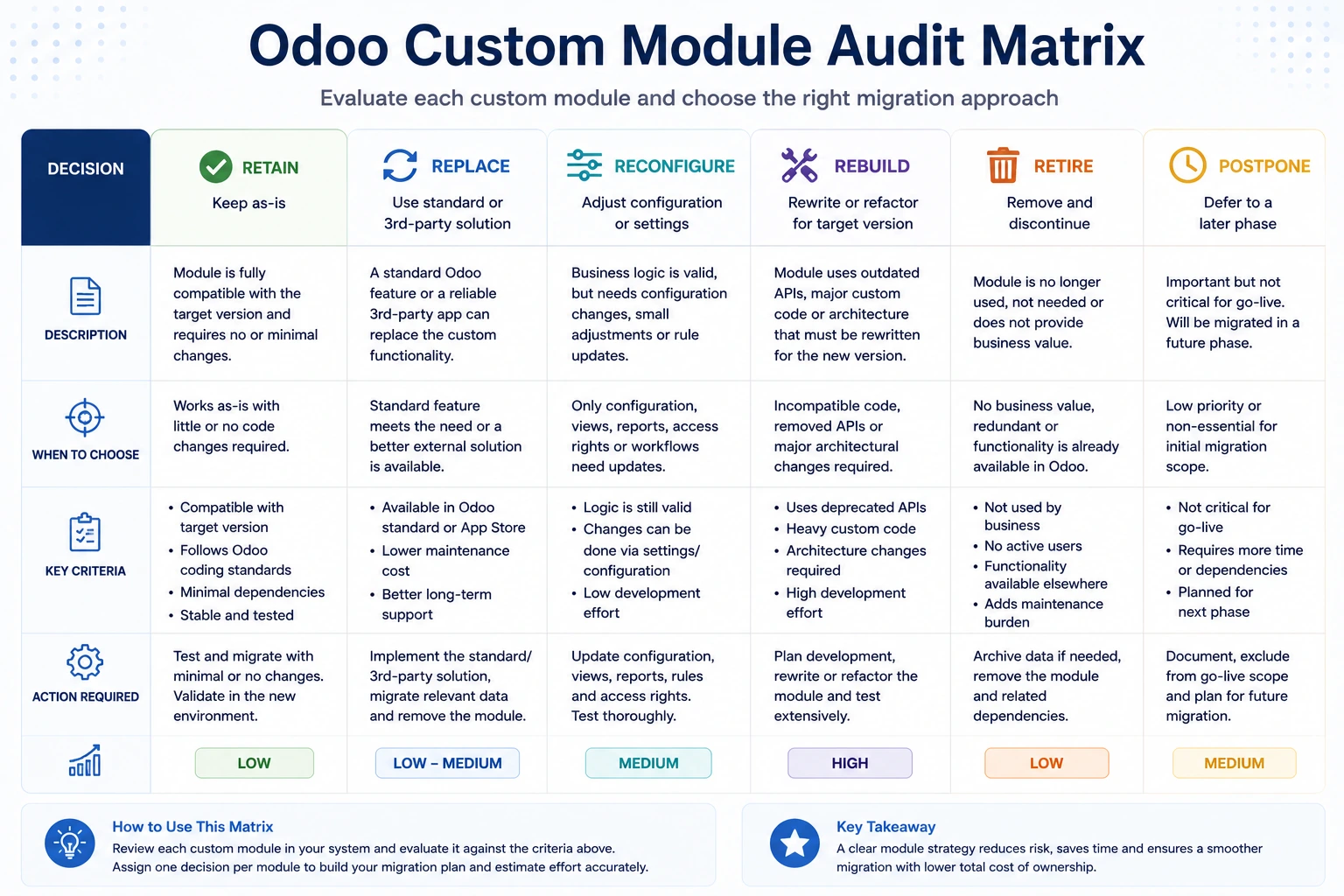
Module Migration Decisions
Classify each module as:
Retain
The functionality remains necessary and must be migrated.
Replace With Standard Odoo
A newer Odoo version now provides equivalent functionality.
Reconfigure
The requirement can be handled through standard settings or Studio rather than custom code.
Rebuild
The module is necessary but the existing architecture should not be carried forward.
Retire
The functionality is no longer required.
Postpone
The module is not required for the initial launch and can move in a later phase.
Odoo recommends stopping feature development at the beginning of a customized upgrade and reviewing existing customizations against new standard capabilities. Removing custom features that have become redundant reduces technical debt and makes the upgrade easier.
Code-Freeze Checklist
Set the code-freeze date.
Stop non-critical feature development.
Allow only approved production fixes.
Create a migration branch.
Tag the current production release.
Record unmerged work.
Document emergency-fix procedures.
Communicate the freeze to all developers.
Prevent uncontrolled production changes.
Establish a method for synchronizing critical fixes.
Without a controlled freeze, the migration team may repeatedly upgrade and retest moving code.
Phase 5: Prepare and Clean Data
Data migration should begin long before the final cutover.
The technical import is often straightforward compared with the business work required to determine what is correct.
Data Discovery Checklist
List every source system.
List every spreadsheet used operationally.
Identify the owner of each dataset.
Determine the authoritative source.
Identify duplicate records.
Identify incomplete records.
Identify obsolete records.
Identify invalid references.
Identify unbalanced financial data.
Identify inconsistent product codes.
Identify archived records that should remain archived.
Identify personal or sensitive data.
Define retention obligations.
Define migration-validation rules.
Common Odoo Data Categories
Customers
Suppliers
Contacts
Products
Product variants
Product categories
Units of measure
Price lists
Vendor price lists
Warehouses
Locations
Inventory quantities
Lots and serial numbers
Bills of materials
Routings and operations
Chart of accounts
Taxes
Journals
Opening balances
Open customer invoices
Open vendor bills
Open sales orders
Open purchase orders
Employees
Assets
Projects and tasks
Contracts and subscriptions
Attachments
Chatter history
Data Cleansing Checklist
Remove confirmed duplicate customers.
Remove confirmed duplicate suppliers.
Standardize country and state values.
Standardize phone formats.
Validate email addresses where practical.
Standardize product codes.
Review inactive products.
Review obsolete suppliers.
Correct invalid tax assignments.
Correct missing account mappings.
Reconcile inventory.
Reconcile receivables and payables.
Reconcile the general ledger.
Review negative inventory.
Review incomplete manufacturing orders.
Review draft and cancelled documents.
Separate records to migrate from records to archive.
Obtain data-owner approval.
Historical Data Decision
Do not migrate history merely because it exists.
Ask:
Do users need it for daily operations?
Is it required for audit or legal purposes?
Can it remain in a read-only archive?
Will migrating it improve decisions?
Can it be reliably reconciled?
Does it depend on obsolete custom models?
Will attachments create excessive downtime?
A practical approach may include:
Migrating master data
Migrating open transactions
Migrating recent operational history
Retaining older history in a searchable archive
Phase 6: Prepare Infrastructure and Hosting
The target environment should be ready before the migration rehearsal begins.
Target Infrastructure Checklist
Confirm the hosting platform.
Confirm the hosting region.
Confirm subscription eligibility.
Confirm server capacity.
Confirm PostgreSQL compatibility.
Confirm required Python packages.
Confirm system libraries.
Configure source repositories.
Configure deployment branches.
Configure domains and DNS.
Prepare SSL certificates.
Configure outgoing email.
Configure inbound email aliases.
Configure backup schedules.
Test backup restoration.
Configure monitoring.
Configure error logging.
Configure access controls.
Configure firewall rules.
Confirm filestore storage.
Confirm attachment transfer method.
Confirm disaster-recovery responsibilities.
Environment Checklist
Prepare separate environments for:
Development
Migration development
Functional testing
User acceptance testing
Staging or rehearsal
Production
Using one environment for every activity increases the risk of overwritten data, inconsistent testing and accidental external communication.
Phase 7: Upgrade Custom Modules
Custom modules must be made compatible with the target Odoo version before production migration.
Odoo’s current customized-upgrade guidance recommends first making each module installable on an empty database running the target version. This helps isolate code-level incompatibilities from configuration or production-data problems.
Empty-Database Compatibility Checklist
Create an empty target-version database.
Install custom modules one at a time.
Resolve dependency errors.
Resolve Python syntax and API changes.
Update manifest files.
Update asset declarations.
Update XML views.
Review removed or renamed models.
Review removed or renamed fields.
Review inherited view paths.
Review XPath expressions.
Review OWL components.
Review JavaScript imports.
Review controllers and routes.
Review reports.
Review email templates.
Review computed fields.
Review constraints.
Review record rules.
Review access-control files.
Review scheduled actions.
Review automated actions.
Review external Python dependencies.
Confirm installation without critical warnings.
Confirm uninstallation where relevant.
Odoo identifies common compatibility problems such as changed asset declarations, OWL updates, removed fields or models, moved views, broken XPath expressions and renamed methods.
Custom-Module Runtime Testing Checklist
Open every customized view.
Create records through custom workflows.
Update records.
Delete records where permitted.
Test computed fields.
Test onchange behaviour.
Test constraints.
Test automated actions.
Test scheduled actions.
Test server actions.
Test reports.
Test email templates.
Test portal functionality.
Test website functionality.
Test access rights.
Test multi-company behaviour.
Test multi-currency behaviour.
Test translations.
Test external API calls.
Run automated tests.
A module being installable does not prove that its business behaviour is correct. Odoo specifically recommends runtime testing of views, reports, templates, workflows, computed fields and automation, as well as upgrading and running automated tests where available.
Code Cleanup Checklist
Remove functionality now available in standard Odoo.
Remove dead models and fields.
Remove unused views.
Remove unnecessary overrides.
Remove obsolete compatibility code.
Remove abandoned commented code.
Refactor duplicated logic.
Update documentation.
Add missing tests.
Review module dependencies.
Review security risks.
Review performance-heavy code.
An upgrade is a useful opportunity to reduce technical debt rather than copying every historical decision into the new version.
Phase 8: Request and Prepare the Migrated Test Database
Never make the first migration attempt against the only production database.
Odoo’s standard upgrade process begins with requesting an upgraded test database, updating custom code where applicable, thoroughly testing the result, resolving issues and only then planning the production upgrade.
Test Migration Checklist
Take a verified production backup.
Record the backup timestamp.
Confirm database and filestore are included.
Submit or restore the backup in the migration environment.
Run standard upgrade services where applicable.
Deploy upgraded custom modules.
Run migration scripts.
Merge the required filestore.
Review migration logs.
Record warnings and errors.
Confirm all expected modules are installed.
Confirm all companies are present.
Confirm all users are present.
Confirm attachments are accessible.
Confirm no unexpected modules were installed.
Confirm external communication is neutralized.
Assign the database to the testing team.
For on-premise upgrade requests, Odoo notes that the database copy may be processed without the full production filestore. The upgraded filestore output must therefore be combined correctly with the production filestore before realistic testing.
Test-Environment Safety Checklist
Disable or neutralize outgoing email.
Disable live payment credentials.
Disable live shipping credentials.
Disable production bank synchronization.
Disable external scheduled jobs.
Use sandbox integration credentials.
Add a visible test-environment banner.
Prevent test documents from reaching customers.
Prevent test stock updates from reaching marketplaces.
Restrict access to authorized testers.
Odoo-generated upgrade test databases are neutralized: scheduled actions and outgoing email are disabled, payment and delivery providers are reset to testing and bank synchronization is disabled. Teams should still review every custom integration and automated process.
Phase 9: Test the Migrated Environment
Testing must follow real business processes from beginning to end. Opening the database, reviewing a few records and printing one invoice is not sufficient.
Basic System Validation
Users can log in.
User roles are correct.
Companies are accessible correctly.
Menus and actions load.
Standard views display correctly.
Customized views display correctly.
Records can be created and edited.
Search filters work.
Saved favourites remain useful.
Data can be exported.
Attachments open.
Reports generate.
Email templates render.
Translations display correctly.
Website pages load.
Portal pages load.
Mobile views are usable.
Odoo’s own basic test guidance asks teams to verify views, reports, websites, record creation, mail templates, translations, filters and data exports.
Data Validation Checklist
Compare customer counts.
Compare supplier counts.
Compare product counts.
Compare user counts.
Compare open sales orders.
Compare open purchase orders.
Compare customer invoices.
Compare vendor bills.
Compare inventory quantities.
Compare inventory valuation.
Compare receivables.
Compare payables.
Compare trial balance.
Compare tax balances.
Compare asset values.
Compare bills of materials.
Compare active projects.
Confirm attachments.
Confirm external identifiers.
Investigate every unexplained variance.
Sales and CRM Testing
Create a lead.
Convert the lead into an opportunity.
Schedule an activity.
Create a quotation.
Apply a price list.
Apply a discount.
Apply taxes.
Request approval.
Confirm a sales order.
Create a delivery.
Generate an invoice.
Register payment.
Create a credit note.
Test customer communication.
Test sales reports.
Purchase and Inventory Testing
Create a request for quotation.
Confirm a purchase order.
Receive all goods.
Receive a partial quantity.
Create a backorder.
Return products to a supplier.
Test warehouse routes.
Test internal transfers.
Test replenishment.
Test dropshipping.
Test lots and serial numbers.
Test barcode operations.
Validate stock valuation.
Validate inventory reports.
Accounting Testing
Review the chart of accounts.
Review journals.
Review taxes.
Review fiscal positions.
Review currencies and exchange rates.
Create a customer invoice.
Create a vendor bill.
Register payments.
Reconcile bank transactions.
Process a credit note.
Test payment terms.
Test analytic accounting.
Test assets where applicable.
Review aged receivables.
Review aged payables.
Review tax reports.
Review profit and loss.
Review balance sheet.
Compare the trial balance.
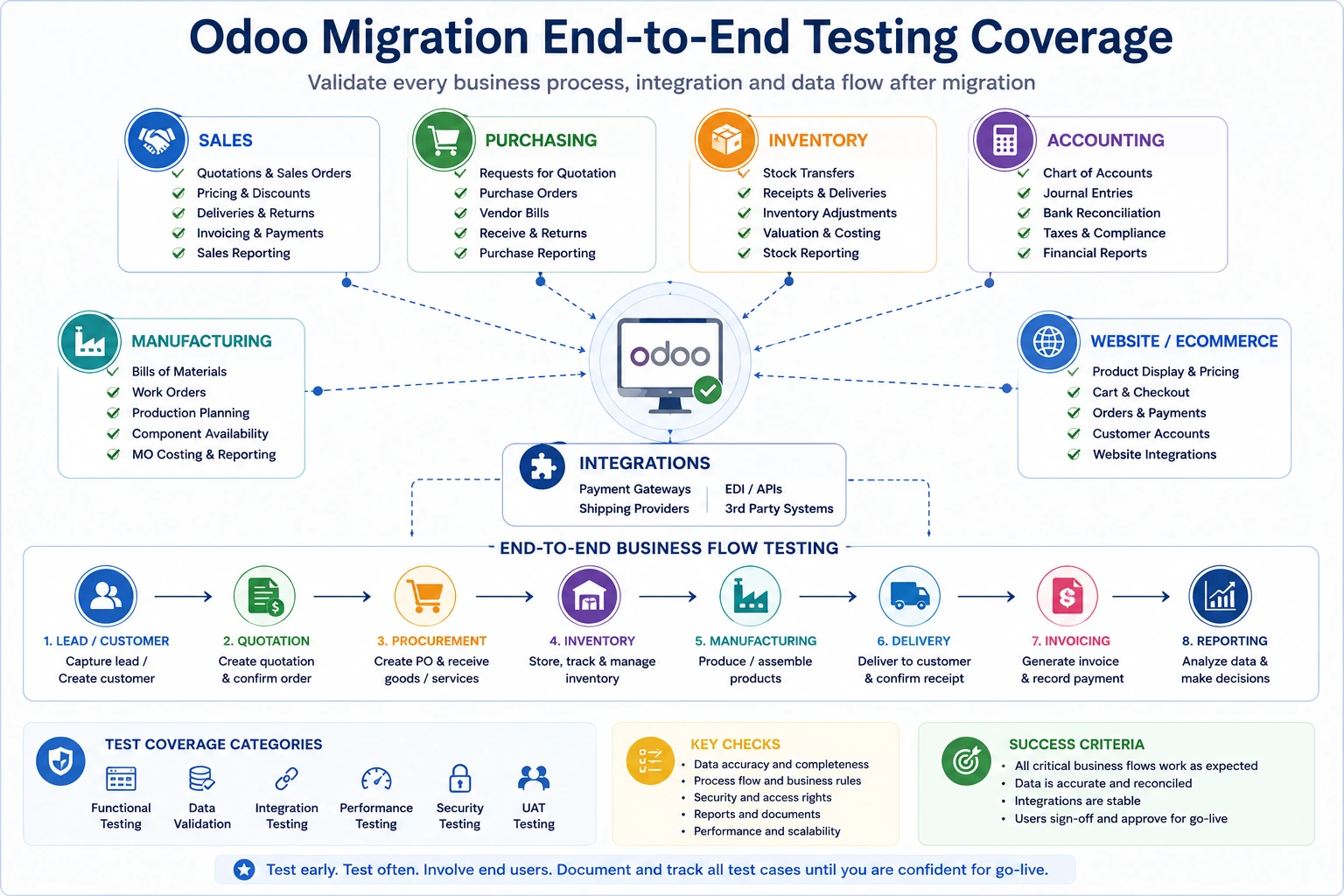
Manufacturing Testing
Review bills of materials.
Review work centres.
Review routings and operations.
Create a manufacturing order.
Reserve components.
Record production.
Record scrap.
Process by-products.
Test subcontracting.
Test quality checks.
Test maintenance requests.
Test lot and serial traceability.
Review product cost.
Review manufacturing reports.
Website and Ecommerce Testing
Open every important webpage.
Test navigation.
Test website forms.
Test lead generation.
Test product pages.
Test search and filters.
Test price lists.
Test customer login.
Add products to the cart.
Complete checkout.
Test shipping calculation.
Test payment in sandbox mode.
Test order confirmation emails.
Test portal order visibility.
Test refunds or returns.
Test SEO metadata.
Test redirects.
Test structured data.
Test mobile responsiveness.
Integration Testing
Test every API connection.
Test authentication renewal.
Test inbound data.
Test outbound data.
Test one-way synchronization.
Test bidirectional synchronization.
Test duplicate prevention.
Test failed requests.
Test retry mechanisms.
Test error logs.
Test high-volume batches.
Test timezone handling.
Test currency handling.
Test webhook endpoints.
Test EDI flows.
Test ecommerce stock updates.
Test payment callbacks.
Test shipping labels.
Confirm monitoring alerts.
Odoo explicitly recommends testing external integrations, workflows spanning multiple applications, data exports, automated actions and server actions before production upgrade.
Performance Testing
Measure login time.
Measure list-view loading.
Measure form loading.
Measure report generation.
Test large searches.
Test large imports.
Test scheduled actions.
Test concurrent users.
Test ecommerce traffic.
Review slow queries.
Review worker utilization.
Review memory consumption.
Review database locks.
Review integration throughput.
User Acceptance Testing
User acceptance testing should be performed by employees who understand the real process.
UAT Checklist
Define test scenarios.
Define expected results.
Assign testers by department.
Provide representative test data.
Record actual results.
Record screenshots where helpful.
Classify issues by severity.
Assign issue owners.
Retest corrected issues.
Obtain process-owner sign-off.
Record accepted limitations.
Record deferred enhancements.
Confirm no critical issue remains open.
Suggested Issue Classification
Severity | Meaning | Go-live impact |
Critical | Core business process cannot operate | Blocks go-live |
High | Major process is seriously restricted | Usually blocks go-live |
Medium | Workaround exists | Business decision required |
Low | Minor usability or cosmetic issue | Can enter backlog |
Testing should not be declared complete because the planned testing period has ended.
It is complete when agreed critical processes have passed and decision-makers understand the remaining risk.
Phase 10: Prepare Users and Documentation
A technically correct migration can still fail if employees are unprepared.
Users may encounter:
New menu locations
Changed screens
Removed fields
Different workflow steps
New terminology
Different reports
New approval responsibilities
Changed access rights
User Readiness Checklist
Identify affected roles.
Document process changes.
Create role-based training.
Train key users first.
Provide practice access.
Create quick-reference guides.
Update standard operating procedures.
Record important training sessions.
Explain known differences.
Explain support channels.
Explain cutover timing.
Confirm employee availability.
Measure readiness.
Schedule refresher training.
Communication Checklist
Communicate:
Why the migration is happening
What benefits the new version provides
Which processes will change
Which processes will remain the same
When the old system will stop
When the new system will become available
What employees must complete before cutover
Where users should report issues
Which temporary limitations may exist
Do not introduce the migration to most employees a few days before launch.
Phase 11: Create the Cutover Plan
Cutover is the sequence of activities that moves live business operations from the old environment to the new one.
Every activity should have an owner, start time, expected duration, dependency and validation step.
Cutover Plan Structure
Activity | Owner | Start | Duration | Dependency | Validation |
Stop user transactions | Project manager | 8:00 PM | 15 min | Business close | Users logged out |
Take final backup | DevOps lead | 8:15 PM | 30 min | Transactions stopped | Backup verified |
Run production migration | Technical lead | 8:45 PM | 3 hours | Backup complete | Migration log reviewed |
Deploy custom modules | Technical lead | 11:45 PM | 45 min | Database upgraded | Module update succeeds |
Reconcile critical data | Finance and data owners | 12:30 AM | 2 hours | System available | Signed reconciliation |
Open system to key users | Project manager | 2:30 AM | 1 hour | Validation complete | Smoke tests pass |
Open system to all users | Sponsor | 8:00 AM | — | Go-live approval | Access confirmed |
Cutover Checklist
Approve final migration date.
Confirm the low-usage window.
Confirm expected downtime.
Inform employees.
Inform customers where necessary.
Inform suppliers where necessary.
Stop or queue integrations.
Stop scheduled actions.
Stop source-system transactions.
Take the final database backup.
Take the final filestore backup.
Verify backup integrity.
Export final delta data where necessary.
Record final source-system counts.
Record financial balances.
Run migration.
Deploy target-version custom modules.
Run migration scripts.
Restore or merge attachments.
Configure production credentials.
Configure email.
Configure payment providers.
Configure delivery providers.
Restart integrations.
Execute smoke tests.
Reconcile critical data.
Obtain go-live approval.
Release the system to users.

Odoo recommends scheduling production upgrades during a period of minimal use because the production database is unavailable during the process. It also recommends performing a complete rehearsal shortly before production migration.
Rollback and Contingency Planning
A rollback plan explains what the team will do if go-live criteria are not met.
For a standard completed Odoo version upgrade, reverting the upgraded production database to the previous version is not supported as a normal post-success action. Therefore, the decision point and backup strategy must be designed before users begin creating production transactions in the new version.
Contingency Checklist
Define go/no-go criteria.
Define the final rollback decision time.
Confirm the pre-migration backup.
Confirm source-environment availability.
Define how queued transactions will be handled.
Define customer-communication procedures.
Define integration rollback procedures.
Define DNS rollback procedures where applicable.
Define responsibility for the rollback decision.
Define how users will be informed.
Test backup restoration.
Record recovery-time expectations.
A contingency plan is not evidence that the team expects failure. It is evidence that the team understands operational responsibility.
Phase 12: Execute the Production Migration
Production migration should follow the rehearsed runbook. Avoid adding untested steps because someone remembers a final improvement during cutover.
Production Execution Checklist
Confirm all participants are available.
Open the migration coordination channel.
Confirm business transaction freeze.
Confirm final backups.
Confirm backup timestamps.
Record every major step.
Record actual start and completion times.
Monitor migration logs.
Stop when a critical unexpected error occurs.
Avoid undocumented manual database changes.
Deploy only approved code.
Execute approved migration scripts.
Confirm module updates.
Confirm attachment availability.
Confirm database accessibility.
Confirm company access.
Run technical smoke tests.
Run business smoke tests.
Complete financial reconciliation.
Record go-live approval.
Immediate Smoke Tests
Test at least:
User login
Customer search
Product search
Quotation creation
Sales-order confirmation
Delivery validation
Invoice creation
Purchase-order confirmation
Inventory receipt
Report generation
Email sending
Website availability
Ecommerce checkout
One critical integration
One critical scheduled process
Phase 13: Validate After Go-Live
The first validation should happen before normal business volume resumes.
Post-Migration Validation Checklist
System
Users can access the correct companies.
Menus and views load.
Reports generate.
Attachments open.
Email sends correctly.
Scheduled actions run.
Logs do not contain critical recurring errors.
Performance is acceptable.
Data
Customer and supplier counts match.
Product counts match.
Inventory quantities match.
Inventory valuation matches.
Open orders match.
Receivables and payables match.
Trial balance matches.
Tax balances match.
Open manufacturing orders match.
Attachments are available.
Integrations
Ecommerce orders arrive.
Inventory updates leave Odoo.
Payment callbacks work.
Shipping labels generate.
Banking connections work.
EDI transactions exchange.
Monitoring alerts work.
Failed transactions can be retried.
Business
Sales can create and confirm orders.
Warehouse can receive and ship.
Finance can invoice and reconcile.
Procurement can create purchase orders.
Manufacturing can process production.
Website visitors can submit forms.
Customers can access the portal.
Managers can access reports.
Phase 14: Stabilize and Optimize
Migration is not complete immediately after the system opens. The team should enter a controlled stabilization period.
Stabilization Checklist
Create a dedicated support channel.
Hold daily issue reviews initially.
Track issues by severity.
Separate defects from training questions.
Monitor integrations.
Monitor scheduled actions.
Monitor server performance.
Monitor database growth.
Review user adoption.
Review unresolved workarounds.
Deliver refresher training.
Update documentation.
Close obsolete user accounts.
Secure or decommission the old system.
Archive migration files securely.
Review project lessons.
Approve the stabilization exit.
Create the optimization backlog.
Legacy-System Decommissioning Checklist
Do not immediately delete the old environment.
Confirm retention obligations.
Make the old system read-only.
Restrict administrator access.
Preserve final backups.
Preserve required audit records.
Preserve integration logs.
Document archive access.
Set the final decommission date.
Remove unnecessary credentials.
Cancel unused infrastructure and licences.
Obtain formal decommission approval.
Odoo Migration Checklist by Business Function
Finance
Chart of accounts
Journals
Taxes
Fiscal positions
Payment terms
Currencies
Opening balances
Receivables
Payables
Bank accounts
Reconciliation
Fixed assets
Analytic accounts
Tax reporting
Financial statements
Sales
Leads and opportunities
Sales teams
Price lists
Discounts
Quotation templates
Approval rules
Sales orders
Customer portals
Commission processes
Sales reports
Procurement
Suppliers
Vendor price lists
Approval levels
Purchase agreements
Purchase orders
Drop-shipping
Supplier returns
Purchase reports
Inventory
Warehouses
Locations
Routes
Operation types
Reordering rules
Lots and serial numbers
Packages
Barcode configuration
Stock quantities
Inventory valuation
Delivery documents
Manufacturing
Bills of materials
Work centres
Operations
Manufacturing orders
Subcontracting
Quality
Maintenance
Product lifecycle management
Costing
Traceability
Website and Ecommerce
Domain
DNS
SSL
Website pages
Menus
Forms
Products
Categories
Price lists
Payments
Shipping
Customer accounts
Redirects
SEO metadata
Analytics and tags
Structured data
Human Resources
Employees
Departments
Managers
Contracts
Time off
Attendance
Expenses
Recruitment
Payroll integration
Access rights
Sensitive-data controls
Common Odoo Migration Risks
Risk | Potential impact | Recommended control |
Incomplete scope | Unexpected cost and delay | Approve a detailed scope |
No code freeze | Repeated migration work | Freeze non-critical development |
Poor data quality | Incorrect reports and operations | Clean and reconcile early |
Unsupported custom modules | Production failure | Audit and migrate code |
Insufficient testing | Business interruption | Test end-to-end workflows |
Missing filestore | Broken attachments and images | Validate backup and merge process |
Integration failure | Missing or duplicated transactions | Test errors and retries |
Weak user involvement | Low adoption and missed issues | Include key users in UAT |
No rehearsal | Unpredictable downtime | Run a complete cutover rehearsal |
No contingency plan | Prolonged interruption | Define go/no-go and recovery actions |
Unclear ownership | Delayed decisions | Assign process and data owners |
Poor communication | User confusion | Publish a migration communication plan |
Immediate legacy shutdown | Lost audit access | Retain a controlled read-only archive |
Migration without optimization | Old problems remain | Review processes and customizations |
Common Odoo Migration Mistakes
1. Treating Migration as a Purely Technical Project
Technology moves the database. Business users confirm whether the migrated system still supports operations.
2. Migrating Every Customization
Some custom features may be obsolete, duplicated by standard Odoo, or no longer worth maintaining.
3. Testing Only Happy Paths
Real operations include partial deliveries, backorders, returns, rejected approvals, credit notes, failed payments and missing stock.
4. Ignoring Attachments
The database and filestore must remain aligned. A successful database restoration does not guarantee that documents, product images and attachments are available.
5. Migrating Unnecessary History
Old data increases migration time, validation effort, storage and complexity.
6. Failing to Reconcile Accounting
Record counts alone do not prove financial accuracy.
7. Using Production Credentials in Testing
Test environments should not send live emails, charge customers, or update production marketplaces.
8. Allowing Uncontrolled Changes During Migration
Changes to custom code, configuration and data must follow a controlled process.
9. Skipping Employee Training
A changed workflow can appear to users as a software defect when they were never shown the new process.
10. Launching Without Dedicated Support
Users need a clear place to report issues and receive quick answers during stabilization.
How Long Does an Odoo Migration Take?
Migration duration depends on:
Version gap
Database size
Filestore size
Number of custom modules
Quality of custom code
Number of companies
Data quality
Integrations
Testing requirements
User availability
Hosting change
Process redesign
Illustrative Planning Ranges
Migration type | Typical planning range |
Standard small database upgrade | 4–8 weeks |
Moderate upgrade with limited custom modules | 2–4 months |
Customized multi-application upgrade | 4–9 months |
Complex manufacturing or multi-company upgrade | 6–15 months |
Legacy ERP to Odoo transformation | 6–18+ months |
These are planning ranges, not guaranteed durations. A smaller version gap is generally easier to manage than skipping several major releases because fewer framework, data-model and functional changes accumulate. Odoo’s current guidance also notes that smaller version gaps should make upgrades easier.
Odoo Migration Cost Factors
Migration cost may include:
Assessment
Project management
Database upgrade
Custom-module migration
Migration scripts
Data cleansing
Data mapping
Testing
Infrastructure
Integration changes
Training
Cutover
Support
Internal employee time
Main Cost Drivers
Cost driver | Why it matters |
Custom modules | Require analysis, redevelopment and testing |
Version gap | More accumulated platform changes |
Data quality | More cleansing and reconciliation |
Historical data | Greater volume and validation effort |
Integrations | API and mapping changes |
Website customization | Frontend and ecommerce retesting |
Manufacturing complexity | More interconnected workflows |
Multi-company setup | More accounting, access and process scenarios |
Hosting change | Infrastructure and deployment work |
User count | More training and adoption support |
A migration quotation should clearly distinguish:
Standard Odoo database-upgrade work
Custom-code migration
Data migration
Hosting transfer
Testing
Training
Post-go-live support
How to Choose an Odoo Migration Partner
A qualified migration partner should understand both Odoo development and business operations.
Partner Evaluation Checklist
Experience with your current Odoo version
Experience with the target version
Experience \with custom-module migration
Experience with your hosting platform
Experience with your industry
Data-migration capability
Accounting-migration capability
Integration experience
Testing methodology
Cutover methodology
Rollback and contingency planning
Documentation quality
Post-go-live support
Client references
Clear responsibilities
Transparent assumptions
Upgrade-friendly coding standards
Questions to Ask
How will you audit our current database?
How will you classify custom modules?
Which customizations should be retired?
How will you validate the migrated data?
How many test migrations are included?
Who prepares the business test scenarios?
How will integrations be tested?
How will accounting balances be reconciled?
What is the expected downtime?
Will you perform a full rehearsal?
What happens when a migration script fails?
What post-launch support is included?
How are change requests priced?
Who owns the migrated source code?
How will future upgrades be protected?
Master Odoo Migration Checklist
Planning
Migration type confirmed
Current and target versions confirmed
Current and target editions confirmed
Current and target hosting confirmed
Scope documented
Exclusions documented
Budget approved
Timeline approved
Executive sponsor assigned
Project manager assigned
Process owners assigned
Data owners assigned
Risk register created
Current-System Assessment
Database and filestore sizes recorded
Backup process reviewed
Backup restoration tested
Standard applications listed
Custom modules listed
Third-party modules listed
Studio changes listed
Integrations listed
Reports listed
Automated actions listed
Email templates listed
Business workflows documented
Code and Modules
Code freeze established
Production code tagged
Migration branch created
Custom modules classified
Redundant customizations removed
Modules installed on empty target database
Views upgraded
OWL and JavaScript upgraded
Reports upgraded
Security upgraded
Automated tests upgraded
Runtime testing completed
Migration scripts completed
Data
Source systems identified
Migration datasets agreed
Historical scope agreed
Duplicates removed
Master data cleaned
Financial data reconciled
Inventory reconciled
Mapping rules documented
Test imports completed
Data owners approved results
Infrastructure
Target environment provisioned
Required packages installed
Domains prepared
SSL prepared
Email prepared
Backups configured
Monitoring configured
Security reviewed
Deployment process tested
Filestore process tested
Testing
Test database created
Test environment neutralized
Basic application testing completed
Data counts compared
Accounting reconciled
Sales flow tested
Purchase flow tested
Inventory flow tested
Manufacturing flow tested
Website and ecommerce tested
Integrations tested
Reports tested
Permissions tested
Performance tested
UAT completed
Critical defects closed
Process owners signed off
Readiness
Training delivered
Procedures updated
Key users prepared
Support channel prepared
Communication sent
Cutover plan approved
Rehearsal completed
Downtime communicated
Go/no-go criteria approved
Contingency plan approved
Production Migration
Transactions frozen
Final database backup taken
Final filestore backup taken
Backup verified
Final data counts recorded
Production migration completed
Custom modules deployed
Attachments validated
Production credentials configured
Integrations restarted
Smoke tests passed
Financial validation completed
Go-live approved
Post-Go-Live
Users can access the system
Critical workflows operate
Accounting balances match
Inventory matches
Integrations operate
Scheduled actions operate
Email operates
Website operates
Support issues tracked
Performance monitored
Refresher training delivered
Legacy system secured
Documentation updated
Stabilization approved
Optimization backlog created
How Browseinfo Can Support Odoo Migration
An Odoo migration combines technical, functional and operational work.
The database must be upgraded or imported correctly, but the migrated environment must also support accounting, inventory, sales, manufacturing, ecommerce, reporting and integrations without disrupting the business.
Browseinfo can support organizations with:
Odoo version upgrades
Odoo Community to Enterprise migration
Legacy ERP to Odoo migration
Odoo Online, Odoo.sh and on-premise migration
Custom-module migration
Odoo Studio migration
Database and filestore migration
Data cleansing and mapping
Accounting-data migration
Inventory migration
Website and ecommerce migration
API and connector migration
Migration testing
User training
Cutover planning
Post-go-live support
Performance optimization
Frequently Asked Questions About Odoo Migration
1. What is an Odoo migration?
An Odoo migration is the controlled movement of data, configurations, custom modules, integrations and users to a newer Odoo version, another Odoo edition, a different hosting environment, or a new Odoo database.
2. What is the difference between an Odoo migration and an Odoo upgrade?
An Odoo upgrade specifically moves a database from an older Odoo version to a newer version. Migration is a broader term that may also include moving from another ERP, changing hosting, switching editions, or rebuilding the database.
3. What should an Odoo migration checklist include?
It should include scope definition, system assessment, backups, custom-module review, data cleansing, infrastructure preparation, test migration, process testing, user training, cutover, reconciliation and post-go-live support.
4. Can Odoo custom modules be migrated automatically?
Not always. Custom modules must be reviewed and made compatible with the target Odoo version. Models, fields, views, XPath expressions, Python methods, JavaScript, OWL components, reports and security rules may require changes.
5. Why is a test migration necessary?
A test migration allows the team to validate data, custom modules, reports, integrations, permissions and business workflows without disrupting production operations.
6. How many test migrations should be performed?
The required number depends on project complexity. At least one complete test migration and one final rehearsal are strongly recommended. Complex or long-running projects may require several iterations.
7. What data should be migrated to Odoo?
Businesses commonly migrate master data, open transactions, accounting balances, inventory and selected operational history. Older data may remain in a secure read-only archive when it is not required for daily operations.
8. How are attachments handled during an Odoo migration?
Odoo attachments are commonly stored in the filestore as well as referenced by database records. The database and filestore must be backed up, transferred and restored consistently.
9. How long does an Odoo migration take?
A small standard upgrade may take several weeks, while a customized multi-company or manufacturing migration may take several months. Duration depends on custom modules, data, integrations, testing and the version gap.
10. What should be tested after an Odoo migration?
Testing should cover data, access rights, reports, email templates, sales, purchasing, inventory, accounting, manufacturing, ecommerce, integrations, automated actions, exports and complete end-to-end workflows.
11. Can a business continue using Odoo during production migration?
Production access is normally restricted because transactions created after the final migration copy may not appear in the upgraded environment. The cutover should therefore be scheduled during a low-usage period.
12. How can businesses reduce Odoo migration risk?
Start early, establish a code freeze, clean data, audit custom modules, test complete workflows, perform a full rehearsal, train users, maintain verified backups and define clear go-live criteria.
