Introduction
ERP transformation sounds like a technology project. In reality, technology is only one part of it.
The real transformation happens when a company changes how orders are processed, how inventory is controlled, how managers receive information, how departments share data and how employees perform their daily work.
A company can install a new ERP system and still keep the same slow approvals, disconnected spreadsheets, duplicate records and manual workarounds. The software may be new but the business has not truly changed.
ERP transformation takes a broader approach. It uses an ERP platform as the foundation for redesigning business processes, improving data quality, connecting departments and creating a more scalable operating model.
Quick answer: ERP transformation is the coordinated redesign of business processes, data, technology and employee working practices using an ERP platform. Its purpose is not simply to replace old software, but to improve how the organization operates and delivers measurable business value.
This guide explains how to assess transformation readiness, build a roadmap, redesign processes, manage data, prepare employees, control risks and measure whether the transformation is producing meaningful results.
Table of Contents
What Is ERP Transformation?
ERP transformation is the process of using Enterprise Resource Planning technology to fundamentally improve how a business operates.
It commonly includes changes to:
Business processes
Organizational responsibilities
Data standards
Reporting
Approvals
Customer and supplier interactions
Technology architecture
Integrations
Employee roles
Performance measurement
Governance
The ERP system connects these elements, but the transformation is created by the business decisions surrounding the technology.
For example, replacing an old accounting application with a new one is primarily a software change.
Redesigning the complete order-to-cash process so that sales, inventory, delivery, invoicing and collections work through one shared system is ERP transformation.
A Simple ERP Transformation Example
Imagine a distributor where:
Sales representatives create quotations in spreadsheets.
Warehouse employees receive orders through email.
Finance enters invoices manually.
Management waits until the end of the month for margin reports.
Stock availability is never completely reliable.
The business could install a new ERP system and reproduce every existing step.
Alternatively, it could transform the process:
Sales creates quotations directly in ERP.
Approved pricing is applied automatically.
Confirmed orders reserve available inventory.
Warehouse employees receive picking instructions immediately.
Delivery creates the invoice automatically.
Finance monitors payment status in real time.
Management sees revenue, inventory and margins from one reporting environment.
The second option changes how the organization works. That is ERP transformation.
Why Do Businesses Pursue ERP Transformation?
Most businesses do not begin an ERP transformation because everything is working well. They start because operational problems have become too expensive, too risky or too difficult to manage.
Common transformation drivers include:
Outdated ERP technology
Disconnected applications
Excessive spreadsheet use
Duplicate data entry
Slow financial reporting
Limited inventory visibility
Inconsistent processes between locations
Manual approvals
Poor system performance
Increasing support costs
Cybersecurity concerns
Business acquisitions
International expansion
Regulatory requirements
Customer-service problems
Difficulty adopting automation or AI
Transformation is usually necessary when the existing environment no longer supports the company’s size, complexity or strategic direction.
Microsoft’s current implementation guidance emphasizes connecting business processes, data, security and governance rather than treating enterprise applications as isolated technical installations. Its 2026 guidance also extends this data-first foundation toward controlled AI-enabled execution.
ERP Transformation vs ERP Implementation
ERP implementation is the process of configuring and launching an ERP system. ERP transformation is the broader business change that the ERP system is expected to enable.
Area | ERP implementation | ERP transformation |
Primary objective | Deploy the ERP system | Improve how the business operates |
Main focus | Configuration and technical delivery | Processes, people, data and technology |
Success measure | System goes live | Business outcomes improve |
Leadership | Project and IT teams | Executive, business and IT leadership |
Process approach | Configure required workflows | Redesign inefficient workflows |
Data approach | Move data into the new system | Establish ownership, quality and governance |
User approach | Train employees to use screens | Prepare employees for new responsibilities |
Timeline | Often ends after stabilization | Continues through optimization |
Expected result | Working ERP software | Stronger operating model |
A successful implementation can be part of a transformation, but not every implementation creates transformation. A new system can go live on Friday and the old habits can return on Monday.
ERP Transformation vs ERP Migration
ERP migration usually refers to moving data, configuration and business operations from one ERP environment to another.
Examples include:
Moving from legacy ERP to cloud ERP
Migrating from SAP to Odoo
Moving from spreadsheets to ERP
Consolidating several ERP systems
Upgrading to a new ERP generation
Moving from on-premises hosting to the cloud
Migration asks:
How do we move from the current environment to the new one?
Transformation asks:
How should the business work after the move?
Migration is therefore one workstream within the wider transformation program.
ERP Transformation vs ERP Modernization
ERP modernization focuses on improving the technical environment.
It may include:
Moving to cloud infrastructure
Replacing unsupported software
Updating the user interface
Creating APIs
Improving cybersecurity
Removing technical debt
Upgrading the database
Introducing mobile access
Improving performance
ERP transformation includes modernization but also addresses processes, organizational design, data ownership, employee adoption and business value.
A company may modernize its infrastructure without changing how it operates. It has then completed a technical modernization, not necessarily a business transformation.
ERP Transformation vs Digital Transformation
Digital transformation is the broader use of technology to change products, services, customer experiences and business models.
ERP transformation focuses on the organization’s operational foundation.
Digital transformation | ERP transformation |
Covers the wider business ecosystem | Focuses on connected business operations |
May include customer apps, ecommerce, AI and digital products | Usually centres on finance, sales, supply chain, HR and operations |
Can change the company’s business model | Usually changes the operating model |
May involve several technology platforms | ERP acts as the central transactional platform |
ERP transformation often supports digital transformation by creating reliable data and connected processes.
It is difficult to provide an excellent digital customer experience when inventory, pricing, customer records and fulfilment information remain fragmented internally.
Signs Your Business Needs ERP Transformation
Your company may need ERP transformation when several of the following conditions exist.
1. Employees Depend on Spreadsheets
Spreadsheets are useful, but they become risky when they act as unofficial ERP systems.
Warning signs include:
Several versions of the same report
Manual consolidation
Unclear ownership
Broken formulas
Data copied from multiple applications
Limited audit history
Key processes dependent on one employee’s file
2. Teams Re-enter the Same Data
When sales, warehouse and finance employees enter the same information separately, the business pays for the same work more than once and increases the risk of inconsistency.
3. Reporting Takes Too Long
Management should not have to wait several days for basic questions such as:
Which products are most profitable?
What is our available inventory?
Which customer payments are overdue?
Which orders are delayed?
What is the current project margin?
Which production orders are behind schedule?
4. Each Location Works Differently
Local flexibility can be useful, but uncontrolled process differences create:
Inconsistent customer experiences
Difficult reporting
Duplicate configuration
Training problems
Compliance risks
Higher support costs
5. The Current ERP Cannot Support Growth
The system may struggle with:
Additional companies
Higher transaction volumes
More warehouses
New countries
Ecommerce
Manufacturing complexity
New tax requirements
Mobile operations
Advanced reporting
6. Customization Has Become Technical Debt
Custom functionality may be poorly documented, dependent on outdated technology or difficult to upgrade.
7. Employees Work Around the ERP
Users may maintain private notes, offline approval processes or separate databases because the official system does not support their work effectively.
8. Customers Experience Internal Problems
Customers often notice ERP limitations through:
Incorrect availability information
Delayed quotations
Shipping errors
Slow refund processing
Inaccurate invoices
Repeated requests for the same information
Poor order visibility
When internal fragmentation affects the customer, transformation has become a business priority rather than an IT preference.

The Core Pillars of ERP Transformation
Successful ERP transformation requires progress across several connected areas.
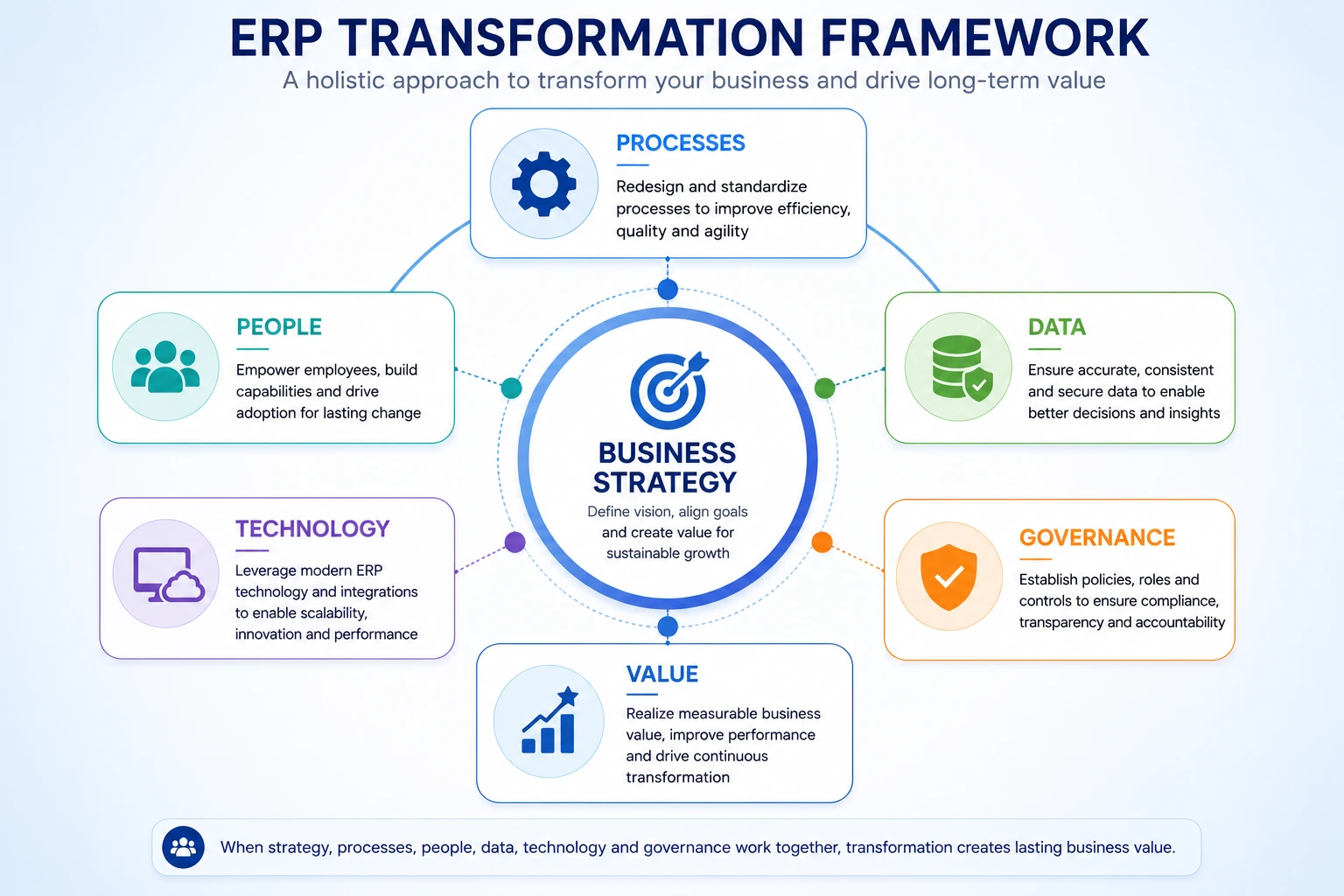
ERP Transformation Framework
Transformation pillar | Main objective | Key question |
Business strategy | Connect ERP to organizational priorities | What business results must change? |
Operating model | Clarify how departments should work together | How should work flow in the future? |
Processes | Simplify and standardize workflows | Which steps add value? |
People | Prepare employees for new ways of working | Who will be affected and how? |
Data | Create trusted, governed information | Who owns each data category? |
Technology | Build a scalable ERP foundation | Which platform and architecture fit the business? |
Integration | Connect required applications | Which system owns each piece of information? |
Governance | Control decisions, risks and changes | Who has authority? |
Value realization | Measure business outcomes | Did the transformation improve performance? |
Ignoring one pillar usually creates problems elsewhere.
For example, a strong technical solution with weak change management can produce low adoption. A well-designed process with poor data can produce unreliable reporting. Clean data inside an overly customized system can create future upgrade problems.
How to Build an ERP Transformation Roadmap
An ERP transformation roadmap turns a broad ambition into a sequence of realistic decisions and activities.
ERP Transformation Roadmap Overview
Phase | Main focus | Primary output |
1. Vision | Define why transformation is needed | Transformation objectives |
2. Assessment | Understand the current environment | Current-state findings |
3. Future state | Design the target operating model | Future processes |
4. Business case | Confirm costs, benefits and priorities | Approved investment case |
5. Selection | Choose ERP and implementation partner | Platform decision |
6. Design | Translate objectives into solution design | Approved blueprint |
7. Delivery | Configure, develop and migrate | Tested ERP solution |
8. Adoption | Prepare users and the organization | Trained, ready workforce |
9. Deployment | Move operations to the new environment | Controlled go-live |
10. Optimization | Stabilize and improve the platform | Benefits realization |
Microsoft recommends planning transformation in phases and increments so teams can obtain earlier feedback and deliver value progressively rather than placing every desired capability into one oversized launch.

Step 1: Define the Transformation Vision
Begin by explaining why the organization needs to change. A transformation vision should be understandable to employees outside the project team.
Weak vision:
Implement a modern cloud ERP platform. Human and business-focused vision:
Create one connected operational platform that gives employees reliable information, reduces manual work and supports growth across all locations.
The vision should answer:
What is not working today?
Why must it change now?
What will be different after transformation?
How will customers and employees benefit?
Which business outcomes will improve?
What will happen if the organization does nothing?
Example Transformation Objectives
Reduce monthly financial closing from ten days to five.
Increase inventory accuracy from 90% to 98%.
Remove duplicate order entry.
Create one standard purchasing process.
Provide real-time project profitability.
Support three additional warehouses.
Retire five disconnected applications.
Reduce manual reporting effort.
Improve on-time delivery.
Establish one customer record across departments.
Each objective should have a baseline, target, owner and measurement method.
Step 2: Assess the Current Environment
The current-state assessment should examine how work is actually completed, not only how official documents say it should be completed.
Speak with employees who perform the work every day. A process may look simple in a policy document but contain ten unofficial steps, several spreadsheets and repeated phone calls in practice.
Areas to Assess
Business Processes
Where do delays occur?
Which approvals create bottlenecks?
Where is information re-entered?
Which exceptions happen most often?
Which processes differ by department or location?
Technology
Which applications are used?
Which systems are no longer supported?
Which applications duplicate functionality?
Which integrations are unreliable?
What technical debt exists?
Data
Where is master data stored?
Which records contain duplicates?
Who maintains product and customer information?
Are financial and inventory records reconciled?
Which reports are trusted?
People
Which roles will change?
Where is knowledge concentrated?
Which employees depend heavily on workarounds?
What concerns do users have?
Which teams have experienced failed technology projects?
Governance
Who approves process changes?
Who owns business data?
How are customizations approved?
Who controls user access?
How are priorities decided?
The purpose is not to blame departments. It is to understand why workarounds were created and whether the future system can remove the underlying need.
Step 3: Design the Future Operating Model
The future operating model explains how the company should function after transformation.
It should define:
Process ownership
Department responsibilities
Shared data
Approval authority
Service levels
Reporting
Centralized and local activities
Technology responsibilities
Performance measures
Exception management
Questions to Ask
Which processes should be standardized?
Which decisions should remain local?
Which activities should be centralized?
Which approvals are truly necessary?
Which steps can be automated?
Where is human judgment essential?
Which information should be visible across departments?
How should exceptions be handled?
Who owns the final result of each process?
ERP transformation works best when the operating model is designed before detailed system configuration begins.
Otherwise, the project team is forced to make major business decisions while configuring screens and workflows.
Step 4: Build the ERP Transformation Business Case
The business case explains why the transformation deserves investment. It should include financial benefits, operational improvements, risk reduction and strategic value.
Transformation Cost Categories
ERP subscriptions or licences
Internal project resources
Infrastructure
Change management
Temporary backfill
Go-live support
Ongoing support
Upgrades
Contingency
Transformation Benefit Categories
Reduced manual work
Fewer process errors
Faster reporting
Improved inventory management
Lower application costs
Better employee productivity
Reduced order-processing time
Improved financial control
Better customer service
Faster decision-making
Increased scalability
Improved compliance
Reduced operational risk
Simple ERP Transformation ROI Formula
Annual transformation benefit = Labour savings
Avoided application costs
Inventory improvements
Reduced error costs
Revenue or capacity improvements
Net transformation value = Total benefits − Implementation and operating costs
ROI percentage = Net transformation value ÷ Total transformation investment × 100
Avoid filling the business case with benefits that nobody owns.
For every projected benefit, assign:
A business owner
A baseline
A target
A measurement method
A planned achievement date
Step 5: Redesign Business Processes
ERP transformation should simplify processes before automating them. Automating a complicated process only allows the organization to perform unnecessary work faster.
Process Redesign Method
For every major process:
Document the current workflow.
Identify delays and duplicate effort.
Separate necessary controls from historical habits.
Review standard ERP capabilities.
Design the future process.
Define roles and approvals.
Identify exceptions.
Confirm performance measures.
Test the process with realistic scenarios.
Obtain process-owner approval.
Example: Purchase-to-Pay Transformation
Current Process
Employee emails a purchase request.
Manager approves by replying.
Purchasing creates a spreadsheet entry.
Supplier order is entered separately.
Goods receipt is recorded manually.
Finance receives the invoice without purchase-order context.
Employees spend time finding approval evidence.
Future Process
Employee creates a purchase request in ERP.
The request follows a value-based approval workflow.
Approved requests create purchase orders.
Warehouse employees record the receipt.
Supplier bills are matched against the purchase order and receipt.
Exceptions are routed for review.
Finance retains a complete audit trail.
The future process is not valuable because it contains more software. It is valuable because it reduces uncertainty, duplicate work and missing information.
Step 6: Select the Right ERP Platform
ERP selection should happen after the organization understands its future processes and priorities. Choosing software too early can cause the transformation to revolve around product demonstrations rather than business needs.
ERP Platform Evaluation Criteria
Evaluation area | What to examine |
Functional fit | Support for critical processes |
Industry fit | Manufacturing, retail, services or distribution requirements |
Scalability | Users, companies, countries and transaction volume |
Configuration | Ability to support workflows without heavy development |
Integration | APIs, connectors and external-system compatibility |
Reporting | Operational and executive visibility |
Data model | Ability to maintain consistent master data |
User experience | Ease of learning and daily use |
Security | Roles, access, logging and auditability |
Localization | Tax, accounting, currency and language support |
Deployment | Cloud, on-premises or hybrid options |
Ecosystem | Partners, developers and extensions |
Upgradeability | Ability to adopt future releases |
Cost | Total ownership cost, not only licence cost |
AI readiness | Data, governance and controlled automation capabilities |
Evaluate Real Scenarios
Ask shortlisted vendors or partners to demonstrate complete business scenarios.
For example:
Create a customer quotation.
Apply customer-specific pricing.
Confirm the order.
Reserve stock.
Handle partial delivery.
Create the invoice.
Process a return.
Show the accounting and inventory impact.
Display management reporting.
A polished dashboard is less important than the system’s ability to handle real operational complexity.
Step 7: Create an ERP Data Transformation Strategy
Data transformation is not simply moving records from one database to another.
It involves deciding:
Which data should be retained
Which data should be corrected
Which records should be combined
Which system is authoritative
Who owns each data category
How future quality will be maintained
Which historical information is genuinely required
NIST describes data governance as an organizing structure through which authority and control over data management can be exercised. Its guidance also warns that ad hoc governance often leads to inconsistent processes and unclear responsibilities.
ERP Data Transformation Activities
Data discovery
Data profiling
Duplicate detection
Data cleansing
Standardization
Mapping
Enrichment
Archiving
Migration
Validation
Reconciliation
Ongoing governance

Common ERP Master Data
Customers
Suppliers
Products
Services
Product categories
Units of measure
Price lists
Warehouses
Locations
Bills of materials
Employees
Accounts
Taxes
Payment terms
Assets
Projects
Data Ownership Table
Data category | Recommended business owner |
Customer data | Sales or customer operations |
Supplier data | Procurement |
Product data | Product management or operations |
Inventory data | Warehouse or supply chain |
Financial data | Finance |
Employee data | Human resources |
Manufacturing data | Production or engineering |
Project data | Project operations |
The technical team can help migrate data, but it should not decide whether a customer, product or accounting record is correct.
That responsibility belongs to the business.
Step 8: Define the Integration Architecture
A modern ERP environment usually includes additional applications.
These may include:
Ecommerce
Payment gateways
Shipping services
Banking
Payroll
Customer portals
Supplier portals
Business intelligence
Manufacturing systems
Tax platforms
Marketplaces
Document-signing applications
Industry-specific software
Integration Design Questions
Which system owns the information?
Which system may change it?
How often must data synchronize?
Is real-time integration necessary?
What happens when an integration fails?
How are errors reported?
How are duplicates prevented?
Who supports the integration?
How will authentication be protected?
How will upgrades be tested?
Integration Options
Integration method | Suitable situation |
Native ERP functionality | The requirement is already supported |
Official connector | A standard supported integration exists |
API integration | Custom or real-time exchange is necessary |
Middleware | Several systems require orchestration |
Scheduled synchronization | Near-real-time exchange is unnecessary |
File import/export | Low-frequency or transitional requirements |
Manual process | Rare and low-risk exceptions |
Every integration creates an operational dependency.
Do not connect a system merely because integration is technically possible. Connect it because the business process requires it.
Step 9: Establish a Customization and Clean-Core Strategy
Customization can create business value, but it can also make the ERP expensive and difficult to upgrade.
A clean-core strategy aims to keep the central ERP environment as close to supported standard functionality as practical while placing justified extensions in controlled layers.
SAP currently describes clean core as a strategy for keeping business-critical ERP systems agile, cost-effective and better prepared to adopt innovation. Although the terminology is commonly associated with SAP, the underlying principle is relevant to any ERP platform.
Customize When:
The requirement is legally mandatory.
It provides clear competitive differentiation.
Standard configuration cannot support it.
The value exceeds development and maintenance costs.
A business owner is accountable.
Upgrade impact is understood.
Testing and documentation are planned.
Avoid Customization When:
It only recreates the old interface.
A user prefers the previous workflow.
The requirement is temporary.
Standard ERP functionality is acceptable.
Only a tiny number of transactions are affected.
The process itself is poorly designed.
Nobody owns future maintenance.
Customization Approval Questions
What business problem does it solve?
How often does the situation occur?
Can configuration solve it?
Can the process be changed?
What is the measurable value?
What will it cost to maintain?
How will it affect upgrades?
Who will test it?
Who will own it after launch?
What happens if it is not developed?
A customization register should document every approved extension.
Step 10: Prepare Employees for the Transformation
Employees experience ERP transformation through changes to their daily work.
They may have to:
Enter information differently
Follow new approval rules
Stop using familiar spreadsheets
Share data with other departments
Take responsibility for data quality
Use standardized processes
Learn new terminology
Accept increased process visibility
That can create anxiety, even when the transformation is positive.
Prosci defines ERP change management as a structured approach that prepares employees to adopt new systems and processes. It distinguishes technical implementation from the people-focused work needed to make the change part of everyday operations.
ERP Change Management Plan
Stakeholder Analysis
Identify:
Who is affected
How their work will change
Their level of influence
Their concerns
Their training needs
Their preferred communication method
Communication
Explain:
Why transformation is necessary
What will change
What will remain the same
When changes will happen
How employees will be supported
Where questions can be raised
Key-User Involvement
Key users should:
Review process designs
Test realistic scenarios
Identify practical issues
Support colleagues
Help create training materials
Provide post-go-live feedback
Role-Based Training
Do not provide the same generic training to every employee. Training should focus on what each role must do. A warehouse employee, accountant, sales representative and manager need different learning paths.
Reinforcement
After go-live:
Monitor adoption
Provide refresher training
Remove unofficial workarounds
Recognize correct use
Improve confusing workflows
Continue communicating progress
A transformation is not adopted because employees attended a training session. It is adopted when the new process becomes the normal way work gets done.
ERP Transformation Governance
Transformation governance creates clear decision-making authority. Without governance, every department may push its own priorities, scope may continue expanding and difficult decisions may remain unresolved.
PMI describes project governance as an oversight function aligned with the organization’s wider governance model and applied throughout the project lifecycle.
Recommended Governance Structure
Executive Sponsor
Defines strategic direction
Protects resources
Resolves executive conflicts
Communicates transformation importance
Holds leaders accountable for benefits
Steering Committee
Reviews progress
Approves major scope changes
Controls budget
Resolves cross-functional issues
Reviews major risks
Transformation Director or Program Manager
Coordinates workstreams
Manages dependencies
Tracks progress and risks
Maintains the roadmap
Reports to leadership
Process Owners
Design future processes
Approve business requirements
Resolve operational decisions
Own post-launch performance
Data Owners
Define data standards
Approve cleansed and migrated data
Monitor ongoing quality
Technical Architecture Team
Defines architecture
Reviews integrations
Controls custom development
Manages security and performance
Change Lead
Manages communication
Assesses organizational impact
Coordinates training
Tracks readiness and adoption
Key Users
Represent practical business needs
Test workflows
Support training
Provide feedback
Decision Ownership Matrix
Decision | Recommended authority |
Transformation objectives | Executive sponsor |
Budget and major scope | Steering committee |
Process design | Process owner |
Data standards | Data owner |
ERP architecture | Technical lead |
Customization approval | Design authority or steering committee |
User-access design | Business owner and security team |
Go-live readiness | Steering committee |
Improvement priorities | ERP product owner |
Testing an ERP Transformation
Testing should confirm that complete business processes work from beginning to end. Testing only individual screens is not enough.
ERP Testing Types
Unit Testing
Confirms that individual configurations and developments work.
Integration Testing
Confirms that ERP communicates correctly with other systems.
Data Migration Testing
Confirms that data is complete, accurate and correctly mapped.
Security Testing
Confirms that users can access only the information and actions appropriate to their roles.
Performance Testing
Confirms that the system can handle expected transaction and user volumes.
User Acceptance Testing
Allows business users to confirm that the solution supports real work.
End-to-End Testing
Tests complete business scenarios across departments.
Cutover Rehearsal
Tests the sequence used to move from the old environment to the new one.
Example End-to-End Test
Create a customer.
Create a quotation.
Confirm the order.
Reserve inventory.
Purchase missing stock.
Receive the goods.
Complete delivery.
Create the invoice.
Record payment.
Process a return.
Verify accounting entries.
Review management reports.
Testing should include normal cases, exceptions and incorrect inputs.
Cutover and Go-Live Strategy
Cutover is the controlled transition to the new ERP environment.
Cutover Activities
Freeze legacy-system changes
Complete final data extraction
Clean and transform data
Load master and transactional data
Reconcile balances
Validate inventory
Activate integrations
Confirm user access
Complete readiness checks
Communicate launch instructions
Open support channels
Monitor critical transactions
Go-Live Decision Questions
Have critical processes passed testing?
Has the migrated data been approved?
Have financial balances been reconciled?
Are users trained?
Are integrations stable?
Is support available?
Are critical defects resolved?
Is there a rollback or contingency plan?
Have business leaders approved readiness?
Can the organization operate safely?
The desire to meet a planned date should not override serious operational concerns.
Stabilization After Go-Live
The first weeks after launch are rarely normal. Employees are learning, data issues may emerge and transaction volumes reveal situations that testing did not fully reproduce.
Stabilization Priorities
Protect critical operations
Resolve high-impact defects
Support users quickly
Monitor integrations
Reconcile financial and inventory information
Track workaround use
Review performance
Communicate known issues
Prioritize fixes transparently
Support Categories
Priority | Example | Expected response |
Critical | Business cannot process orders or invoices | Immediate response |
High | Major process is severely restricted | Urgent resolution |
Medium | Workaround exists | Scheduled correction |
Low | Cosmetic or minor usability issue | Improvement backlog |
Do not treat every user request as a software defect. Some requests may result from incomplete training, misunderstood processes or resistance to a new responsibility.
How to Measure ERP Transformation Success
Going live is a milestone. It is not the final measure of success.
Four Levels of Transformation Measurement
1. Delivery Metrics
Budget performance
Schedule performance
Scope stability
Defect levels
Test completion
Data migration accuracy
2. Adoption Metrics
Active users
Training completion
Process compliance
Spreadsheet reduction
Support requests
User confidence
Use of new workflows
3. Operational Metrics
Order-processing time
Inventory accuracy
Production schedule adherence
Purchasing cycle time
Invoice-processing time
Project profitability
Customer-response time
4. Strategic Metrics
Ability to open new locations
Time required to integrate acquisitions
Number of retired systems
Improved decision speed
Support for new business models
Readiness for automation and AI
ERP Transformation KPI Table
Business area | Current baseline | Target outcome |
Monthly financial close | 12 days | 5 days |
Inventory accuracy | 89% | 98% |
Order-entry time | 18 minutes | 6 minutes |
Supplier invoice processing | 15 minutes | 5 minutes |
On-time delivery | 82% | 95% |
Manual monthly reports | 45 | Fewer than 10 |
Duplicate customer records | 8% | Below 1% |
Active ERP adoption | Not measured | Above agreed role-based target |
Targets should be realistic and based on the company’s actual baseline.

Benefits Realization
ERP benefits do not appear automatically when the software launches. Someone must own the process changes required to produce each benefit.
Benefits Realization Example
Expected benefit | Required change | Owner | Measurement |
Faster financial close | Standardize journal and reconciliation processes | Finance director | Closing days |
Better inventory accuracy | Record every movement in ERP | Warehouse manager | Cycle-count accuracy |
Faster order processing | Remove duplicate entry | Sales operations | Minutes per order |
Lower application cost | Retire legacy tools | IT director | Annual software cost |
Better delivery performance | Improve planning and stock visibility | Operations director | On-time delivery |
Review benefits monthly or quarterly after stabilization.
When a target is not improving, investigate:
Is the process being followed?
Is the data reliable?
Is the configuration correct?
Are users maintaining workarounds?
Was the target unrealistic?
Is additional training required?
Does the process need redesign?
AI and Automation in ERP Transformation
AI can create value during ERP transformation, but it should not be used to avoid fixing weak processes or unreliable data.
Microsoft’s latest implementation guidance describes AI-enabled execution as an extension of a strong data foundation, with clear governance for data quality, security and human oversight.
Potential AI Use Cases
Summarizing customer conversations
Classifying documents
Drafting business communication
Identifying unusual transactions
Supporting natural-language search
Forecasting demand
Extracting information from invoices
Assisting customer support
Suggesting next actions
Creating management summaries
Questions Before Introducing AI
Is the underlying data accurate?
Is the process clearly defined?
What decision will AI support?
Is the output verifiable?
Is human review required?
What information can be shared with the AI provider?
How will incorrect output be handled?
Who owns performance monitoring?
How will costs be controlled?
What access is the AI allowed?
ERP transformation should establish the foundation first. AI and advanced automation can then be introduced in controlled phases.
ERP Transformation by Company Size
Small Business ERP Transformation
Small businesses usually benefit from:
Standard cloud functionality
Limited customization
Core financial control
Connected sales and inventory
Simple reporting
Fast user training
Phased expansion
The biggest risk is attempting to build an enterprise-level solution before the business needs one.
Mid-Market ERP Transformation
Mid-sized businesses often require:
Multi-department integration
Multiple warehouses or companies
Better approvals
Advanced inventory
Manufacturing or distribution workflows
Ecommerce integration
Management reporting
Formal process ownership
Controlled customization
The biggest risk is underestimating the complexity created by years of growth.
Enterprise ERP Transformation
Large organizations commonly require:
Global process templates
Regional localization
Complex security
Multiple legal entities
Extensive integrations
Large data volumes
Formal architecture
Strong governance
Phased rollout
Structured change management
The biggest risk is allowing local requirements to create an unmanageable global solution.
ERP Transformation by Industry
Manufacturing
Priorities often include:
Production planning
Bills of materials
Routing
Work centres
Material requirements planning
Quality
Maintenance
Traceability
Shop-floor reporting
Product costing
Retail
Priorities often include:
Point of sale
Omnichannel orders
Store inventory
Product catalogues
Promotions
Customer loyalty
Replenishment
Returns
Multi-store reporting
Wholesale and Distribution
Priorities often include:
Purchasing
Warehouse management
Customer-specific pricing
Batch and serial tracking
Demand planning
Backorders
Delivery scheduling
Inventory turnover
Supplier performance
Professional Services
Priorities often include:
Resource planning
Projects
Timesheets
Expenses
Billing
Utilization
Project profitability
Contracts
Revenue recognition
Construction
Priorities often include:
Job costing
Project budgets
Procurement
Subcontractors
Equipment
Progress billing
Site expenses
Document control
Project profitability
Ecommerce
Priorities often include:
Product information
Website orders
Inventory synchronization
Payments
Shipping
Customer accounts
Returns
Marketplace integration
Tax management
Common ERP Transformation Risks
Risk | Likely effect | Recommended response |
Unclear objectives | Technology without measurable value | Define business outcomes |
Weak sponsorship | Slow decisions and low accountability | Appoint an active executive sponsor |
Expanding scope | Cost and schedule pressure | Apply formal change control |
Poor data | Unreliable operations and reports | Begin cleansing early |
Excessive customization | Upgrade and maintenance problems | Apply fit-to-standard principles |
Low user involvement | Poor practical fit | Include key users from discovery onward |
Weak change management | Resistance and workarounds | Run a structured adoption program |
Insufficient testing | Operational disruption | Test complete business scenarios |
Unrealistic timeline | Reduced quality and readiness | Plan based on actual complexity |
Too many integrations | Fragile architecture | Integrate only where necessary |
Weak partner capability | Design and delivery problems | Evaluate experience and references |
No optimization plan | Benefits remain unrealized | Plan post-launch ownership |
Common ERP Transformation Mistakes
1. Calling a Software Upgrade a Transformation
An upgrade can support transformation, but a newer version does not automatically improve the operating model.
2. Reproducing Every Old Process
Some legacy processes exist only because the old system was limited.
3. Focusing on Features Instead of Outcomes
A long feature list does not explain whether the business will become faster, more accurate or easier to manage.
4. Leaving Employees Out of Design
Executives understand strategic problems. Employees understand the practical details of everyday work. Both perspectives are necessary.
5. Delaying Data Work
Data cleansing nearly always requires more business effort than expected.
6. Customizing Too Early
Teams often request custom development before learning what standard configuration can do.
7. Treating Training as a Final Activity
Employees should understand the transformation before they are asked to learn the new system.
8. Ignoring Operational Exceptions
A process may work perfectly in normal conditions but fail during partial deliveries, returns, cancellations, shortages or credit problems.
9. Going Live Without Clear Support
Users need a fast and visible path for reporting problems.
10. Ending the Program at Go-Live
The value stage begins after employees start using the system.
A Practical 90-Day ERP Transformation Preparation Plan
Days 1–30: Understand the Problem
Confirm executive sponsor
Interview business leaders
Speak with end users
Document major pain points
Review current systems
Identify manual processes
Assess data quality
Define preliminary objectives
Days 31–60: Define the Future Direction
Prioritize business outcomes
Map critical processes
Design high-level future workflows
Identify standardization opportunities
Create ERP principles
Review platform options
Estimate costs and benefits
Assess organizational readiness
Days 61–90: Prepare the Roadmap
Confirm transformation scope
Establish governance
Assign process and data owners
Define implementation phases
Create the business case
Develop a change plan
Identify major risks
Prepare vendor or partner evaluation
Approve the next-stage roadmap
The objective of the first 90 days is not to configure software. It is to create enough clarity to avoid expensive mistakes later.
Questions to Ask an ERP Transformation Partner
How will you learn our business processes?
How do you distinguish requirements from preferences?
How do you control customization?
Who will lead process design?
How will data migration be managed?
What is expected from our internal team?
How will user adoption be measured?
How do you test end-to-end processes?
How are scope changes approved?
How do you manage integrations?
What support is available after go-live?
How will future upgrades be protected?
What industry experience does the team have?
Can we speak with relevant customers?
How will transformation benefits be measured?
A good partner should be willing to challenge unnecessary complexity rather than agreeing to every request.
ERP Transformation Checklist
Vision and Leadership
Transformation drivers are documented
Executive sponsorship is active
Business outcomes are measurable
A transformation narrative is communicated
Leadership responsibilities are clear
Processes
Current workflows are documented
Pain points are validated
Future processes are designed
Process owners are appointed
Exceptions are included
Standardization opportunities are identified
Technology
ERP requirements are prioritized
Platform options are evaluated
Architecture principles are established
Integrations are justified
Customization rules are approved
Security is included in the design
Data
Data owners are assigned
Source systems are identified
Data quality is assessed
Migration scope is controlled
Validation rules are documented
Reconciliation is planned
People
Stakeholders are identified
Change impacts are assessed
Communication is ongoing
Key users are involved
Training is role-based
Readiness is measured
Delivery
Governance is established
Scope is controlled
Risks are tracked
End-to-end testing is planned
Cutover is rehearsed
Support is prepared
Value
Benefits have owners
Baselines are recorded
KPIs are agreed
Adoption is measured
Optimization is planned
Leadership reviews outcomes
Clear Answers About ERP Transformation
1. What is the main purpose of ERP transformation?
The main purpose is to improve how the organization operates by connecting processes, data, technology and people through a shared ERP platform.
2. Is ERP transformation only for large enterprises?
No. Small and mid-sized businesses can also transform their operations by replacing disconnected tools, standardizing processes and introducing a scalable ERP foundation.
3. Does ERP transformation require replacing the current ERP?
Not always. Some organizations can transform by redesigning processes, removing unnecessary customization, improving data and extending their current ERP. Others require a new platform because the existing system cannot support future needs.
4. How long does ERP transformation take?
The timeline depends on scope, company size, process complexity, data quality, integrations, customization and rollout strategy. A focused transformation may be delivered in phases, while a global program may continue across several years.
5. What is the most difficult part of ERP transformation?
The most difficult part is often aligning departments around common processes and helping employees adopt new responsibilities. Technical configuration is important, but organizational change determines whether the system becomes part of everyday work.
6. When should AI be introduced?
AI should be introduced after the business has established reliable data, defined processes, appropriate security and human oversight. It should solve a specific, measurable problem rather than being added only because it is available.
How Browseinfo Can Support ERP Transformation
ERP transformation requires more than software configuration. The business needs clear objectives, realistic process design, reliable data, controlled implementation and employees who are prepared to work differently.
Browseinfo can support organizations through:
ERP transformation consulting
Odoo consulting
ERP readiness assessments
Business-process analysis
Odoo implementation
Legacy ERP migration
Data migration
Odoo customization
ERP integrations
Multi-company implementation
Industry-specific solutions
User training
Change-support activities
ERP health checks
Post-go-live support
Odoo AI implementation
ERP performance optimization
Odoo provides an integrated suite of applications covering areas such as CRM, accounting, ecommerce, inventory, point of sale, projects and manufacturing. This connected application model can support organizations seeking to consolidate fragmented business operations.
Browseinfo can help evaluate whether Odoo fits the organization’s transformation objectives and create a phased roadmap aligned with its processes, data and growth plans.
Frequently Asked Questions About ERP Transformation
1. What is ERP transformation?
ERP transformation is the coordinated redesign of business processes, data, technology and employee working practices using an ERP platform. Its purpose is to improve how the organization operates rather than simply replace software.
2. What is the difference between ERP transformation and ERP implementation?
ERP implementation focuses on configuring and launching the software. ERP transformation includes the wider changes to processes, responsibilities, data, governance and employee behaviour required to produce business value.
3. Why do businesses need ERP transformation?
Businesses pursue ERP transformation to replace outdated systems, connect departments, improve reporting, reduce manual work, standardize processes, support growth and create more reliable business information.
4. What are the main stages of ERP transformation?
The main stages include defining the vision, assessing the current environment, designing future processes, building the business case, selecting technology, implementing the solution, preparing employees, going live and optimizing performance.
5. How long does ERP transformation take?
The duration depends on company size, scope, process complexity, data quality, integrations and rollout approach. Focused transformations may be delivered through shorter phases, while large multi-company programs can continue for several years.
6. What is an ERP transformation roadmap?
An ERP transformation roadmap is a phased plan showing how an organization will move from its current processes and systems to a future ERP-enabled operating model.
7. What are the biggest ERP transformation risks?
Common risks include unclear objectives, weak leadership, expanding scope, poor data quality, excessive customization, inadequate testing, low user involvement and insufficient change management.
8. How important is change management in ERP transformation?
Change management is essential because employees must adopt new processes, responsibilities and working practices. A technically functional ERP will deliver limited value when users continue relying on old systems and workarounds.
9. Can a business transform without replacing its ERP?
Yes. A business may be able to redesign processes, improve data, reduce customization and expand its current platform. Replacement is necessary when the existing ERP cannot meet future operational, technical or strategic requirements.
10. How should ERP transformation success be measured?
Success should be measured through delivery, adoption, operational and strategic indicators. Examples include inventory accuracy, financial closing time, order-processing time, active system use and the number of retired legacy applications.
11. What role does data play in ERP transformation?
Reliable data is necessary for transactions, reporting, automation and decision-making. ERP transformation should define data owners, standards, cleansing rules, migration processes and ongoing governance.
12. How can Odoo support ERP transformation?
Odoo can support ERP transformation by connecting applications such as CRM, sales, accounting, inventory, manufacturing, ecommerce, projects and human resources within an integrated business platform.
