Executive Summary
For companies Odoo is what makes everything work. It handles the money, the products, the sales, the people and the customers.. When these companies get bigger the old Odoo can cause problems. It can be slow not secure and hard to use.
Upgrading Odoo is not, about getting new software. It is a chance to make the whole business better. You can make things easier for people to do make sure everything is safe and get the things that Odoo has.
If you are using Odoo 11 ,Odoo 12, Odoo 13, Odoo 14, Odoo 15, Odoo 16, Odoo 17 or Odoo 18 you should think about moving to Odoo 19. This can save you money in the run and make things work better.
This guide will tell you how to upgrade Odoo what can go wrong what to do with the parts you made how to move your data and how to make a plan. It will also tell you what to expect and how to do things the way so you can make your Odoo better.
Why Companies Upgrade to Newer Odoo Versions
Odoo is always changing and getting better they add things make it easier to use and improve the way it is built and secured with each new version.
Companies usually upgrade to Odoo because they want Odoo to be faster they want Odoo to be easier to use they want tools to look at reports they want Odoo to work well on mobile devices they want Odoo to be more secure they want Odoo to work with other systems they want Odoo to have features that use artificial intelligence to help them work smarter they want to reduce the problems that come with using old technology and they want to keep getting help from the people who make Odoo.
If companies wait long to upgrade Odoo they will have a harder time making changes, to Odoo and it will cost more money and be more risky when they finally do upgrade Odoo.
Signs Your Current Odoo Version May Be Limiting Growth
1. Increasing Maintenance Costs
Maintaining Odoo versions is costly because you have to pay for ongoing fixes and support to keep it working properly.
2. Integration Challenges
New systems often only work with the version of Odoo.
3. Slow Performance
If you have a lot of data in Odoo it may start to run if you are using an old version.
4. Security Concerns
Old versions of Odoo do not get the security updates so they are not as safe.
5. User Frustration
If Odoo looks old and is hard to use people will not want to use it. They will not be as productive.
6. Difficulty Finding Support
It is hard to find experts who can help with Odoo versions because they only work with the latest ones.
Odoo Legacy Versions vs Odoo 19 Strategic Comparison
| Capability | Older Odoo Versions | Odoo 19 |
|---|---|---|
| User Experience | Traditional UI | Modern UX |
| Performance | Limited Optimization | Enhanced Performance |
| Mobile Experience | Basic | Improved Mobile Access |
| Reporting | Standard | Advanced Dashboards |
| Automation | Moderate | Expanded Automation |
| API Support | Legacy Integrations | Modern APIs |
| Security | Older Standards | Latest Security Framework |
| AI Features | Minimal | AI-Enhanced Capabilities |
| Scalability | Version Dependent | Enterprise Ready |
| Long-Term Support | Limited | Current Release Support |
When Staying on Your Current Odoo Version Makes Sense
Upgrading is not always immediately necessary.
You may remain on your current version if:
✓ System performance remains strong
✓ Users are highly satisfied
✓ Existing integrations are stable
✓ Business growth is predictable
✓ Regulatory requirements are met
✓ Current customizations provide competitive advantage
However, organizations should still maintain a future upgrade roadmap.
Odoo Migration Risks
Custom Module Compatibility
Custom applications often require refactoring for newer frameworks.
Third-Party Integration Failures
External APIs may behave differently after migration.
Data Quality Issues
Historical inconsistencies can surface during migration.
Workflow Changes
Business users may need retraining.
Downtime During Cutover
Poor planning can impact operations.
Scope Expansion
Organizations frequently attempt process redesign and upgrades simultaneously.
Odoo Version Upgrade Roadmap
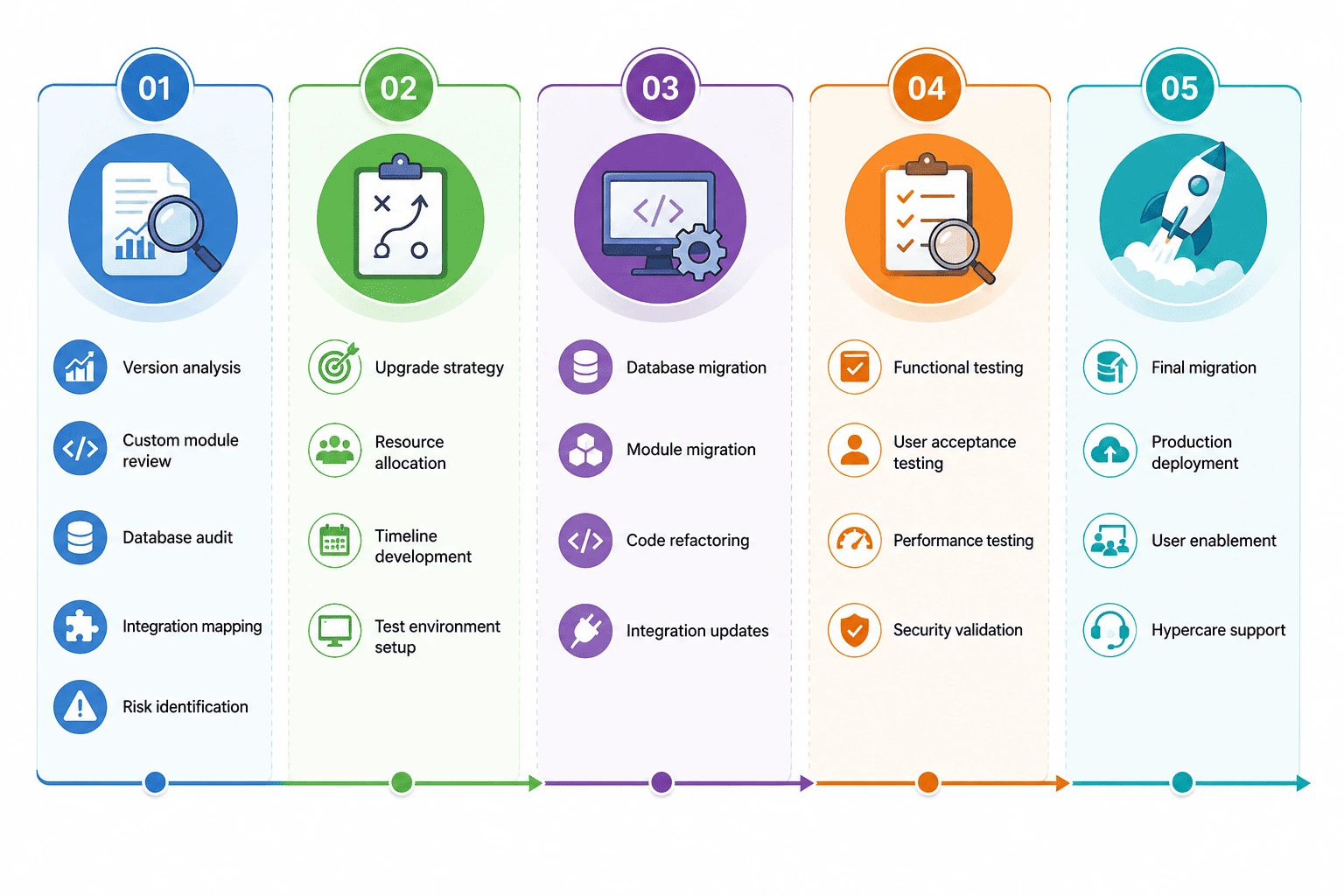 Odoo Upgrade Paths
 Odoo Upgrade Paths
Odoo 11 to Odoo 19
Requires significant architectural review and extensive testing.
Odoo 12 to Odoo 19
Often involves multiple module compatibility adjustments.
Odoo 13 to Odoo 19
Popular migration path among manufacturing companies.
Odoo 14 to Odoo 19
Allows access to major usability and automation improvements.
Odoo 15 to Odoo 19
Common upgrade project for growing organizations.
Odoo 16 to Odoo 19
Typically lower complexity migration.
Odoo 17 to Odoo 19
Focused primarily on feature adoption and optimization.
Odoo 18 to Odoo 19
Usually streamlined upgrade projects.
Community Edition to Enterprise Migration
Many organizations also combine version upgrades with Enterprise adoption.
Benefits include:
- Studio
- Advanced Reporting
- Document Management
- Spreadsheet Integration
- Helpdesk
- Field Service
- Maintenance Management
- Enhanced Manufacturing Features
Industry-Specific Upgrade Considerations
Manufacturing
Focus on:
- BOM integrity
- Work centers
- MRP workflows
- Shop floor operations
Retail
Focus on:
- POS synchronization
- Inventory accuracy
- Multi-store operations
Distribution
Focus on:
- Warehouse workflows
- Procurement automation
- Logistics integrations
Services
Focus on:
- Project management
- Timesheets
- Billing automation
Cost and ROI Considerations
Major upgrade cost factors include:
| Factor | Impact |
|---|---|
| Database Size | Medium |
| Custom Modules | High |
| Integrations | High |
| User Count | Medium |
| Testing Requirements | Medium |
| Training Needs | Medium |
ROI commonly comes from:
- Reduced maintenance costs
- Improved productivity
- Better reporting visibility
- Faster business processes
- Lower support overhead
- Increased automation
Common Odoo Upgrade Mistakes
1.Skipping Discovery
Migration surprises usually originate from insufficient assessment.
2.Ignoring Custom Modules
Every customization should be reviewed before migration begins.
3.Poor Testing
Testing is often the most critical phase.
4.Lack of User Training
New features require adoption planning.
5.Underestimating Integrations
External systems frequently create unexpected complexity.
6.No Rollback Strategy
Every migration should include contingency planning.
Decision Matrix
You Should Evaluate an Odoo Upgrade If:
✓ Your version is more than three releases behind
✓ Maintenance costs continue rising
✓ Users request newer functionality
✓ Integrations are becoming difficult
✓ Security requirements have increased
✓ Performance is declining
✓ Multiple workarounds have emerged
You May Stay on Your Current Version If:
✓ Business objectives are being met
✓ User satisfaction remains high
✓ Existing infrastructure is stable
✓ Upgrade ROI is currently limited
✓ Major business changes are not expected soon
How Browseinfo Supports Odoo Modernization
BrowseInfo helps organizations successfully execute:
- Odoo Version Upgrades
- Odoo Database Migration
- Community to Enterprise Migration
- Custom Module Migration
- Integration Modernization
- Performance Optimization
- Data Cleansing
- Post-Go-Live Support
Our migration methodology emphasizes risk reduction, business continuity, technical validation, and long-term scalability.
Frequently Asked Questions
1.What is an Odoo version upgrade.
An Odoo version upgrade is when you move your business system from one Odoo version to another Odoo version. This means you get to keep all your business data and the way things work in your Odoo system.
2.How long does it take to do an Odoo migration.
It usually takes between 4 and 16 weeks to upgrade to an Odoo version. The time it takes depends on the size of your Odoo database and any changes you made to your Odoo system. You also need to test things in your Odoo system.
3.How long does it take to do an Odoo migration.
It usually takes between 4 and 16 weeks to upgrade to an Odoo version. The time it takes to do the Odoo migration depends on the size of your Odoo database and any changes you made to your Odoo system. You also need to test things in your system to make sure everything works properly.
4.Can you move custom modules to Odoo 19.
Yes you can move custom modules to Odoo 19. To do this you need to check the code of your custom modules make some changes, to the code and test the custom modules to make sure they work properly with Odoo 19.
5.Can you migrate directly from Odoo 12 13 or 14 to Odoo 19.
Yes you can migrate directly from Odoo 12 13 or 14 to Odoo 19. If you are moving from an Odoo version to Odoo 19 you need to test things in your Odoo system and plan the Odoo 19 upgrade carefully to make sure the Odoo migration is successful.
6.Can you do an Odoo upgrade without stopping your system for a time.
Yes you can do an Odoo upgrade with some downtime. If you plan it well test things in your system and have a strategy you can reduce the time your Odoo system is down.
7.Is it worth upgrading to Odoo 19.
For companies upgrading to Odoo 19 is an idea. You get performance, stronger security and a modern way of working with your Odoo system. You also get access, to Odoo 19 features. You can automate things and connect systems more easily with your Odoo system and Odoo 19.
Final Thoughts
Upgrading to an Odoo version is not just about fixing the technology. It is about making your company better and more modern. This helps your company work efficiently be more secure and have less to worry about when it comes to maintenance. It also helps your company get ready for what's coming next.
If you are thinking about upgrading from Odoo 12 Odoo 14 Odoo 15 Odoo 16 Odoo 17 or Odoo 18 you should have a plan for how you're going to do it. This plan will help you avoid problems and make sure you get the most out of your Odoo version upgrade in the run. Companies that make sure their Odoo environments are up to date are usually better at using technology making their work easier and growing their business quickly when they need to. Odoo version upgrade is important, for your company and your Odoo environments.
