Introduction
“How much does Odoo implementation cost?” sounds like a simple question.
It is not.
The cost is rarely determined by the software subscription alone. Two companies with the same number of employees may receive very different quotations because one needs standard CRM and invoicing while the other needs manufacturing, barcode operations, accounting localization, historical data migration and custom integrations.
A small organization using standard Odoo workflows might complete its initial implementation for a few thousand dollars. A multi-company manufacturer with complex production, integrations and custom requirements may invest hundreds of thousands.
The difference comes from scope, complexity and the amount of change required not simply the number of Odoo applications selected.
Quick answer: A basic Odoo implementation may cost approximately $5,000–$15,000, a structured small-business project may cost $15,000–$50,000, a mid-market implementation may cost $50,000–$200,000 and a complex multi-company or manufacturing implementation can exceed $150,000–$500,000. These are independent budgeting ranges, not official Odoo quotations. The final price depends on users, processes, applications, data, customization, integrations, training and implementation location.
This guide explains every major Odoo cost category so that you can build a realistic budget, compare implementation quotations and avoid unpleasant surprises after the project begins.
Important Pricing Note
Odoo pricing can vary by:
Country
Currency
Taxes
Contract date
Annual or monthly billing
First-year promotions
Number of users
Hosting method
Implementation provider
Custom development
Selected services
The official Odoo pricing page viewed on July 20, 2026 displayed different USD amounts depending on billing frequency and first-year discounts. Always request a current written quotation before making a purchasing decision.
The implementation-budget ranges in this guide are planning estimates created to help businesses understand likely project size. They are not fixed prices from Odoo SA or Browseinfo.
Table of Contents
How Much Does Odoo Implementation Cost?
The total cost of implementing Odoo generally includes:
Odoo software subscription
Hosting or infrastructure
Business analysis
Project management
Application configuration
Data preparation and migration
Custom development
Third-party integrations
Reports and document layouts
Testing
User training
Go-live preparation
Post-launch support
Internal employee time
Ongoing maintenance
Estimated Odoo Implementation Cost by Project Size
Project type | Common characteristics | Independent planning range |
Basic setup | 1–10 users, limited apps, standard workflows, minimal migration | $5,000–$15,000 |
Small-business implementation | 10–30 users, several apps, moderate data and training | $15,000–$50,000 |
Growing or mid-market business | 30–100 users, cross-department workflows, integrations and migration | $50,000–$200,000 |
Complex manufacturing or distribution | MRP, warehouse, quality, accounting, integrations and customization | $100,000–$350,000 |
Multi-company or enterprise rollout | Multiple entities, countries, integrations, advanced controls and phased delivery | $150,000–$500,000+ |
These ranges can move considerably based on the implementation partner’s location, project method and the amount of work completed by the customer’s internal team.
A business with clean data and a willingness to use standard Odoo processes may fall near the lower end. A business with heavily customized legacy processes, poor data and several integrations may exceed the higher end.
Odoo Software Price vs Odoo Implementation Cost
One of the most common budgeting mistakes is treating the Odoo subscription as the total project cost. They are separate expenses.
Odoo Software Subscription
The subscription gives eligible users access to the software plan and included applications. Depending on the selected plan, it may also include:
Odoo Online hosting
Standard software maintenance
Product upgrades
Standard support
Backups and monitoring
Access to Odoo applications
Odoo Implementation Services
Implementation services make the software usable for your specific organization.
They can include:
Understanding your requirements
Redesigning processes
Configuring applications
Setting up taxes and accounting
Importing records
Developing custom features
Connecting external systems
Training users
Testing complete workflows
Supporting the launch
Odoo’s official pricing page explicitly states that its subscription plans do not include implementation services, access to Odoo expert services, Odoo.sh hosting for custom developments, in-app purchase credits or maintenance of custom code.
Simple Comparison
Cost category | What you are paying for |
Subscription | Right to use the selected Odoo edition and plan |
Hosting | Infrastructure that runs the database |
Implementation | Making Odoo support your business processes |
Customization | Changing or extending standard Odoo behaviour |
Integration | Connecting Odoo with another platform |
Support | Helping users and resolving operational issues |
Maintenance | Keeping custom code and integrations working |
Upgrade | Moving the database and customizations to a newer version |
Buying an Odoo subscription without budgeting for implementation is similar to purchasing construction materials without budgeting for design and labour.
The materials matter, but they do not create a finished building by themselves.
Official Odoo Pricing Overview
Odoo offers a free single-application option and paid plans that provide access to its application suite.
The official pricing page currently presents three main choices:
One App Free
One application
Unlimited users
Odoo Online
$0 software subscription
Some dependent applications may also be included when they are required by the selected app.
This option can be useful for a focused requirement, but it is not necessarily suitable for a complete ERP implementation spanning several departments.
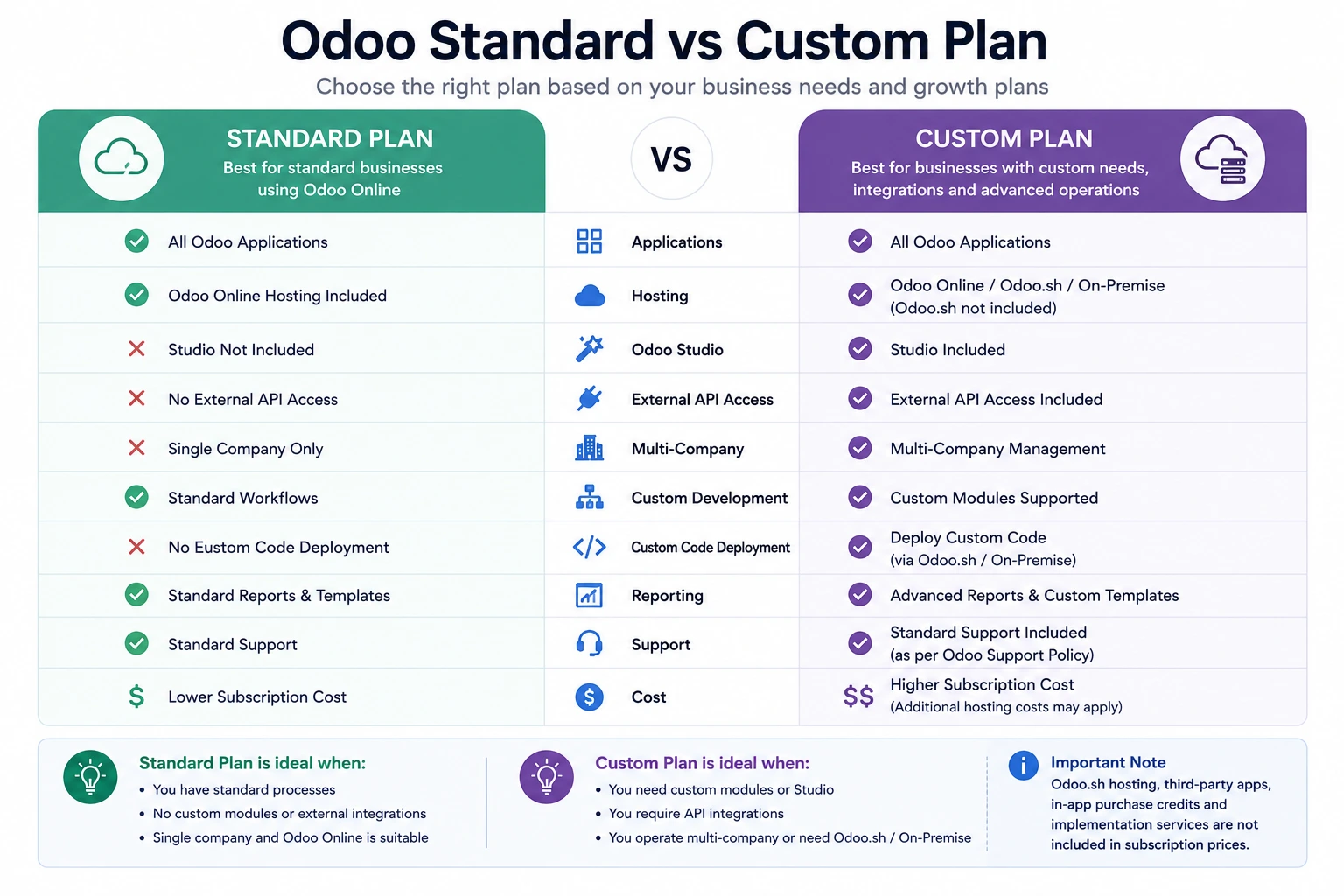
Standard Plan
The Standard plan includes:
All Odoo applications
Odoo Online hosting
Standard Odoo functionality
It is designed for companies that can work without custom modules, external API integrations, Odoo Studio or advanced multi-company requirements.
Custom Plan
The Custom plan includes:
All Odoo applications
Odoo Online, Odoo.sh or on-premise deployment options
Odoo Studio
Multi-company capabilities
External API access
Support for custom-development deployment
Odoo.sh hosting is not included in the Custom subscription price and must be calculated separately when used.
Official USD Pricing Snapshot
The official page viewed in July 2026 displayed promotional, annual and monthly figures that varied by the selected billing option.
The page showed figures in approximately these ranges:
Plan | Displayed USD range per paying user/month | Important note |
One App Free | $0 | One app with unlimited users |
Standard | Approximately $13.50–$21.10 | Depends on billing and promotional status |
Custom | Approximately $20.40–$31.90 | Depends on billing and promotional status |
The official page states that its initial-user discount is valid for 12 months. Therefore, businesses should budget using the expected renewal price rather than relying only on the lowest promotional figure.
Who Counts as a Paying User?
Odoo generally defines a paying user as an employee who accesses the backend to view, create or edit business documents.
External customers and suppliers using the Odoo portal are not normally counted as paying backend users.
This distinction can materially affect the subscription budget.
A business may have:
30 internal employees using the backend
2,000 customers using the portal
500 suppliers accessing selected documents
The subscription calculation would generally focus on the backend users rather than all portal visitors.
Odoo Community vs Enterprise Implementation Cost
Odoo is available in Community and Enterprise editions. Odoo describes Community as its open-source edition and Enterprise as its licensed edition with additional applications, infrastructure options and professional services.
Odoo Community Edition
Odoo Community does not require an Enterprise user subscription. However, that does not mean the implementation is free.
You may still need to pay for:
Server hosting
Infrastructure administration
Backups
Security
Installation
Configuration
Data migration
Development
Community applications
Third-party modules
Testing
Training
Technical support
Version upgrades
Ongoing maintenance
Odoo Enterprise Edition
Odoo Enterprise requires a paid subscription but provides access to additional proprietary applications and functionality.
Depending on the plan, it may also simplify:
Hosting
Backups
Standard support
Upgrades
Advanced applications
Studio configuration
Multi-company operations
External API access
Community vs Enterprise Cost Comparison
Cost area | Community | Enterprise |
User licence | No Enterprise subscription | Paid per eligible user |
Standard hosting | Self-managed or third-party | Odoo Online included in applicable plans |
Custom hosting | Self-managed or third-party | Odoo.sh or on-premise available under Custom |
Infrastructure management | Customer responsibility | Depends on hosting model |
Enterprise applications | Not included | Included according to plan |
Custom development | Possible | Possible under suitable deployment |
Standard Odoo support | Community resources or provider | Included within defined subscription scope |
Upgrade responsibility | Customer or service provider | Standard platform upgrades included under plan conditions |
Implementation | Additional cost | Additional cost |
Custom-code maintenance | Additional cost | Additional cost |
Community can be cost-effective for technically capable organizations with suitable requirements.
Enterprise may be more economical when the business values managed services, Enterprise applications and a more structured upgrade path.
The correct decision should consider three- to five-year ownership costs not only the first-year licence fee.
Odoo Standard vs Custom: Which Plan Affects Implementation Cost?
Choosing the wrong plan during budgeting can create significant scope changes later.
Standard Plan May Be Suitable When:
You can use Odoo Online.
You do not need custom Python or JavaScript modules.
You do not need external API access.
You do not require Odoo Studio.
You operate a relatively standard workflow.
You do not need advanced multi-company configuration.
Standard reports and layouts are acceptable.
Custom Plan Is Usually Required When:
You need custom modules.
You need Odoo Studio.
You require external API integrations.
You need Odoo.sh or on-premise deployment.
You operate multiple companies in one environment.
You need custom workflows beyond standard configuration.
You are installing third-party modules requiring custom hosting.
Odoo explains that the Custom plan is intended for organizations requiring multi-company management, Studio, custom development or API-based extensions.
Cost Implication
The difference is not limited to the higher per-user subscription.
Selecting Custom may also introduce:
Odoo.sh hosting
Development environments
Source-code management
Custom-module testing
Code maintenance
Upgrade testing
Additional technical support
A custom requirement that appears small during sales discussions may therefore create recurring costs throughout the system’s life.
Complete Odoo Implementation Cost Breakdown
A transparent Odoo quotation should separate the following cost areas.
1. Discovery and Business Analysis
Discovery helps the implementation team understand:
Current processes
Business problems
User roles
Approval rules
Reporting requirements
Data sources
Legal requirements
Integration requirements
Future growth plans
Existing custom workflows
Estimated Share of Budget
Approximately 8%–15% of the implementation budget in a structured project.
Why It Matters
Skipping discovery can make the initial quotation appear cheaper. However, unidentified requirements usually return later as:
Change requests
Rework
Additional development
Delays
Process confusion
Budget expansion
Good discovery does not attempt to document every minor field before work begins. It creates enough shared understanding to control scope and architecture.
2. Project Management
Project-management work may include:
Project planning
Scope control
Progress meetings
Risk management
Decision tracking
Resource coordination
Documentation
Change-request management
Budget monitoring
Go-live planning
Estimated Share of Budget
Approximately 8%–15%.
A quotation with no project-management allocation may assume that the customer will manage coordination internally. That can work for a very small setup. It becomes risky when several departments, vendors and workstreams are involved.
3. Standard Application Configuration
Configuration uses Odoo’s standard settings to support the agreed processes.
Examples include:
Sales teams
Pipelines
Warehouses
Routes
Taxes
Accounts
Journals
Payment terms
Price lists
Product categories
Units of measure
Approval rules
Manufacturing operations
User roles
Email templates
Estimated Share of Budget
Approximately 20%–35%.
Standard configuration is usually more affordable and upgrade-friendly than custom development.
The business should first ask:
Can we use Odoo’s standard process with reasonable configuration? Only then should it consider development.
4. Data Preparation and Migration
Migration can include:
Customers
Suppliers
Products
Price lists
Bills of materials
Accounts
Opening balances
Inventory
Employees
Open invoices
Open orders
Projects
Assets
Historical transactions
Estimated Share of Budget
Approximately 10%–25%, depending on data quality and history.
Migration becomes expensive when:
Several legacy systems are involved.
Data contains duplicates.
Product codes are inconsistent.
Historical records are incomplete.
Accounting balances are not reconciled.
There is no clear data owner.
Data must be transformed rather than simply imported.
Several test migrations are required.
The cost often comes from cleaning and validating data not from clicking the import button.
5. Custom Development
Custom development changes or extends Odoo beyond standard configuration.
Examples include:
New business models
Custom fields and screens
Approval workflows
Custom pricing logic
Industry-specific operations
Advanced dashboards
Specialized reports
Portal functionality
Custom website experiences
Automation
External API connectors
Estimated Share of Budget
Anywhere from 0% to more than 40%. The more the project depends on custom code, the more the business should budget for:
Functional specifications
Development
Code review
Testing
Documentation
Deployment
Bug correction
Ongoing maintenance
Upgrade migration
Odoo modules can extend business logic, views, reports, security, controllers and frontend behaviour, making the platform highly extensible but each extension creates a lifecycle responsibility.

6. Third-Party Integrations
Common Odoo integrations include:
Shopify
WooCommerce
Amazon
eBay
Shipping providers
Payment gateways
Banks
Payroll systems
Electronic data interchange
Tax platforms
CRM platforms
Business intelligence tools
Warehouse automation
Manufacturing equipment
Estimated Share of Budget
Approximately 10%–30% for integration-heavy projects.
Integration cost depends on:
API quality
Data volume
Synchronization frequency
Error-handling requirements
Authentication
Mapping complexity
Availability of a standard connector
Ownership of business data
Testing requirements
Third-party vendor cooperation
A basic one-way contact import is very different from a real-time, bidirectional ecommerce integration with orders, products, stock, prices, refunds and payments.
7. Reports and Document Templates
Companies often require:
Quotation layouts
Sales orders
Purchase orders
Invoices
Delivery slips
Manufacturing reports
Shipping labels
Management reports
Tax reports
Custom dashboards
Costs increase when documents require:
Complex calculations
Multiple languages
Country-specific formats
Advanced grouping
Dynamic terms
Barcode or QR code support
Pixel-perfect branding
Data from custom modules
Before requesting a custom report, confirm whether Odoo’s standard report or spreadsheet tools can meet the requirement.
8. Testing
Testing should cover:
Individual features
Complete processes
Integrations
Permissions
Data migration
Performance
Reports
Exceptions
User acceptance
Cutover
Estimated Share of Budget
Approximately 10%–20%.
Testing is sometimes removed from low-price quotations or shifted entirely to the customer. That does not remove the cost. It transfers the effort and risk.
A cheaper project with insufficient testing may become expensive after go-live when employees cannot process real transactions.
9. User Training
Training costs depend on:
Number of user roles
Number of employees
Locations
Languages
Process complexity
Training format
Documentation requirements
Need for recorded sessions
Need for trainer travel
Common Training Methods
Key-user training
Role-based workshops
Train-the-trainer
Recorded tutorials
Written procedures
Practice databases
Post-launch refresher sessions
Generic training explains what buttons do. Effective training explains how employees should complete their actual responsibilities.
10. Cutover and Go-Live
Go-live activities may include:
Final data migration
System freeze
Balance reconciliation
Inventory validation
User-access activation
Integration activation
Launch communication
Onsite or remote support
Issue prioritization
Daily status reviews
This work should appear in the implementation plan and budget. A project is not finished when configuration ends. It must safely move the business into production.
11. Post-Go-Live Support
The first weeks after launch commonly involve:
User questions
Process corrections
Data issues
Report adjustments
Permission updates
Minor configuration changes
Integration monitoring
Defect correction
Post-launch support may be:
Included for a defined period
Sold as a support package
Billed hourly
Covered under a monthly agreement
Ask the provider to clearly distinguish:
Warranty
Bug fixing
User support
New enhancements
Customization
Standard Odoo support
Odoo’s Enterprise terms distinguish standard bug and usage support from development and customization assistance, which may require a separate service agreement.
Odoo Success Packs and Partner Implementation
Odoo offers time-based Success Packs for implementation assistance, particularly for smaller organizations.
The official estimator states that implementation may include:
Business-needs analysis
Configuration
Training and coaching
Data-import assistance
Workflow customization
Development
Its current estimator lists consultant allocations from a few hours up to 200 hours and displays paid packages ranging from approximately $2,040 to $12,750, depending on the selected pack and local pricing.
Odoo’s pricing guidance generally directs:
Smaller businesses with fewer than 50 employees or users toward Odoo’s direct implementation services or Success Packs
Mid-sized and larger organizations toward local Odoo partners
Large organizations toward more detailed consultation
The appropriate option depends on complexity, localization, industry knowledge and required custom development not only company size.
Odoo Implementation Cost by Business Size
Microbusiness or Startup
Typical profile:
1–10 users
CRM, Sales, Invoicing or Project
Limited historical data
One company
Standard Odoo Online
No major integration
Minimal customization
Planning range: $5,000–$15,000
A business willing to begin with one focused process may spend less. Costs rise when the startup attempts to implement every future requirement immediately.
Small Business
Typical profile:
10–30 users
Sales, CRM, Accounting, Purchase and Inventory
One or two locations
Moderate data import
Basic reports
Role-based training
Limited customization
Planning range: $15,000–$50,000
The main cost drivers are usually accounting setup, data migration, inventory configuration and user training.

Growing Mid-Market Business
Typical profile:
30–100 users
Several departments
Multiple warehouses
Accounting and operational reporting
Ecommerce or other integrations
Formal approvals
Moderate custom development
Structured testing and change management
Planning range: $50,000–$200,000
These organizations often underestimate internal differences between departments and locations.
The software may support the required processes, but agreeing on a common future process can require significant analysis and leadership involvement.
Complex Manufacturing or Distribution Business
Typical profile:
Manufacturing and material planning
Bills of materials and routings
Quality and maintenance
Barcode warehouse operations
Product costing
Multiple warehouses
Accounting
Supplier and customer integrations
Legacy migration
Custom reports
Planning range: $100,000–$350,000+
Manufacturing projects become more expensive when they include:
Complex variants
Subcontracting
Multi-level bills of materials
Shop-floor devices
Quality controls
Traceability
Demand forecasting
Capacity planning
Specialized costing
Machinery integration
Multi-Company or Enterprise Organization
Typical profile:
100+ users
Multiple legal entities
Several countries
Consolidated reporting
Local taxes
Complex permissions
Large data volumes
Many integrations
Phased rollout
Formal governance and change management
Planning range: $150,000–$500,000+
Global or multi-company transformation can exceed this range when it includes extensive localization, custom applications or a multi-year rollout.
Odoo Implementation Cost by Application
The number of applications matters, but application complexity matters more.
Lower-Complexity Applications
These can often be implemented relatively quickly when requirements are standard:
CRM
Sales
Invoicing
Project
Timesheets
Expenses
Recruitment
Time Off
Basic Website
Basic Email Marketing
Medium-Complexity Applications
These usually require more process design and data preparation:
Accounting
Purchase
Inventory
Helpdesk
Field Service
Subscriptions
Ecommerce
Rental
Documents
Sign
Planning
Point of Sale
Higher-Complexity Applications
These can involve more configuration, testing and operational change:
Manufacturing
Material Requirements Planning
Product Lifecycle Management
Quality
Maintenance
Advanced warehousing
Multi-company accounting
Consolidation
Complex Point of Sale rollout
Payroll localization
Omnichannel ecommerce
Advanced logistics
Application Complexity Table
Application group | Why cost can increase |
CRM and Sales | Pipeline design, pricing, approvals and communication |
Accounting | Localization, chart of accounts, taxes, balances and controls |
Inventory | Warehouses, routes, replenishment, traceability and valuation |
Manufacturing | Bills of materials, routings, capacity, costing and shop-floor processes |
Ecommerce | Catalogue, payment, shipping, SEO, pricing and fulfilment |
POS | Hardware, stores, payment devices, inventory and offline operations |
HR | Employee data, approvals, local policies and payroll integration |
Projects | Billing, profitability, resources, timesheets and service delivery |
Implementing five simple applications may cost less than implementing one highly specialized manufacturing workflow.
What Affects the Cost of Odoo Implementation?
1. Number of Paying Users
More users increase:
Subscription cost
Training effort
Permission configuration
Testing scenarios
Support demand
Change-management effort
The relationship is not perfectly linear. Adding 20 users in the same role may be easier than adding five users with completely different responsibilities.
2. Number of Companies and Locations
Multiple companies can require:
Intercompany transactions
Separate accounting
Shared master data
Local taxes
Consolidation
Company-specific permissions
Separate warehouses
Different currencies
Different approval rules
Multi-company operation is part of Odoo’s Custom plan.
3. Process Complexity
A straightforward sale-and-delivery process costs less than a workflow involving:
Customer-specific contracts
Multi-level approvals
Drop-shipping
Make-to-order manufacturing
Partial invoicing
Retention
Commission rules
Returns
Product substitutions
Credit control
The implementation provider should estimate complete workflows rather than count applications alone.
4. Data Volume and Quality
Ten thousand clean product records may be easier to migrate than one thousand inconsistent products.
Cost depends on:
Number of data sources
Duplicate rate
Missing information
Historical requirements
Mapping complexity
Validation requirements
Reconciliation requirements
Data ownership
5. Customization
Customization affects both initial and recurring costs.
Every custom module may require:
Requirements
Design
Development
Testing
Documentation
Deployment
Support
Upgrade migration
Odoo’s subscription terms explain that optional maintenance of covered custom modules can be priced according to the number of lines of code, and modules without continuous coverage may create additional upgrade charges.
6. Integrations
Each integration adds:
Technical dependency
Mapping
Authentication
Monitoring
Error handling
Testing
Maintenance
Upgrade risk
The cost should include what happens when the integration fails—not only the successful data exchange.
7. Country Localization
Localization can affect:
Accounting
Taxes
Invoicing
Payroll
Banking
Electronic reporting
Legal documents
Currency
Language
A provider with relevant local experience may complete the work more efficiently than a cheaper provider learning the rules during the project.
8. User Adoption
A project involving a small cooperative team may require less change effort than a company with:
Several locations
Strong resistance
Inconsistent processes
Limited digital skills
Previous failed ERP projects
Different languages
High staff turnover
Change management is a real implementation cost, even when it does not appear as a software feature.
9. Implementation Method
Fixed-Price Project
The provider commits to an agreed scope and price.
Advantages:
Greater budget predictability
Clear scope boundary
Easier purchasing approval
Risks:
Changes can become expensive
Provider may include risk margin
Ambiguous requirements create disputes
Time-and-Materials Project
The customer pays for actual effort.
Advantages:
Flexible scope
Easier iterative delivery
Appropriate for uncertain requirements
Risks:
Lower initial budget certainty
Requires strong prioritization
Costs can grow without governance
Phased Implementation
The business launches selected applications or locations in stages.
Advantages:
Lower initial investment
Earlier feedback
Reduced launch risk
Easier learning
Risks:
Longer overall program
Temporary integrations
Repeated change effort
Odoo Customization Cost
Customization cost is commonly estimated using:
Customization cost = Analysis hours
Development hours
Testing hours
Deployment hours
Project-management hours
Documentation hours
Simple Customization
Examples:
Additional fields
Form-view adjustments
Basic automation
Small report changes
Simple approval rule
Planning range: Approximately $500–$3,000 per requirement, depending on quality expectations and provider rates.
Medium Customization
Examples:
Custom workflow
Complex report
New portal functionality
Advanced pricing
Department-specific dashboard
Custom approval process
Planning range: Approximately $3,000–$15,000.
Complex Custom Application
Examples:
Industry-specific operational module
Advanced planning engine
Marketplace integration
Custom product configurator
Complex customer portal
External platform synchronization
Planning range: Approximately $15,000–$100,000+.
These ranges are only for planning. A feature that sounds small in one sentence may involve several models, permissions, reports and edge cases.
Questions to Ask Before Approving Customization
What business problem does it solve?
Can standard Odoo configuration solve it?
Can the process be simplified?
How many users need it?
How often will it be used?
What measurable value will it create?
How will it be tested?
Who will maintain it?
What is the upgrade impact?
What happens if we do not build it?
Odoo Data Migration Cost
Data migration may be priced by:
Dataset
Source system
Record volume
Complexity
Historical period
Required transformations
Number of test migrations
Estimated Migration Ranges
Migration type | Planning range |
Basic contacts and products | $1,000–$5,000 |
Moderate master data and opening balances | $5,000–$15,000 |
Operational transactions and multiple datasets | $10,000–$40,000 |
Complex historical or multi-system migration | $25,000–$100,000+ |
Ways to Reduce Migration Cost
Migrate only necessary history.
Archive old documents outside the live ERP.
Clean duplicates before handing data to the provider.
Assign business data owners.
Use standard import templates.
Reconcile balances before migration.
Freeze unnecessary data changes.
Approve mapping rules early.
Migrating ten years of history may sound desirable, but the business should ask whether users need that information inside the transactional ERP every day.
Odoo Integration Cost
Basic Integration
Limited fields
One-way synchronization
Scheduled updates
Stable standard API
Planning range: $2,000–$8,000
Moderate Integration
Bidirectional synchronization
Several business objects
Validation
Error handling
Scheduled or near-real-time updates
Planning range: $8,000–$30,000
Complex Integration
High transaction volume
Real-time exchange
Several systems
Complex business rules
Queuing
Monitoring
Retry logic
Financial reconciliation
Planning range: $25,000–$100,000+
Integration Cost Checklist
Confirm whether the quotation includes:
API analysis
Field mapping
Authentication
Development
Testing
Error logging
Retry mechanisms
Monitoring
Documentation
Third-party coordination
Production deployment
Ongoing support
Odoo Hosting Cost
Odoo Online
Odoo Online hosting is included in the applicable Standard and Custom plans. It is suitable for databases using supported online functionality without custom server-side modules.
Odoo states that its online subscription includes hosting, backups, monitoring and a management control centre, subject to its plan conditions.
Odoo.sh
Odoo.sh is Odoo’s managed cloud platform for projects requiring custom modules and development workflows.
The official configurator viewed in July 2026 displayed separate Odoo.sh charges for:
Workers
Storage
Staging environments
Dedicated hosting
Under the annual pricing view, displayed rates included approximately:
$57.60 per worker/month
$0.20 per GB/month
$14.40 per staging environment/month
$480 per dedicated server/month
Higher rates were displayed under alternative billing conditions. These figures can change and should be verified using the current configurator.
On-Premise or Self-Hosted
Self-hosting may avoid Odoo.sh fees but introduces other costs:
Cloud or physical server
Database administration
Linux administration
Backups
Monitoring
Security
SSL certificates
Disaster recovery
Performance tuning
Deployment
Availability management
“Free self-hosting” means Odoo does not charge a separate platform-hosting fee. It does not mean infrastructure and administration are free.
Odoo Training and Support Cost
Training Cost Drivers
Number of users
Number of roles
Number of locations
Process complexity
Language requirements
Training materials
Onsite travel
Recorded content
Practice exercises
Estimated Training Budget
A practical project may allocate approximately 5%–15% of its implementation budget to training and adoption.
Ongoing Support Models
Pay-As-You-Go
Suitable for occasional questions and small improvements.
Monthly Retainer
Suitable when the company expects regular assistance.
Dedicated Support Package
Suitable for business-critical or highly customized environments.
Internal Odoo Team
Suitable for larger organizations with continuous development needs.
Support Questions
Ask whether support includes:
Functional questions
User training
Standard Odoo issues
Custom-module issues
Integration monitoring
Data correction
New development
Response-time commitments
Weekend coverage
Upgrade support
Hidden Odoo Implementation Costs
1. Internal Employee Time
Your employees must participate in:
Workshops
Data preparation
Testing
Training
Decision-making
Documentation
Go-live support
Their time has a real cost and should be included in the business case.
2. Poor Data Quality
Low-quality data creates delays, rework and inaccurate reporting.
3. Uncontrolled Scope Changes
Small requests accumulate.
A formal change process should record:
Requirement
Business value
Estimated effort
Schedule impact
Budget impact
Approval
4. Custom-Code Maintenance
The subscription does not automatically include maintenance of custom code.
5. Odoo.sh Hosting
Custom-plan subscription fees do not include Odoo.sh infrastructure charges.
6. In-App Purchase Credits
Some services, including selected document digitization, messaging and data-enrichment functions, may use separate credits.
7. Third-Party Application Licences
Apps purchased from external developers may have:
Initial purchase costs
Per-version purchase requirements
Support fees
Upgrade costs
Compatibility limitations
8. Renewal Pricing
The lowest first-year promotional price may not continue. Odoo’s official terms state that renewal charges below the current applicable list price may rise by up to 7% per year under the agreement conditions.
9. Staying on an Old Version
Odoo’s Enterprise terms cover the three most recently released major versions and state that databases older than the covered versions may be subject to an additional annualized fee under specified conditions.
Businesses should therefore maintain an upgrade strategy rather than remaining indefinitely on an old custom version.
10. Hardware
Potential hardware costs include:
Barcode scanners
Tablets
POS terminals
Receipt printers
Label printers
Payment terminals
Weighing scales
Shop-floor devices
IoT equipment
11. Travel and Onsite Consulting
Onsite workshops may add:
Flights
Accommodation
Local travel
Daily allowances
Travel time
12. Temporary Productivity Reduction
Employees may work more slowly during initial adoption. A realistic business case should allow for temporary productivity loss around go-live.
Example Odoo Implementation Budgets
Scenario 1: Ten-User Professional Services Company
Requirements
CRM
Sales
Invoicing
Project
Timesheets
Expenses
Basic customer data
Standard reports
Odoo Online
No custom integration
Illustrative Budget
Cost area | Estimated amount |
Subscription | $1,500–$3,000 annually |
Discovery and configuration | $5,000–$10,000 |
Data migration | $1,000–$3,000 |
Training and launch | $2,000–$5,000 |
Contingency | $1,000–$3,000 |
Estimated first-year total | $10,500–$24,000 |
Scenario 2: Twenty-Five-User Distributor
Requirements
CRM and Sales
Purchase
Inventory
Barcode
Accounting
Two warehouses
Product and customer migration
Shipping integration
Custom document layouts
Role-based training
Illustrative Budget
Cost area | Estimated amount |
Subscription and hosting | $6,000–$12,000 annually |
Discovery and design | $6,000–$12,000 |
Configuration | $15,000–$30,000 |
Migration | $5,000–$15,000 |
Integration | $8,000–$25,000 |
Reports and customization | $5,000–$20,000 |
Testing, training and launch | $8,000–$20,000 |
Contingency | $5,000–$15,000 |
Estimated first-year total | $58,000–$149,000 |
Scenario 3: Fifty-User Manufacturer
Requirements
Sales
Purchase
Inventory
Manufacturing
Quality
Maintenance
PLM
Accounting
Multiple warehouses
Bills of materials
Routings
Barcode operations
Legacy migration
Machine or external system integration
Custom reporting
Illustrative Budget
Cost area | Estimated amount |
Subscription and hosting | $15,000–$30,000 annually |
Discovery and future-process design | $15,000–$35,000 |
Configuration | $35,000–$80,000 |
Data migration | $15,000–$40,000 |
Custom development | $25,000–$100,000 |
Integrations | $20,000–$80,000 |
Testing and training | $20,000–$50,000 |
Go-live and stabilization | $10,000–$30,000 |
Contingency | $15,000–$50,000 |
Estimated first-year total | $170,000–$495,000 |
These examples are not quotations. They illustrate why the licence cost is only one part of the total investment.
Odoo Implementation Cost Calculator
Use the following model to create a preliminary budget.
First-Year Cost Formula
First-year Odoo cost = Software subscription
Hosting
Discovery
Project management
Configuration
Data migration
Custom development
Integrations
Reports
Testing
Training
Cutover
Post-launch support
Internal labour
Contingency
Three-Year Total Cost of Ownership
Three-year TCO = First-year implementation cost
Three years of subscription
Three years of hosting
Support and maintenance
Custom-code maintenance
Third-party licences
Planned enhancements
Upgrade preparation
Internal ERP-team cost

Preliminary Budget Worksheet
Cost category | Your estimate |
Odoo subscription | $ |
Hosting | $ |
Discovery | $ |
Configuration | $ |
Data migration | $ |
Customization | $ |
Integrations | $ |
Reports | $ |
Testing | $ |
Training | $ |
Go-live | $ |
Support | $ |
Internal team | $ |
Hardware | $ |
Contingency | $ |
Estimated first-year cost | $ |
Recommended Contingency
A practical initial budget may include a 10%–20% contingency, particularly when:
Requirements are incomplete.
Legacy data is poor.
Several integrations are involved.
Custom development is expected.
Different departments disagree on processes.
The business has not implemented ERP before.
Contingency is not permission to spend carelessly. It protects the project from uncertainty that cannot be completely removed during early planning.
Why Two Odoo Quotations Can Be Very Different
Imagine that one provider quotes $25,000 and another quotes $70,000.
The higher quotation is not automatically overpriced, and the lower quotation is not automatically incomplete. Compare what each proposal assumes.
Quotation Comparison Checklist
Area | Questions to ask |
Discovery | Are process workshops included? |
Scope | Which applications, companies and locations are covered? |
Configuration | What specific workflows are included? |
Data | Which records and historical periods will be migrated? |
Customization | Is development included or estimated separately? |
Integration | Are error handling and monitoring included? |
Reports | How many reports and document templates are included? |
Testing | Who prepares and executes test scenarios? |
Training | How many sessions, users and roles are covered? |
Go-live | Is launch support included? |
Warranty | How are defects handled after launch? |
Support | What happens after the warranty period? |
Hosting | Is Odoo.sh or infrastructure included? |
Upgradeability | How will custom modules be maintained? |
Travel | Are onsite expenses included? |
Project management | Is coordination included or customer-managed? |
Ask for Assumptions
A strong quotation should explain assumptions such as:
Number of users
Number of legal entities
Number of warehouses
Data condition
Number of integrations
Number of custom reports
Customer responsibilities
Project timeline
Required availability of key users
A price without assumptions is difficult to evaluate.

How to Reduce Odoo Implementation Cost
1. Start With Clear Business Outcomes
Do not begin with a list of every feature employees might want. Start with the processes that create the greatest operational value.
2. Use Standard Odoo Where Practical
Every standard process reduces:
Development cost
Testing effort
Maintenance
Upgrade complexity
Standard does not mean accepting a poor process. It means distinguishing genuine business requirements from personal preferences.
3. Implement in Phases
A practical first phase might include:
CRM
Sales
Purchase
Inventory
Accounting
Later phases may include:
Manufacturing
Ecommerce
HR
Advanced automation
AI
Additional companies
Phasing reduces initial risk and allows the company to learn from real use.
4. Clean Data Early
Do not pay consultants to discover avoidable duplicate and incomplete records during migration.
5. Assign Strong Internal Owners
The implementation provider cannot make every business decision.
Assign:
Executive sponsor
Project manager
Process owners
Data owners
Key users
Quick decisions reduce waiting and rework.
6. Control Customization
Require a short business case for every custom request.
7. Train Key Users
Key users can answer routine questions and reduce external support dependency.
8. Avoid Migrating Unnecessary History
Move the information needed for operations, reporting and legal obligations. Archive other history where appropriate.
9. Prioritize Integrations
Not every external system needs real-time bidirectional synchronization. A scheduled import may meet the business requirement at a lower cost.
10. Define Acceptance Criteria
For every major workflow, specify what “complete” means.
Example:
A salesperson can create a quotation, apply approved pricing, confirm the order, reserve inventory and generate the correct invoice without using a spreadsheet. Clear acceptance criteria reduce disagreements.
When the Cheapest Odoo Quotation Becomes Expensive
A very low quotation may exclude work that later becomes unavoidable.
Warning signs include:
No discovery phase
No written scope
No data-migration detail
Unlimited customization promises
No testing allocation
No training plan
No post-launch support
No project governance
No upgrade strategy
No documentation
No discussion of customer responsibilities
No explanation of exclusions
The true cost of an ERP project includes the cost of correcting mistakes.
A failed or poorly adopted implementation may create:
Reimplementation
Data cleanup
Operational disruption
Employee frustration
Customer-service problems
Duplicate systems
Lost management confidence
The goal is not to select the highest quotation.
The goal is to select a realistic proposal from a team capable of understanding and delivering the required business outcome.
How Long Does Odoo Implementation Take?
Approximate timelines may look like this:
Project type | Planning timeline |
Basic application setup | 4–8 weeks |
Small-business implementation | 2–4 months |
Structured multi-department project | 4–9 months |
Manufacturing or distribution implementation | 6–15 months |
Multi-company enterprise rollout | 12–24+ months |
Timeline and cost are connected.
An artificially compressed timeline may require:
More consultants
More customer availability
Less process redesign
Reduced migration scope
Less customization
Greater implementation risk
A longer timeline can also increase cost when decisions are delayed and resources remain allocated without progress.
Is Odoo Expensive to Implement?
Odoo can be less expensive than many traditional ERP programs because it provides an integrated application suite and several deployment options.
However, it is not automatically cheap.
A serious ERP implementation still requires:
Business knowledge
Data preparation
Process decisions
Testing
Training
Project management
Technical expertise
The correct comparison is not:
Is Odoo cheaper than doing nothing?
It is:
What will Odoo cost compared with maintaining disconnected systems, manual work, poor reporting and operational errors?
A successful implementation should produce value through:
Time savings
Better inventory control
Faster reporting
Reduced duplicate entry
Improved customer service
System consolidation
Better decision-making
Scalable processes
How Browseinfo Can Help Estimate Odoo Implementation Cost
A reliable Odoo estimate should begin with an understanding of your actual processes not a generic price per application.
Browseinfo can help evaluate:
Business requirements
Existing software
Number of users and companies
Odoo application scope
Data condition
Customization requirements
Integration requirements
Hosting options
Implementation phases
Training needs
Support requirements
Long-term upgradeability
Browseinfo’s Odoo services can include:
Frequently Asked Questions About Odoo Implementation Cost
1. How much does Odoo implementation cost?
A basic implementation may cost approximately $5,000–$15,000, while a structured small-business implementation may cost $15,000–$50,000. Mid-market or complex implementations may range from $50,000 to more than $500,000. Final cost depends on scope, data, customization, integrations and training.
2. Is Odoo implementation included in the licence price?
No. The Odoo subscription provides access to the software plan, but implementation services such as analysis, configuration, migration, customization and training are separate.
3. How much does Odoo cost per user?
Odoo charges eligible backend users according to the selected plan, billing frequency, country and current promotion. Its official pricing should be checked before purchase because the displayed rate can change.
4. Is Odoo Community completely free?
Odoo Community does not require an Enterprise user subscription, but businesses may still pay for hosting, implementation, customization, third-party modules, support, security and upgrades.
5. What is the difference between Odoo Standard and Custom pricing?
Standard is intended for companies using Odoo Online without custom modules or external API requirements. Custom supports capabilities such as Studio, external API access, multi-company operation, Odoo.sh and on-premise deployment.
6. How much does Odoo customization cost?
A simple customization may cost from several hundred to a few thousand dollars. Complex workflows, integrations or custom applications may cost tens of thousands. Cost depends on analysis, development, testing and long-term maintenance.
7. How much does Odoo data migration cost?
Basic contact and product migration may cost approximately $1,000–$5,000. Multi-system, historical or financially complex migrations may cost $25,000–$100,000 or more.
8. Is Odoo.sh included in the Custom plan?
No. The Custom plan permits Odoo.sh deployment, but Odoo.sh infrastructure is priced separately according to resources such as workers, storage and staging environments.
9. What hidden costs should be included in an Odoo budget?
Potential hidden costs include internal employee time, data cleanup, Odoo.sh hosting, custom-code maintenance, third-party applications, hardware, travel, support, upgrades and scope changes.
10. How long does an Odoo implementation take?
A basic setup may take four to eight weeks. A structured small-business implementation may take two to four months, while manufacturing, multi-company or enterprise rollouts may take six months to two years or longer.
11. How can a business reduce Odoo implementation cost?
Use standard Odoo functionality, implement in phases, clean data early, control customization, assign internal process owners and prioritize only valuable integrations.
12. Should a business choose the cheapest Odoo partner?
Not automatically. Compare scope, assumptions, experience, testing, migration, training and support. A low quotation can become expensive when essential work is excluded or the implementation requires major correction later.
