Overview
An ERP strategy is a long-term plan for using Enterprise Resource Planning software to support business goals, improve operations, standardize data and enable sustainable growth.
A strong ERP strategy does more than select software. It defines why the organization needs ERP, which processes should change, how data will be governed, who will make decisions, how users will adopt the system and how success will be measured after implementation.
Without a clear strategy, businesses often treat ERP as an IT installation. That approach can lead to excessive customization, unclear ownership, low user adoption, data-quality problems and limited return on investment.
This ERP strategy guide explains how to create a practical roadmap covering business alignment, process assessment, ERP selection, implementation, change management, governance, risk control and continuous improvement.
Quick answer: An ERP strategy connects business objectives with the processes, technology, data, people and governance required to implement and improve an ERP system. It should define the desired business outcomes, implementation roadmap, ownership model, performance measures and long-term optimization plan.
Table of Contents
What Is an ERP Strategy?
An ERP strategy is a structured plan that explains how an organization will select, implement, govern and improve an ERP platform to support its business objectives.
It connects five major areas:
Business goals
Operational processes
Technology architecture
Data and integrations
People and governance
An effective ERP strategy answers questions such as:
Why does the organization need a new or improved ERP system?
Which business problems must the ERP solve?
Which processes should be standardized?
Which capabilities are essential?
Should the organization use cloud, on-premises or hybrid ERP?
Which applications must integrate with ERP?
How much customization is acceptable?
Who owns process and data decisions?
How will users be trained?
How will ERP performance and ROI be measured?
ERP strategy should be developed before software selection and updated throughout the ERP lifecycle.
Why Is ERP Strategy Important?
ERP affects multiple departments, including finance, sales, purchasing, inventory, manufacturing, human resources, projects and customer service. A software-focused implementation may technically go live while failing to improve the business.
A clear ERP strategy helps an organization:
Align ERP investments with business priorities
Define measurable outcomes
Avoid unnecessary customization
Standardize processes
Improve data quality
Clarify responsibilities
Manage project risk
Control implementation scope
Improve user adoption
Plan integrations
Establish governance
Support future growth
Increase return on ERP investment
ERP Strategy With and Without Clear Planning
Area | Without a clear ERP strategy | With a clear ERP strategy |
Objectives | Broad goal such as “replace the old system” | Measurable operational and financial outcomes |
Software selection | Based mainly on features or demonstrations | Based on process, industry and growth requirements |
Project scope | Expands continuously | Controlled through priorities and governance |
Customization | Used to preserve existing habits | Used only where business value justifies it |
Data | Migrated without sufficient cleanup | Governed, validated and owned |
Users | Trained near go-live | Involved throughout the transformation |
Integrations | Added reactively | Planned within the target architecture |
KPIs | Focused only on go-live | Includes adoption, efficiency and business results |
Optimization | Begins only when problems appear | Planned as a continuous improvement program |
ERP Strategy vs ERP Implementation Plan
An ERP strategy and an ERP implementation plan are related, but they are not the same.
ERP Strategy
ERP strategy defines the direction and decision-making framework.
It includes:
Business goals
Transformation priorities
ERP principles
Target operating model
Technology direction
Data governance
Ownership
Investment priorities
Long-term roadmap
ERP Implementation Plan
The implementation plan explains how a specific ERP project will be delivered.
It includes:
Project phases
Tasks
Owners
Timelines
Configuration
Development
Testing
Training
Data migration
Cutover
Go-live support
Evaluation area | ERP strategy | ERP implementation plan |
Main purpose | Define long-term direction | Deliver the ERP project |
Time horizon | Multiple years | Specific project period |
Focus | Business, people, process and technology | Tasks, resources and deadlines |
Created by | Executive, business and IT leadership | Project and implementation teams |
Key output | ERP roadmap and governance model | Detailed project plan |
Updated when | Business strategy changes | Project conditions change |
The implementation plan should be created within the boundaries defined by the ERP strategy.
What Should an ERP Strategy Include?
A complete ERP strategy should include the following components.

ERP Strategy Framework
Strategy component | Key question | Expected output |
Business vision | What should ERP help the business achieve? | Clear transformation objectives |
Current-state assessment | What is not working today? | Process, system and data findings |
Future-state operating model | How should the business work in the future? | Target process design |
ERP requirements | Which capabilities are essential? | Prioritized requirement list |
Technology strategy | What architecture and deployment model are needed? | Target ERP architecture |
Data strategy | How will business data be standardized and governed? | Data ownership and migration plan |
Integration strategy | Which systems should connect to ERP? | Integration architecture |
Customization strategy | What should remain standard and what requires development? | Customization principles |
Delivery roadmap | How should ERP be implemented? | Phased implementation plan |
Change strategy | How will employees adopt new processes? | Communication and training plan |
Governance | Who makes decisions and controls changes? | Governance structure |
Risk strategy | What could prevent success? | Risk register and mitigation plan |
Measurement | How will benefits be tracked? | ERP KPIs and ROI model |
Optimization | How will ERP improve after go-live? | Continuous improvement roadmap |
How to Create an ERP Strategy
Step 1: Define Business Objectives
Start with the business strategy, not the software catalogue. ERP objectives should connect to measurable business outcomes.
Weak objective:
Implement a modern ERP system.
Stronger objective:
Reduce manual order processing, improve inventory visibility, standardize financial reporting and support expansion into three additional locations.
Common ERP Business Objectives
Reduce operational costs
Replace disconnected systems
Improve real-time reporting
Standardize processes
Improve inventory accuracy
Shorten order-to-cash cycles
Improve production planning
Support multi-company operations
Improve customer service
Strengthen financial controls
Enable ecommerce or digital channels
Support international expansion
Automate repetitive tasks
Improve compliance and auditability
Each objective should have an owner, baseline and target outcome.
Step 2: Assess the Current ERP Environment
Document the organization’s existing systems, processes, pain points and dependencies.
The assessment should cover:
Current ERP or accounting software
Spreadsheets and manual processes
Department-specific applications
Duplicate data entry
Existing integrations
Reporting limitations
Approval workflows
Security and user access
System performance
Custom developments
Data quality
Process variations between locations
User complaints
Technical debt
Vendor support limitations
Current-State Assessment Table
Area | Questions to evaluate |
Processes | Which steps are manual, duplicated or delayed? |
Systems | Which applications overlap or create data silos? |
Data | Where are records incomplete, inconsistent or duplicated? |
Reporting | Which decisions are delayed because information is unavailable? |
Users | Which tasks create the most frustration or rework? |
Controls | Where are approvals, permissions or audit trails weak? |
Technology | Which systems are expensive, unsupported or difficult to integrate? |
Growth | Which current limitations will become more serious as the company grows? |
Do not assume that every existing process should be reproduced in the new ERP.
Step 3: Design the Future-State Operating Model
The future-state model defines how departments should operate after ERP implementation.
It should describe:
Standard processes
Department responsibilities
Approval levels
Data ownership
Reporting requirements
Exception handling
Shared-service opportunities
Automation opportunities
Customer and supplier interactions
Process handoffs
The objective is not to create a perfect theoretical process. It is to define a process that employees can consistently follow and the ERP can support.
Example: Future Order-to-Cash Process
Sales quotation is created in ERP.
Pricing follows an approved price list.
Customer credit is checked.
The order is confirmed.
Inventory is reserved.
Delivery is completed.
The invoice is generated.
Payment is recorded.
Management receives real-time margin and collection reports.
A future-state process clarifies what the system must support and where controls should exist.
Step 4: Establish ERP Design Principles
Design principles guide decisions throughout the program.
Recommended ERP principles include:
Use standard ERP functionality where practical.
Customize only where there is clear business value.
Maintain one trusted source of business data.
Simplify processes before automating them.
Assign accountable process and data owners.
Protect upgradeability.
Integrate only systems with a justified business role.
Configure permissions according to user responsibilities.
Design reporting during implementation, not after go-live.
Measure adoption and business outcomes.
Deliver in controlled phases where possible.
When stakeholders disagree, these principles help the team make consistent decisions.
Step 5: Prioritize ERP Requirements
Requirements should be ranked according to business impact.
A useful classification is:
Must have
Should have
Could have
Future phase
Out of scope
ERP Requirements Prioritization Table
Priority | Meaning | Example |
Must have | Essential for operations or compliance | Tax calculation and statutory reporting |
Should have | Important but manageable through a temporary alternative | Advanced demand forecasting |
Could have | Valuable but not required for initial success | Automated recommendation engine |
Future phase | Intentionally postponed | International payroll rollout |
Out of scope | Not part of the ERP program | Replacing unrelated engineering software |
Requirements should describe business outcomes rather than preferred technical solutions.
Instead of:
Add a custom button that creates three Excel sheets.
Use:
Finance users need a monthly consolidated report covering revenue, expenses and margins by company. This gives the ERP team flexibility to identify the best solution.
Step 6: Build the ERP Business Case
An ERP business case should explain why the investment is necessary and how value will be created.
ERP Cost Categories
Software licences or subscriptions
Implementation services
Data migration
Custom development
Integrations
Infrastructure
Internal project resources
Training
Change management
Testing
Support
Maintenance
Upgrades
Temporary productivity reduction
Contingency
ERP Benefit Categories
Reduced manual work
Lower software duplication
Improved inventory control
Faster financial close
Reduced order errors
Improved production utilization
Lower operating costs
Faster decision-making
Better customer response
Improved compliance
Increased sales capacity
Reduced reporting effort
Better procurement control
Basic ERP ROI Formula
Annual ERP benefit = Labour savings
Inventory savings
Revenue improvement
Avoided system costs
Reduced error costs
Net ERP benefit = Total benefits − Implementation and operating costs
ERP ROI percentage = Net ERP benefit ÷ Total ERP investment × 100
The business case should include conservative, expected and optimistic scenarios.
ERP Software Selection Strategy
ERP selection should be based on business fit, not the number of features shown in a demonstration.
ERP Selection Criteria
Criterion | What to evaluate |
Functional fit | Ability to support critical business processes |
Industry fit | Relevant workflows, terminology and reporting |
Scalability | Ability to support future users, companies and locations |
Flexibility | Configuration, workflows and extension options |
Integration | APIs and connectivity with other systems |
Reporting | Operational, financial and executive reporting |
User experience | Ease of use and training requirements |
Deployment | Cloud, on-premises or hybrid availability |
Security | Roles, permissions, auditability and controls |
Localization | Tax, language, currency and country support |
Implementation ecosystem | Availability of qualified implementation partners |
Upgradeability | Frequency and complexity of updates |
Total cost | Software, services, support and long-term ownership |
Vendor viability | Product direction, support and ecosystem |
Data ownership | Export, access and portability options |
Create Scenario-Based Demonstrations
Avoid allowing vendors to show only their strongest standard features. Provide realistic scenarios based on your operations.
Examples:
Create a quotation using customer-specific pricing.
Confirm the sale and reserve stock from the correct warehouse.
Handle partial delivery and backorder.
Generate the invoice.
Process a customer return.
Show the financial and inventory impact.
Display management reporting.
Scenario-based demonstrations reveal how the ERP handles real process complexity.
Use a Weighted ERP Scorecard
Evaluation area | Weight | Vendor score | Weighted result |
Functional fit | 25% | 8/10 | 2.00 |
Industry requirements | 15% | 9/10 | 1.35 |
Scalability | 10% | 8/10 | 0.80 |
Integration | 10% | 7/10 | 0.70 |
User experience | 10% | 9/10 | 0.90 |
Reporting | 10% | 8/10 | 0.80 |
Total cost | 10% | 7/10 | 0.70 |
Partner capability | 10% | 9/10 | 0.90 |
Total | 100% | 8.15/10 |
The scorecard supports comparison, but it should not replace reference checks, technical due diligence and implementation-partner evaluation.
ERP Implementation Strategy
The implementation strategy defines how the organization will move from its current environment to the future ERP model.
Common ERP Implementation Approaches
Big-Bang Implementation
All major departments or locations move to the new ERP at the same time.
Advantages:
Shorter transition period
Faster retirement of legacy systems
One organization-wide change event
Risks:
Higher operational risk
Large training requirement
Limited time to apply lessons
Difficult cutover
Phased Implementation
ERP is introduced by process, department, company or location.
Advantages:
Lower change risk
Easier learning and adjustment
More manageable project scope
Reduced cutover pressure
Risks:
Longer program duration
Temporary integrations with legacy systems
Potential process inconsistency during transition
Pilot Implementation
One business unit or location implements ERP first.
Advantages:
Tests processes and configuration
Provides realistic lessons
Creates internal champions
Reduces wider rollout risk
Risks:
Pilot conditions may not represent every business unit
Later teams may request significant changes
Temporary duplication may remain necessary
Parallel Implementation
The old and new systems operate together for a period.
Advantages:
Easier output comparison
Reduced immediate dependency on the new system
Risks:
Duplicate work
User confusion
Higher cost
Conflicting data

ERP Implementation Roadmap
Phase 1: Strategy and Discovery
Confirm executive objectives
Establish governance
Assess current processes
Identify pain points
Define target outcomes
Create the business case
Agree on ERP principles
Define high-level scope
Phase 2: ERP Selection
Document requirements
Identify potential ERP systems
Evaluate implementation partners
Conduct scenario-based demonstrations
Review references
Evaluate architecture
Confirm total cost
Select the platform and partner
Phase 3: Solution Design
Design future processes
Confirm gaps
Define configuration
Approve customization
Design integrations
Define roles and permissions
Plan data migration
Define reports and KPIs
Finalize the implementation plan
Phase 4: Build and Configure
Configure ERP modules
Develop approved customizations
Build integrations
Prepare migration tools
Configure reports
Create user roles
Document processes
Conduct technical reviews
Phase 5: Testing
Unit testing
Integration testing
Data migration testing
Security testing
Performance testing
User-acceptance testing
End-to-end process testing
Cutover rehearsal
Phase 6: Training and Change Readiness
Train process owners
Train key users
Deliver role-based user training
Publish procedures
Communicate process changes
Confirm support channels
Measure user readiness
Phase 7: Cutover and Go-Live
Complete final migration
Validate balances and data
Activate integrations
Confirm system access
Execute cutover checklist
Monitor critical processes
Provide immediate user support
Phase 8: Stabilization and Optimization
Resolve defects
Monitor adoption
Review performance
Track business KPIs
Prioritize improvements
Remove temporary processes
Plan the next rollout phase
ERP Data Strategy
Data is one of the most important parts of an ERP strategy.
A data strategy should define:
Which data will be migrated
Who owns each data category
Which source is authoritative
How duplicates will be removed
How records will be standardized
Which historical data is required
How data quality will be measured
Who approves migrated data
How ongoing data governance will work
Common ERP Data Categories
Customers
Suppliers
Products
Product categories
Bills of materials
Price lists
Warehouses
Employees
Accounts
Taxes
Opening balances
Outstanding invoices
Sales orders
Purchase orders
Inventory quantities
Equipment
Projects
Contracts
ERP Data Migration Principles
Do not migrate unnecessary data.
Clean data before loading it.
Define a clear owner for every dataset.
Test migration multiple times.
Reconcile totals and balances.
Preserve audit requirements.
Freeze or control source changes near cutover.
Obtain formal business approval.
Data Migration Validation Table
Data category | Validation method |
Customers | Record counts, duplicate checks and contact validation |
Products | SKU, category, unit and pricing verification |
Inventory | Quantity and valuation reconciliation |
Accounting | Trial balance and open-item reconciliation |
Suppliers | Payment terms and tax-information validation |
Bills of materials | Component and quantity review |
Open orders | Status, quantity and value reconciliation |
Data migration should be treated as a business responsibility supported by the technical team.
ERP Integration Strategy
ERP rarely operates alone.
Common integrations include:
Ecommerce platforms
Payment gateways
Shipping providers
Banking systems
CRM applications
Payroll platforms
Point-of-sale systems
Manufacturing equipment
Business intelligence platforms
Tax services
Electronic data interchange
Marketplaces
Customer portals
Supplier systems
ERP Integration Questions
Is the integration required for the initial launch?
Which system owns the data?
How frequently should data synchronize?
Is real-time integration necessary?
How are failures detected?
What happens when data conflicts?
Who supports the integration?
How will authentication be managed?
How will changes be tested?
Is a standard connector available?
Integration Strategy Table
Integration type | Suitable use |
Native application | Standard functionality within the ERP ecosystem |
Official connector | Common supported third-party integration |
API integration | Custom or advanced data exchange |
Middleware | Multiple applications and complex orchestration |
Scheduled import/export | Lower-frequency and less critical data transfer |
Manual process | Rare, low-volume or exception-based activity |
Do not build real-time integrations when scheduled synchronization meets the business requirement.
ERP Customization Strategy
Customization can create competitive value, but excessive customization increases cost and upgrade complexity.
Customize ERP When:
The requirement is legally necessary
The process provides meaningful competitive advantage
Standard configuration cannot meet the need
The expected business value justifies the cost
The customization has a clear owner
Testing and maintenance are planned
Upgrade impact is understood
Avoid Customization When:
It only preserves an outdated process
Standard ERP functionality is acceptable
A user prefers the old screen layout
The requirement affects very few transactions
A temporary workaround is sufficient
The functionality belongs in another specialized system
There is no long-term owner
Customization Decision Matrix
Question | Yes | No |
Is the requirement mandatory for compliance? | Consider customization | Continue evaluation |
Does it create significant business value? | Quantify the value | Prefer standard ERP |
Can configuration solve it? | Use configuration | Continue evaluation |
Is the requirement stable? | Consider development | Avoid building unstable logic |
Can it be supported after go-live? | Proceed with governance | Do not customize |
Is the upgrade impact acceptable? | Approve conditionally | Redesign the solution |
Maintain a customization register containing purpose, owner, cost, dependency, test coverage and upgrade considerations.
ERP Change Management Strategy
ERP transformation changes how employees perform their work. Training alone is not a complete change-management strategy.
A strong plan should include:
Stakeholder analysis
Change-impact assessment
Leadership communication
Employee involvement
Process-owner participation
Key-user network
Role-based training
Readiness measurement
Feedback channels
Post-go-live reinforcement
ERP Change Management Activities
Project stage | Change activity |
Strategy | Explain why change is necessary |
Discovery | Involve employees in process assessment |
Design | Confirm role and responsibility changes |
Build | Prepare training content and champions |
Testing | Include real users in validation |
Pre-go-live | Deliver role-based training |
Go-live | Provide rapid support and communication |
Post-go-live | Track adoption and reinforce new processes |
Common User Concerns
Will ERP replace my role?
Will my work become more difficult?
Why is the old process changing?
Who decided on this workflow?
Will management use the system to monitor me?
What happens when the system fails?
Where can I get help?
Why should I enter more information?
These concerns should be addressed honestly and early.
ERP Governance Strategy
ERP governance defines how decisions are made and how the system is controlled after implementation.

Recommended ERP Governance Roles
Executive Sponsor
Provides strategic direction
Resolves major conflicts
Protects funding and resources
Holds leaders accountable
Steering Committee
Reviews progress
Approves scope changes
Manages risks
Prioritizes major decisions
ERP Program Manager
Coordinates delivery
Tracks scope, schedule and budget
Manages dependencies
Reports program status
Process Owners
Approve business-process designs
Resolve operational decisions
Own process performance
Data Owners
Define data standards
Approve migration results
Manage ongoing data quality
Technical Team
Manages architecture
Develops approved extensions
Maintains integrations
Supports security and performance
Key Users
Validate workflows
Support testing
Help train colleagues
Provide operational feedback
Governance Decision Levels
Decision | Recommended owner |
Business objectives | Executive sponsor |
Scope and budget | Steering committee |
Process design | Process owner |
Data standards | Data owner |
Technical architecture | ERP architect or technical lead |
Customization approval | Governance board |
User access | Business owner and security administrator |
Enhancement priority | ERP product owner or steering committee |
ERP Risk Management
Common ERP Risks and Mitigation
Risk | Potential impact | Mitigation |
Unclear objectives | Poor decisions and limited ROI | Define measurable outcomes |
Expanding scope | Delay and budget increase | Use formal change control |
Weak data quality | Incorrect operations and reports | Start cleansing early |
Low user involvement | Poor adoption | Include users in design and testing |
Excessive customization | High maintenance and upgrade cost | Apply customization principles |
Insufficient testing | Disruption after go-live | Test complete business scenarios |
Weak leadership | Slow decisions | Assign an active executive sponsor |
Limited training | Errors and resistance | Deliver role-based training |
Integration failure | Interrupted business processes | Test failures and recovery procedures |
Unrealistic timeline | Reduced quality | Build the plan from actual effort |
Poor partner selection | Delivery and quality problems | Evaluate experience and references |
No post-go-live plan | Prolonged instability | Plan support before launch |
A risk register should include:
Risk description
Probability
Business impact
Owner
Mitigation action
Target date
Current status
Contingency plan
How to Measure ERP Success
ERP success should not be measured only by whether the system went live.
ERP Project Metrics
Budget variance
Schedule variance
Scope stability
Defect rate
Test completion
Data migration accuracy
Training completion
Cutover readiness
ERP Adoption Metrics
Active users
Transactions completed in ERP
Use of approved workflows
Manual workaround reduction
Support-ticket volume
Training assessment results
User-satisfaction scores

ERP Business Metrics
Business area | Example ERP KPI |
Finance | Days required to close the month |
Sales | Quotation-to-order conversion |
Inventory | Inventory accuracy |
Procurement | Purchase-order cycle time |
Manufacturing | Schedule adherence |
Customer service | Order fulfilment time |
Warehousing | Picking accuracy |
Projects | Project-margin visibility |
Management | Report preparation time |
IT | Number of retired legacy systems |
ERP Benefits Realization
Each expected benefit should have:
Baseline
Target
Measurement method
Data source
Owner
Review frequency
Improvement action
Example:
Benefit | Baseline | Target | Owner |
Inventory accuracy | 88% | 98% | Warehouse manager |
Monthly close | 12 days | 5 days | Finance director |
Order-entry time | 15 minutes | 5 minutes | Sales operations |
Manual reports | 40 per month | Fewer than 10 | ERP product owner |
ERP Strategy by Company Size
Small Business ERP Strategy
Small businesses should focus on:
Core finance and sales processes
Simple inventory control
Limited customization
Cloud deployment
Fast implementation
Standard reporting
Affordable scalability
Clear internal ownership
The main risk is overengineering the initial system.
Mid-Market ERP Strategy
Mid-sized businesses often require:
Multi-department integration
Manufacturing or distribution capabilities
Multiple companies or locations
Stronger approvals
Advanced inventory
Ecommerce integration
Management reporting
Controlled customization
Formal governance
The main risk is underestimating process and change complexity.
Enterprise ERP Strategy
Large organizations typically require:
Global process design
Multi-company governance
Country localization
Complex integrations
Formal architecture
Advanced security
Large-scale data migration
Structured change management
Phased deployment
Enterprise support
The main risk is allowing regional or departmental requirements to create uncontrolled complexity.
ERP Strategy by Industry
Manufacturing ERP Strategy
Focus areas:
Bills of materials
Routing
Work centres
Production planning
Material requirements planning
Quality management
Maintenance
Traceability
Product costing
Shop-floor visibility
Retail ERP Strategy
Focus areas:
Point of sale
Omnichannel sales
Product catalogue
Promotions
Inventory availability
Store replenishment
Customer loyalty
Returns
Multi-location reporting
Wholesale and Distribution ERP Strategy
Focus areas:
Warehouse operations
Purchasing
Demand planning
Customer pricing
Batch and serial tracking
Delivery scheduling
Backorders
Supplier performance
Inventory turnover
Professional Services ERP Strategy
Focus areas:
Project planning
Resource utilization
Timesheets
Expenses
Billing
Project profitability
Contracts
Service delivery
Revenue recognition
Construction ERP Strategy
Focus areas:
Project budgeting
Job costing
Subcontractors
Procurement
Equipment
Progress billing
Site expenses
Document management
Project profitability
Ecommerce ERP Strategy
Focus areas:
Catalogue synchronization
Orders
Payments
Shipping
Inventory
Customer accounts
Returns
Marketplace integration
Tax
Product information
ERP Strategy Maturity Model
Maturity level | Characteristics | Recommended priority |
Level 1: Fragmented | Spreadsheets, isolated systems and manual reporting | Establish process and system visibility |
Level 2: Standardizing | Shared ERP exists but processes vary | Standardize processes and data |
Level 3: Integrated | Major departments and systems are connected | Improve automation and governance |
Level 4: Optimized | KPIs and continuous improvement are established | Increase efficiency and forecasting |
Level 5: Intelligent | Advanced analytics and AI support decisions | Scale responsible intelligence and automation |
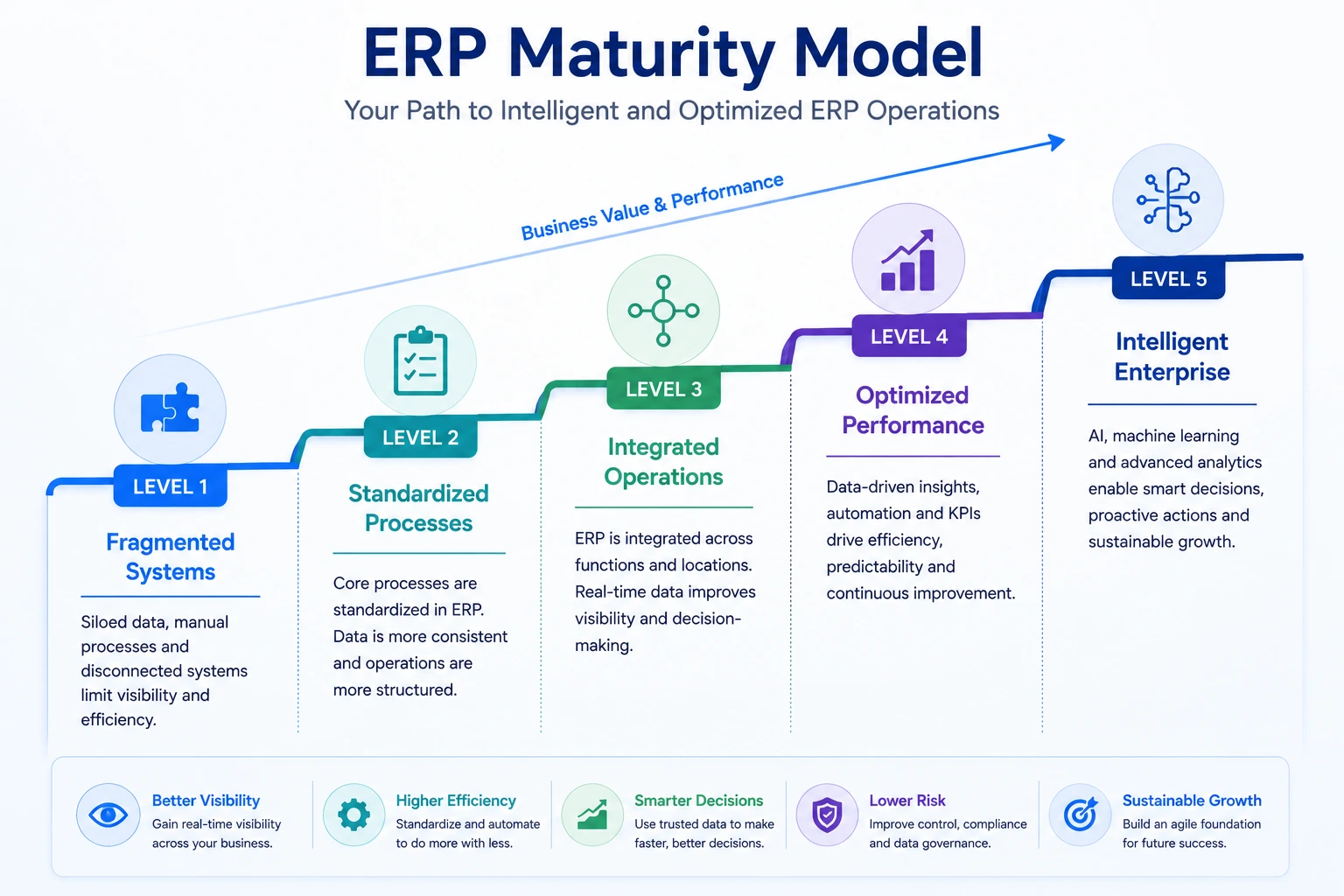
The organization should solve foundational problems before investing heavily in advanced automation.
Common ERP Strategy Mistakes
1. Selecting Software Before Defining Business Needs
Product demonstrations can influence the organization before objectives and requirements are clear.
2. Treating ERP as an IT Project
ERP changes business processes, responsibilities and management information.
3. Recreating Every Existing Process
The legacy process may be inefficient or designed around old technology.
4. Ignoring Data Until Late in the Project
Data cleansing, mapping and validation require significant business involvement.
5. Underestimating Change Management
Users need more than system training. They need to understand new responsibilities and processes.
6. Allowing Uncontrolled Customization
Every customization creates testing, support and upgrade obligations.
7. Choosing an ERP Only on Initial Price
A low initial price can be outweighed by implementation, support and customization costs.
8. Failing to Evaluate the Implementation Partner
Partner capability can be as important as software capability.
9. Planning Only Until Go-Live
ERP value is created through stabilization and ongoing optimization.
10. Measuring Only Technical Completion
A system can be technically successful while producing little operational improvement.
ERP Strategy Checklist
Business Alignment
Business objectives are documented
Executive sponsorship is confirmed
Expected benefits are measurable
The business case is approved
Scope supports the company strategy
Process Strategy
Current processes are documented
Pain points are validated
Future processes are defined
Process owners are assigned
Standardization opportunities are identified
ERP Selection
Requirements are prioritized
Vendors are evaluated through realistic scenarios
Deployment options are reviewed
Total cost of ownership is calculated
Implementation partners are assessed
Data and Technology
Data owners are assigned
Data-quality issues are identified
Migration scope is controlled
Integration architecture is defined
Security requirements are documented
Customization principles are approved
Delivery
Implementation approach is selected
Project governance is established
Risks are actively managed
Testing covers complete processes
Cutover planning starts early
People and Adoption
Change impacts are assessed
Communication is ongoing
Key users are involved
Training is role-based
Support channels are prepared
Adoption metrics are defined
Post-Go-Live
Stabilization support is planned
Business KPIs are monitored
Benefits are reviewed
Enhancement governance is active
Future phases are prioritized
Clear Answers About ERP Strategy
1. What is the purpose of an ERP strategy?
The purpose of an ERP strategy is to align ERP technology, processes, data and people with the organization’s business objectives. It provides direction for software selection, implementation, governance and long-term improvement.
2. When should a business create an ERP strategy?
A business should create an ERP strategy before selecting or replacing ERP software. The strategy should also be reviewed when the company expands, acquires another business, changes its operating model or modernizes legacy systems.
3. Who should be involved in ERP strategy?
ERP strategy should involve executive leadership, finance, operations, sales, supply chain, IT, process owners, data owners and representative end users.
4. How long should an ERP strategy cover?
An ERP strategy commonly covers several years, while the detailed roadmap is divided into shorter implementation and optimization phases.
5. Should every process move into ERP?
No. Processes should move into ERP when the platform can manage them effectively and they benefit from shared data or workflow integration. Specialized systems may remain appropriate for highly specific requirements.
6. Is ERP customization always bad?
No. Customization can be valuable when it supports compliance, differentiation or important business requirements. It becomes risky when it is excessive, poorly documented or used to preserve inefficient processes.
7. How Browseinfo Can Support ERP Strategy
A successful ERP program requires a clear business case, realistic roadmap, appropriate software, disciplined implementation and long-term governance.
Browseinfo can support organizations through services such as:
Browseinfo can help organizations evaluate their current processes, define requirements and build a practical Odoo roadmap aligned with business objectives.
Frequently Asked Questions About ERP Strategy
1. What is an ERP strategy?
An ERP strategy is a long-term plan for selecting, implementing, governing and improving an ERP system. It connects business goals with processes, data, technology, people and performance measurement.
2. Why does a business need an ERP strategy?
A business needs an ERP strategy to align software investment with operational goals, control project scope, improve data quality, manage risks and ensure that ERP delivers measurable business value.
3. What should be included in an ERP strategy?
An ERP strategy should include business objectives, current-state findings, future processes, requirements, software-selection criteria, data and integration plans, implementation roadmap, governance, change management, risks and KPIs.
4. What is the difference between an ERP strategy and an implementation plan?
ERP strategy defines long-term direction, decision principles and business outcomes. An ERP implementation plan defines the tasks, owners, resources and timelines required to deliver a specific ERP project.
5. How do you create an ERP strategy?
Start by defining business objectives, assessing current systems and processes, designing future workflows, prioritizing requirements, creating a business case and establishing a roadmap for software selection, implementation and optimization.
6. Who is responsible for ERP strategy?
ERP strategy should be jointly owned by executive leadership, business process owners and IT leadership. A steering committee typically governs major scope, budget and priority decisions.
7. How should a company select an ERP system?
A company should evaluate ERP systems against prioritized business requirements, industry fit, scalability, integration, reporting, user experience, implementation capability and total cost of ownership.
8. How much ERP customization should a business allow?
Customization should be limited to requirements that deliver clear business value or meet mandatory legal and operational needs. Standard configuration should be preferred when it can support the process effectively.
9. What is an ERP roadmap?
An ERP roadmap is a phased plan showing how the organization will assess, select, implement, stabilize and improve its ERP environment over time.
10. How can ERP success be measured?
ERP success can be measured through project delivery, data accuracy, user adoption, process efficiency and business outcomes such as faster closing, improved inventory accuracy and reduced order-processing time.
11. What are the biggest ERP implementation risks?
Common risks include unclear objectives, scope expansion, poor data quality, insufficient testing, low user involvement, excessive customization, weak leadership and inadequate training.
12. How often should an ERP strategy be reviewed?
An ERP strategy should be reviewed at least annually and whenever the organization experiences significant growth, acquisitions, regulatory changes, technology changes or operating-model changes.
