This apps Offer Different type of reports for warehouse reports. Odoo does not provide any stock reports for overstocking, expired stock, in stock and out of stock situations. We provide app for various reports to cover all important stock information.User can generate report like Inventory Valuation Report, Stock Expiry Report, Stock Aging Report for Unsold Products(Non-Moving Products), Export Stock in Excel Report, Inventory Coverage Report, Inventory Breakdown Report, Stock Rotation Report, Inventory Overstock Report.
Managing inventory manually becomes increasingly difficult as businesses grow and warehouse operations become more complex. Organizations handling multiple warehouses, product categories, stock transfers, purchase orders, and sales operations require accurate inventory visibility to maintain smooth business operations. The Stock Inventory & Warehouse Management Analysis Reports Odoo app provides businesses with a centralized solution for analyzing real-time inventory data using advanced warehouse reporting tools.
This application helps businesses monitor stock valuation, inventory aging, stock movement, overstock situations, inventory coverage, warehouse turnover, product expiry tracking, and non-moving products directly within Odoo ERP. Instead of relying on manual spreadsheets and disconnected reporting systems, organizations can generate detailed inventory reports with real-time stock insights.
The module is highly beneficial for manufacturing industries, wholesale distributors, retailers, logistics companies, eCommerce businesses, and enterprises managing large warehouse operations. Businesses can improve stock visibility, reduce inventory-related losses, optimize warehouse efficiency, and make better purchasing decisions using accurate inventory analytics reports.
Explore Odoo Inventory to manage stock, warehouse operations, and product movements in a smart and organized way. It helps improve stock accuracy, reduce errors, and ensure smooth supply chain management.
Download our Textile Industry ERP brochure to explore inventory tracking, production planning, dyeing management, and order processing workflows.
Feature
1) All in one Inventory Reports
All inventory related report are available in this app, provide important stock information.
2) Stock Rotation Report
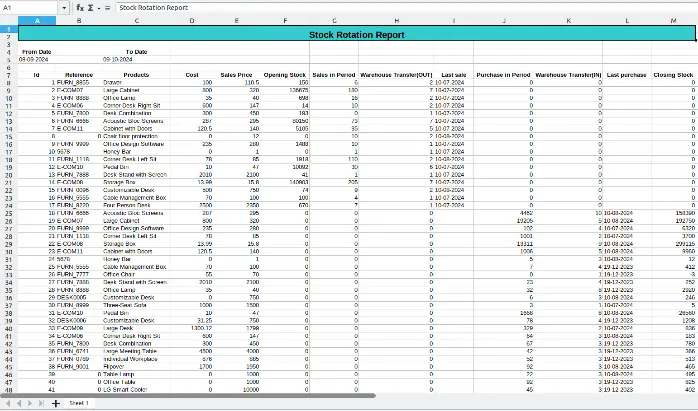
Report for opening stock, closing stock,sale count, purchase count, transfer in/out, last sale, last purchase.
3) Export Stock In Excel Report
Export current stock information for all products in several warehouses.
4) Inventory Overstock Report
Report for incoming/outgoing stock,last sale,avg of daily sale, recent purchase, expected stock, overstock quantity, overstock value according to given duration.
5) Inventory Valuation Report
Report for stock valuation inventory,detail with and without product, stock valuation with summarized data.
6) Inventory Coverage Report
Upcoming days report for inventory/stock important information.
7) Non Moving Products Stock Report
Easily get details how many products are unsold(non moving) even it is available in stock according to specific warehouse and specific duration.
8) Inventory Age Report
Generate excel and pdf inventory age report according to given period.
9) Inventory Breakdown Report
Report for inventory average cost/average price/average value according separately every time period.
10) Stock Aging(Expiry) Report
Report for expired stock information filter by warehouse and locations according specific given days.
Real time Stock Inventory Valuation Report
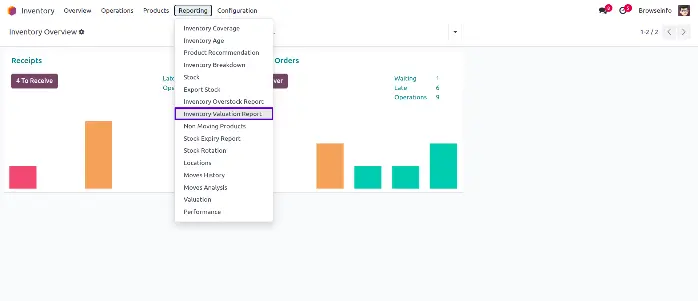
Inventory Valuation Report Menu
User can open form for inventory valuation report.
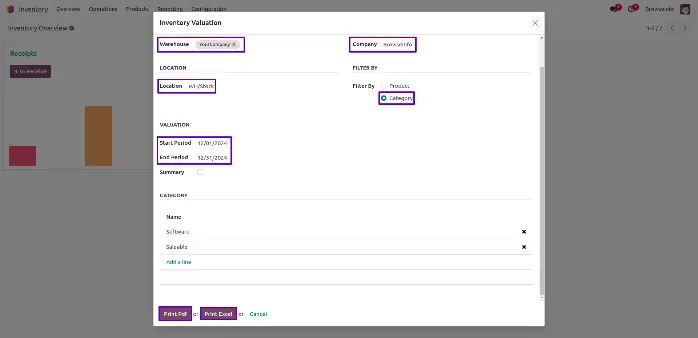
Filter By Warehouses & Filter By Date and Product's Categories
User can filter warehouses, location, company and product's categories according to period.
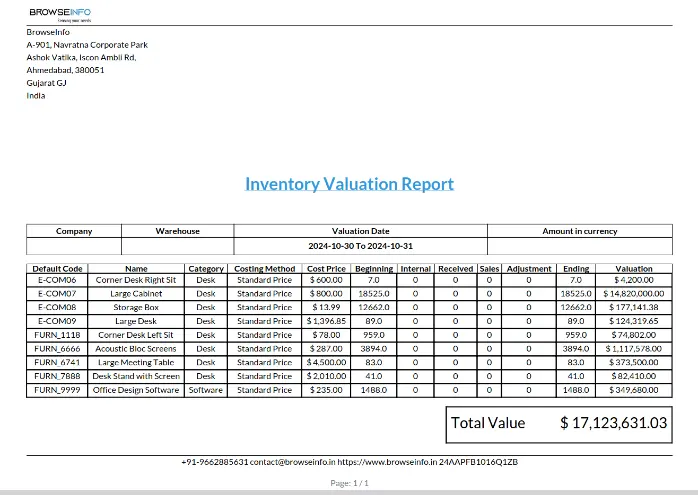
Detail of Inventory Valuation Report
Inventory valuation reports play an important role in warehouse accounting and stock management processes. Businesses need accurate inventory valuation information to understand stock value, monitor warehouse performance, and maintain financial transparency across inventory operations.
This Odoo application allows users to generate real-time inventory valuation reports based on warehouses, locations, product categories, and selected periods. Users can analyze stock valuation details more efficiently while maintaining better inventory tracking within the ERP system.
The ability to filter inventory reports according to warehouses, dates, and products helps businesses generate customized inventory analysis reports according to operational requirements. This flexibility improves reporting accuracy and supports better inventory planning decisions.
User can see detail of specific warehouses stock report.
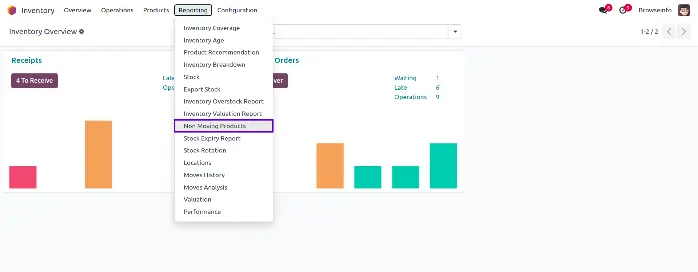
Stock Aging Report for Unsold Products(Non-Moving Products)
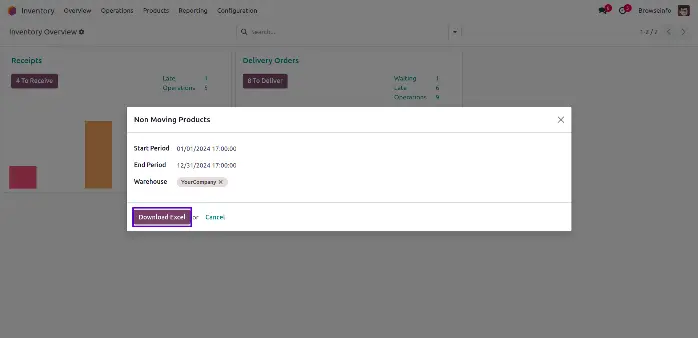
Filter By Warehouses and Filter By Period
User can filter by warehouses and start to end period.
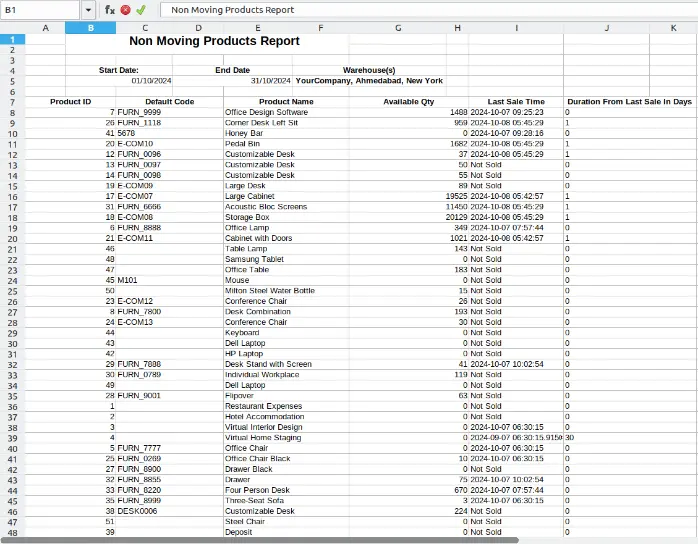
Detail of Aging Report for Non Moving Products
Non-moving and slow-moving products create major challenges for inventory-intensive businesses. Excess stock occupying warehouse space increases holding costs and negatively affects inventory turnover performance. The Stock Aging Report feature helps businesses identify products that remain unsold for long periods.
Users can analyze stock aging data according to warehouse, product category, and selected time duration. This allows warehouse managers and inventory planners to identify products requiring clearance, promotional activities, or procurement adjustments.
The report also helps organizations improve stock rotation strategies and reduce losses caused by excess inventory accumulation. Better visibility into aging inventory supports smarter purchasing decisions and improves warehouse efficiency.
User can see aging report detail for non moving products.
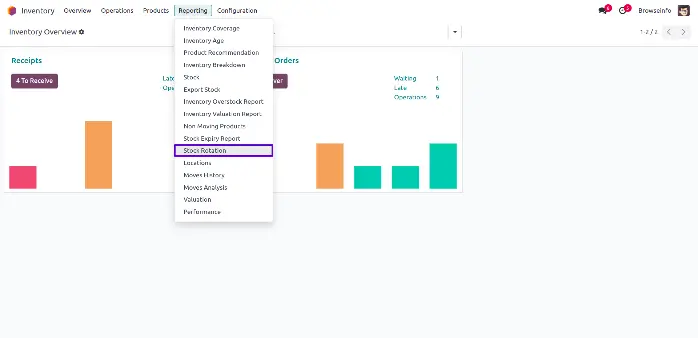
Stock Rotation Report
Stock Rotation Report Menu
User can open form for stock rotation report.
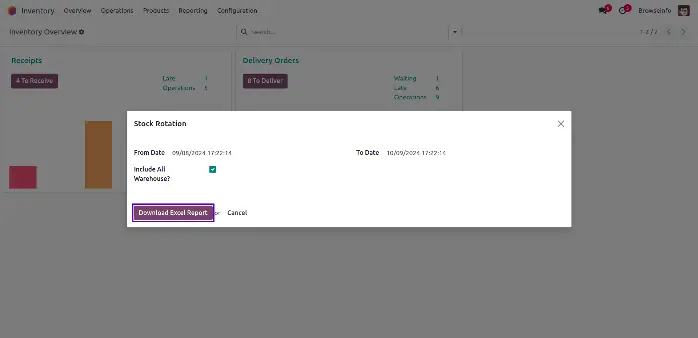
Include All Warehouses
User can Include all warehouses and decide start date and end date.
All Warehouses Stock Report
Stock rotation analysis is essential for maintaining balanced inventory levels and improving warehouse productivity. This module provides detailed stock rotation reports showing opening stock, closing stock, incoming stock, outgoing stock, purchase quantity, sales quantity, and transfer activities.
Businesses can monitor product movement patterns and identify fast-moving, slow-moving, and non-moving inventory more effectively. This helps organizations optimize stock planning and maintain better control over warehouse operations.
Warehouse managers can also use these reports to improve inventory forecasting and reduce the risk of stock shortages or overstock situations. Real-time stock movement analysis supports better operational decision-making and improves supply chain management efficiency.
User can see detail of all warehouses stock report.
Why Businesses Need Advanced Warehouse Reporting in Odoo
Modern warehouse operations involve complex inventory activities including stock transfers, procurement management, product movement tracking, warehouse allocation, inventory forecasting, and stock valuation reporting. Businesses managing these processes manually often face operational inefficiencies, inaccurate inventory records, and delayed decision-making.
Advanced warehouse reporting within Odoo ERP helps organizations simplify inventory management by providing centralized access to important warehouse analytics and stock performance reports. Businesses can monitor inventory conditions more effectively while improving operational planning and warehouse productivity.
The module provides detailed inventory analysis reports such as stock valuation reports, inventory coverage reports, stock aging reports, overstock analysis reports, stock rotation reports, and inventory breakdown reports. These reports help organizations maintain accurate stock planning and optimize warehouse operations according to business requirements.
For businesses operating multiple warehouses, centralized reporting improves inventory visibility across locations and supports better stock distribution strategies. Companies can avoid stock shortages, reduce overstock situations, and improve order fulfillment efficiency using real-time warehouse insights.
The application also supports better business scalability because automated reporting processes reduce manual workload and improve operational control as inventory volumes increase. Businesses can save time, reduce reporting complexity, and improve inventory management performance using this Odoo reporting solution.
Conclusion
The Stock Inventory & Warehouse Management Analysis Reports Odoo app provides businesses with a powerful solution for improving inventory visibility, warehouse efficiency, and stock management accuracy. With advanced reporting features such as inventory valuation reports, stock aging analysis, stock rotation tracking, inventory coverage reports, and warehouse performance monitoring, organizations can make better operational and financial decisions using real-time inventory data.
The application helps businesses reduce manual inventory tracking efforts while improving stock planning, warehouse utilization, and inventory control processes. Companies can easily identify slow-moving products, avoid overstock situations, optimize procurement planning, and maintain accurate warehouse records across multiple locations.
By integrating seamlessly with Odoo Inventory and Warehouse Management workflows, the module supports centralized inventory analysis and automated reporting processes within a single ERP platform. This improves operational productivity, reduces reporting complexity, and helps businesses maintain better control over warehouse activities.
Manufacturing companies, wholesalers, retailers, logistics providers, and enterprises managing high inventory volumes can significantly benefit from this Odoo reporting solution. The module not only simplifies warehouse reporting but also helps organizations improve supply chain efficiency, financial transparency, and overall inventory management performance.
