Executive Summary
Retail businesses that use Square POS usually start out simple. Have fast checkout experiences.. When they get bigger and have multiple stores, warehouses and online channels they start to have some problems. They have trouble keeping track of their inventory and their accounting and reporting are not very good.
Odoo helps solve these problems by bringing the point of sale system, inventory, accounting, customer relationships and purchasing into one system. Of using separate tools and having to manually fix mistakes businesses can see what is happening with their sales and inventory in real time.
This guide will show businesses how to switch from Square POS to Odoo make their operations more accurate get rid of work and grow their retail business in a big way. They can do all this by using automation and combining all their systems into one.
Why Companies Move from Square POS to Odoo
Companies usually switch from Square POS when things get complicated. They need more than just the basic things. Square POS is great for making sales. It is not very good at things like keeping track of money managing inventory in many places and making detailed reports.
Odoo helps with these problems by giving businesses a system where everything works together. This means companies can make decisions and run smoothly. Odoo is like a hub for all business functions including keeping track of money managing inventory in many warehouses and making advanced reports, which are all important for retail businesses like yours. Odoo and Square POS are two systems but Odoo is better for complicated businesses because it has more features. For example Odoo helps with keeping track of money. Odoo helps with managing inventory in many warehouses. The Odoo system is very helpful for businesses because it has features, like Odoo that help with keeping track of money and Odoo that helps with managing inventory.
Signs Your Current POS System Is Limiting Growth
- Your store has inventory levels across locations or sales channels.
- You have to do a lot of work to match up accounting numbers after sales.
- You can't see a history of customer sales in one place.
- Your reports only show sales numbers.
- Running locations is getting really hard to manage.
These issues mean your business needs more, than a regular POS system. It needs an integrated system that can handle everything.
Square POS vs Odoo Strategic Comparison
| Feature | Square POS | Odoo |
|---|---|---|
| Cost | Low entry cost | Modular ERP pricing |
| Licensing | Transaction-based | Subscription-based |
| Flexibility | Limited | Highly customizable |
| Reporting | Basic | Advanced real-time analytics |
| Inventory | Store-level | Multi-warehouse, real-time |
| CRM | Minimal | Full CRM system |
| Accounting | External tools needed | Built-in accounting |
| Integrations | Marketplace apps | Native ERP modules |
| Upgrade Path | Limited scalability | Fully scalable ERP |
| AI & Automation | Minimal | Advanced automation workflows |
When Staying on Square POS Makes Sense
Square POS remains a suitable choice when business operations are simple and stable. It is ideal for:
- Single-store retail setups
- Low transaction volumes
- Minimal inventory complexity
- Basic reporting requirements
In such cases, introducing a full ERP system may add unnecessary complexity.
ERP Migration Risks
When you move from a point of sale system to an Enterprise Resource Planning platform you will face a lot of problems.
- Poor-quality or inconsistent POS data
- Incorrect mapping of inventory and product structures
- Temporary operational downtime during migration
- Staff adaptation and training requirements
- Integration complexity with existing tools
Moving to an Enterprise Resource Planning system is a job so you have to plan it very carefully and do it one step at a time. This will help you avoid a lot of problems, with your ERP Migration.
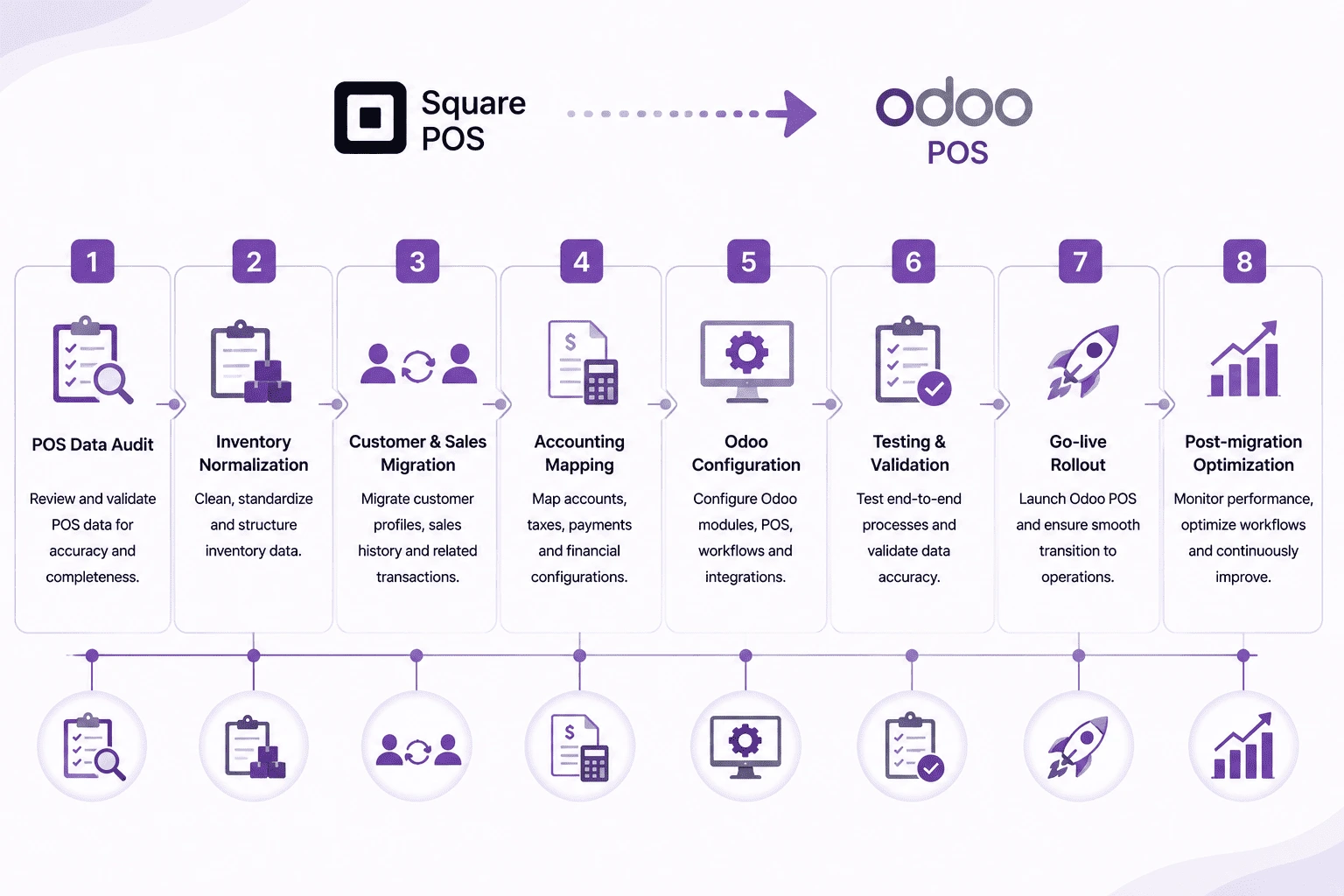
Square POS to Odoo POS Migration Roadmap
Industry-Specific Considerations
Different industries experience unique migration requirements:
- Retail chains: Require centralized multi-store inventory control
- Fashion retail: Needs variant and size/color management
- Food & beverage: Focus on fast-moving stock tracking
- Electronics: Requires serial number traceability
- Franchise businesses: Need centralized reporting with local autonomy
Cost and ROI Considerations
Moving to Odoo helps cut down costs, in the run. This is because you do not have to deal with different systems and manual work. Businesses get a lot of things from this such as:
- Reduced dependency on third-party accounting tools
- Lower manual reconciliation effort
- Improved inventory accuracy across locations
- Better visibility into sales performance
ROI is typically achieved through operational efficiency gains such as faster order processing, reduced stockouts and improved demand forecasting.
Common ERP Migration Mistakes
A lot of projects to move to a system fail because of simple mistakes like:
- Migrating unclean or duplicate POS data
- Ignoring accounting structure alignment
- Inadequate staff training before go-live
- Underestimating integration complexity
- Skipping proper testing phases
You have to avoid these mistakes to make sure everything goes well when you switch.
How Browseinfo Supports ERP Modernization
Browseinfo specializes in helping retail and distribution businesses transition from legacy POS systems to modern ERP platforms.
Their expertise includes:
- Odoo implementation
- POS-to-ERP migration
- Retail automation
- Inventory & accounting integration
- ERP optimization
Frequently Asked Questions
1. Why switch from Square POS to Odoo?
We want to combine sales, inventory and accounting into one system.
2. Can Odoo totally replace Square POS?
Yes Odoo has a POS system.
3. Does Odoo update inventory in time?
Yes it works across warehouses and stores.
4. Is moving from Square POS to Odoo
It depends on how good your data's how big your business is but it can be done with a plan.
5. What information can be moved to Odoo?
You can move products, customers, sales history, inventory and accounting entries.
6. How long does it take to move to Odoo?
It usually takes 2 to 8 weeks depending on how complicated it's
7. Is Odoo good for businesses that are growing?
Yes Odoo is great for businesses, with stores or that sell through many channels.
Final Thoughts
Square POS is good for shops but it gets limiting as they grow. Odoo has a system that links sales, stock and money stuff in real time.
If a business wants to get bigger do things automatically and be, in control switching to Odoo is a move, not just a software switch.
