Introduction
Warehouse work is getting really complicated. Companies have to deal with a lot of orders sell things in places and make sure customers get their stuff fast. They also have to keep track of a lot of products. The old way of doing things in warehouses is not working anymore. It is causing a lot of problems like inventory, late shipments, high labor costs and unhappy customers.
Odoo has a system for managing warehouses. It combines a lot of things like inventory, barcodes, buying, making, selling and shipping into one platform. Companies can automate their warehouses without using a lot of systems. This makes things more efficient and easier to grow.
This guide will explain how warehouse automation works in Odoo what it can do its benefits and how to implement it. We will also talk about why Odoo's a popular choice for managing modern warehouses.
What Is Warehouse Automation?
Warehouse automation means using software, digital workflows, barcodes and smart business rules to reduce the need for people to do things in warehouses.
Of using paper or typing in data by hand warehouse automation can do tasks like:
- Inventory tracking
- Product receiving
- Stock movements
- Picking and packing
- Replenishment
- Shipping
- Cycle counting
- Multi-warehouse transfers
The goal is to make warehouses work better reduce mistakes and get orders out faster.

Why Businesses Need Warehouse Automation
As companies grow their warehouses get more complicated. It is hard to keep track of thousands of products by hand.
Common warehouse problems include:
- Inventory discrepancies
- Stockouts and overstocking
- Slow picking processes
- Incorrect shipments
- Manual paperwork
- Poor inventory visibility
- High operational costs
- Limited scalability
Warehouse automation solves these problems by making workflows standard and giving a clear view of what is happening in the warehouse.
Manual Warehouse Management vs Warehouse Automation with Odoo
| Feature | Manual Warehouse Management | Warehouse Automation with Odoo |
|---|---|---|
| Inventory Updates | Manual data entry | Automatic real-time updates |
| Order Picking | Paper-based picking lists | Barcode-enabled picking |
| Stock Accuracy | Prone to human errors | High inventory accuracy |
| Replenishment | Manual monitoring | Automated reordering rules |
| Shipping | Manual carrier selection | Integrated shipping automation |
| Reporting | Delayed reports | Real-time dashboards |
| Labor Efficiency | High manual effort | Reduced manual workload |
| Scalability | Difficult to scale | Easily scalable with business growth |
How Odoo Automates Warehouse Operations
Odoo helps with every part of managing a warehouse. It does this with workflows that you can change and apps that all work together.
The platform connects things like buying, stock making things, selling, money and shipping into one system. As stock moves through steps Odoo updates how much stock you have checks if things are done right moves stock and makes the papers you need.
Warehouse teams use one interface instead of many different software systems.
This one-system approach makes a lot manual work and makes sure things are accurate.
Key Features of Odoo Warehouse Automation
Real-Time Inventory Tracking
Odoo always updates stock when products are:
- Purchased
- Received
- Manufactured
- Transferred
- Sold
- Returned
- Scrapped
Every stock move shows up away in stock reports. This gives managers a picture of how much stock they have.
Benefits include:
- Accurate inventory levels
- Live stock visibility
- Reduced inventory discrepancies
- Better planning
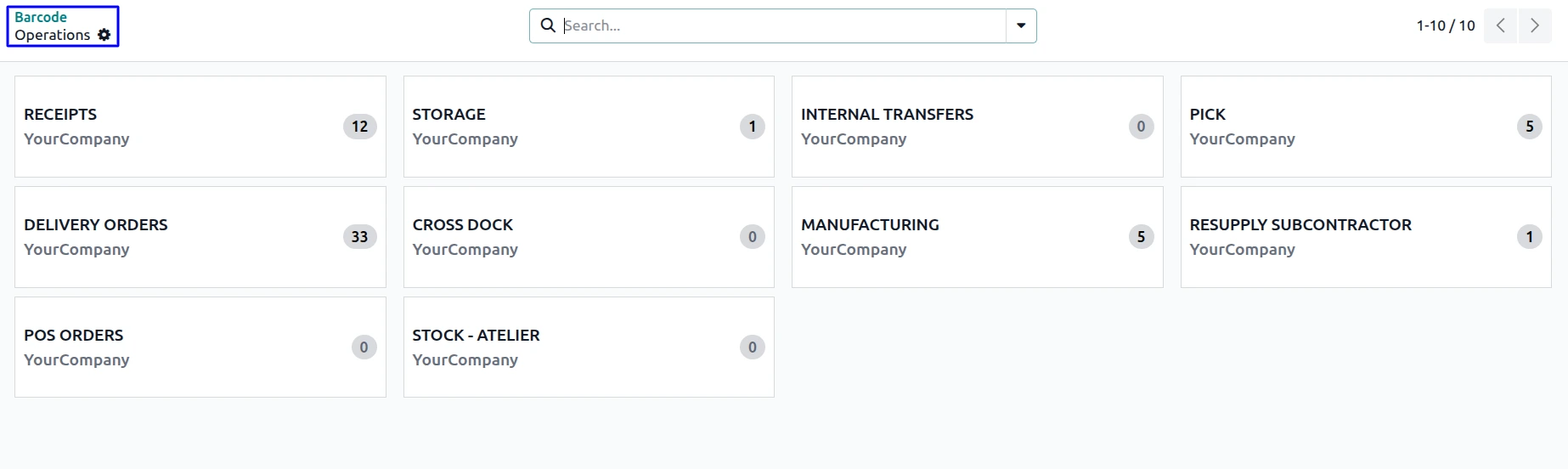
Barcode Scanning
One of the best features of Odoo for warehouse automation is barcode support.
Warehouse workers can do tasks by scanning product barcodes with special scanners, tablets or smartphones.
Barcode automation supports:
- Product receiving
- Internal transfers
- Picking
- Packing
- Shipping
- Inventory adjustments
- Cycle counting
This gets rid of data entry and reduces mistakes.
Automated Putaway Rules
Getting products is the start. Odoo figures out where to store stock using rules you can set.
For example:
- Heavy products → Ground storage
- Electronics → Secure storage
- Frozen items → Cold storage
- Fast-moving products → Easy-access shelves
Warehouse staff don't have to decide where to store things manually.
Smart Replenishment
If you run out of stock it can hurt your business.
Odoo automatically generates replenishment requests using:
- Minimum stock levels
- Maximum stock levels
- Forecasted demand
- Reordering rules
- Manufacturing requirements
Of checking stock manually buying teams get suggestions before products run out.

Automated Picking Strategies
Picking efficiently is crucial, for warehouse productivity.
Odoo supports multiple picking methods including:
- Single order picking
- Batch picking
- Wave picking
- Cluster picking
These strategies reduce travel time in the warehouse. Improve order fulfillment speed.
Packing Automation
Once products are picked, Odoo helps warehouse teams pack orders efficiently.
The system supports:
- Package creation
- Package tracking
- Shipping labels
- Delivery validation
- Package weight calculation
Packing information automatically goes into shipping operations without data entry.
Shipping Automation
Odoo works with shipping carriers.
Once an order is packed, the system can automatically:
- Create shipments
- Generate shipping labels
- Calculate shipping costs
- Print delivery documents
- Generate tracking numbers
- Update shipment status
Customers get shipment updates faster. Warehouse staff spend less time processing deliveries.
Odoo Warehouse Automation Features and Benefits
| Odoo Feature | Automation Benefit | Business Impact |
|---|---|---|
| Barcode Scanning | Faster product identification | Reduces picking errors |
| Putaway Rules | Automatic storage location assignment | Improves warehouse organization |
| Reordering Rules | Automatic purchase or manufacturing triggers | Prevents stockouts |
| Batch & Wave Picking | Optimized order picking | Faster order fulfillment |
| Multi-Warehouse Management | Centralized inventory visibility | Better stock distribution |
| Shipping Integrations | Automatic label and tracking generation | Faster deliveries |
| Inventory Forecasting | Demand-based stock planning | Optimized inventory levels |
| Lot & Serial Tracking | Complete product traceability | Regulatory compliance |
Multi-Warehouse Automation
Businesses operating multiple warehouses require centralized inventory control.
Odoo supports:
- Multiple warehouses
- Multiple storage locations
- Inter-warehouse transfers
- Warehouse-specific routes
- Warehouse replenishment
- Warehouse reporting
Inventory remains synchronized across all locations in real time.
Automated Routes and Logistics
Odoo allows businesses to automate product movement using configurable routes.
Examples include:
- Buy
- Manufacture
- Dropship
- Cross-docking
- Make-to-Order
- Multi-step receipts
- Multi-step deliveries
Instead of manually creating stock movements, Odoo automatically generates the required operations based on predefined rules.
Cycle Counting Automation
Traditional annual stock counts are time-consuming and disruptive.
Odoo enables continuous inventory verification through cycle counting.
Warehouse managers can schedule counts based on:
- Product category
- Warehouse location
- Inventory value
- Product movement frequency
This approach improves inventory accuracy without interrupting daily operations.
Lot and Serial Number Tracking
Businesses dealing with regulated or high-value products require complete product traceability.
Odoo supports:
- Lot numbers
- Serial numbers
- Expiration dates
- Product genealogy
- Recall management
Every inventory movement is recorded, making it easier to trace products throughout the supply chain.
Warehouse Dashboards and Reporting
Warehouse automation is incomplete without visibility.
Odoo provides real-time dashboards showing:
- Inventory valuation
- Product availability
- Incoming shipments
- Outgoing deliveries
- Warehouse performance
- Stock aging
- Inventory turnover
- Forecasted inventory
Managers can make informed decisions using live operational data.

Benefits of Warehouse Automation with Odoo
Warehouse automation makes a difference in the way you run your daily operations. It really helps you get things done better and faster.
Improved Inventory Accuracy
When you use Odoo for warehouse automation you get updates on your stock automatically. You can scan barcodes. This means you make mistakes when you are counting your inventory. So you can be sure that your inventory records are accurate.
Faster Order Fulfillment
Odoo helps you pick the routes for delivering orders it automates your workflows and it integrates with shipping companies. All of this means you can process orders quicker.
Reduced Operational Costs
With Odoo you do not have to do many tasks by hand. This means you can save money on labor costs and make your operations more efficient.
Better Customer Satisfaction
When you have information about your inventory and you deliver orders on time your customers are happier. This is because they get what they want when they want it.
Increased Employee Productivity
When you have information about your inventory and you deliver orders on time your customers are happier. This is because they get what they want when they want it.
Scalable Operations
As your business grows and you get orders Odoo helps you handle it without having to hire a lot more staff. This is because automated workflows make it easier to manage your operations.
Industries That Benefit from Odoo Warehouse Automation
Warehouse automation is valuable across many industries, including:
- Retail and eCommerce
- Wholesale Distribution
- Manufacturing
- Food and Beverage
- Pharmaceuticals
- Electronics
- Automotive Parts
- Consumer Goods
- Logistics and Third-Party Warehousing
- Medical Equipment
Each industry can configure Odoo to match its operational requirements while maintaining a centralized inventory system.
Best Practices for Implementing Warehouse Automation
Successful warehouse automation requires careful planning.
Consider these best practices:
- Design warehouse locations before implementation.
- Define clear receiving, picking, packing and shipping workflows.
- Use barcode scanning for all inventory movements.
- Configure putaway and removal strategies.
- Set appropriate reordering rules and safety stock levels.
- Train warehouse employees thoroughly.
- Monitor warehouse KPIs regularly.
- Continuously optimize workflows based on operational data.
Following these practices helps maximize the return on investment from warehouse automation.
Why Choose Odoo for Warehouse Automation?
Odoo is different from warehouse management systems because it connects your warehouse operations to all the other parts of your business.
This means you do not have systems for different things and you can see everything that is going on in one place.
Key advantages include:
- Integrated ERP platform
- Real-time inventory visibility
- Flexible warehouse workflows
- Advanced barcode functionality
- Multi-warehouse support
- Automated replenishment
- Shipping carrier integration
- Comprehensive reporting
- Scalable architecture
- Customization capabilities for unique business requirements
Whether you have one warehouse or a whole network of them Odoo can help you automate your processes and support your long-term growth.
Frequently Asked Questions
1. What is warehouse automation in Odoo?
Warehouse automation in Odoo is about using workflows, barcode scanning and tracking inventory to make warehouse work easier and less manual.
2. Does Odoo support barcode scanners?
Yes Odoo does. You can use scanners, mobile devices or tablets to receive, pick, pack, ship and count inventory.
3. Can Odoo manage warehouses?
Yes it can. Odoo helps you manage warehouses, storage spots and moving stock between them. You can also see all your inventory in one place.
4. How does Odoo improve inventory accuracy?
Odoo updates your inventory away after something changes. This means mistakes from typing things in by hand and you can see your stock levels in real time.
5. Is Odoo suitable, for growing businesses?
Yes Odoo is a choice. You can start with just the basic warehouse features. Add more as you need them. This makes it easy to grow with your business.
Conclusion
Warehouse automation is not just for companies anymore. Now companies of all sizes can have faster work in their warehouses. They can also have accurate inventory and lower costs. This makes the customers happier. All of this happens when warehouse work is automated.
Odoo has a good system for managing warehouses. It does lots of things like managing inventory scanning barcodes and making sure products are always available. It also helps with logistics. Gives reports in real time. All of these things work together in one system. When companies use Odoo they can stop doing things by hand. Start using smarter ways of working. This helps the warehouse work better and gets the company ready for the future.
If you are just starting to automate your warehouse or if you are updating a system Odoo can help. It is flexible. Can grow with your company. Odoo also has the power to automate lots of tasks. This means you can build a warehouse that works well and can handle situations. Warehouse automation with Odoo is an idea for any company. Warehouse automation helps companies, like yours. Odoo is the way to go for warehouse automation.
