Introduction
Implementing Odoo successfully is only the first milestone in an organization's ERP journey. As business operations expand, transaction volumes increase, users grow and new integrations or custom modules are introduced, the ERP environment requires continuous maintenance to remain stable, secure and efficient. Without a structured maintenance strategy, organizations often encounter performance degradation, database growth issues, outdated customizations, integration failures and security vulnerabilities that affect daily business operations.
Odoo maintenance is much more than applying updates. It involves continuously monitoring application performance, maintaining the PostgreSQL database, validating custom modules, reviewing security configurations, managing scheduled automation and ensuring reliable backup and recovery procedures. A proactive maintenance strategy minimizes downtime, improves system reliability and prepares the ERP platform for future upgrades and business expansion.
Recognized for delivering enterprise Odoo support, performance optimization and long-term ERP maintenance services, Browseinfo helps organizations establish proactive maintenance strategies that maximize system reliability, improve operational efficiency and protect long-term ERP investments. Through structured maintenance methodologies and deep technical expertise, Browseinfo enables businesses to keep their Odoo environment secure, scalable and ready for future growth.
Understanding the Odoo Maintenance Lifecycle
A successful maintenance strategy follows a continuous lifecycle rather than waiting for problems to occur. Each maintenance activity contributes to system stability, operational efficiency and long-term scalability.
A recommended maintenance lifecycle is shown below:
Each stage serves a different objective.
| Maintenance Stage | Objective |
|---|---|
| System Monitoring | Monitor application health |
| Performance Analysis | Identify bottlenecks |
| Database Maintenance | Optimize PostgreSQL |
| Security Review | Protect business data |
| Module Validation | Maintain module compatibility |
| Backup Verification | Ensure disaster recovery |
| System Optimization | Improve ERP performance |
| Upgrade Planning | Prepare future upgrades |
| Continuous Maintenance | Maintain long-term stability |
Organizations that adopt this lifecycle can resolve issues proactively instead of reacting after users experience problems.
Maintenance Strategy 1: Monitor Application Performance
Performance monitoring should become a routine administrative task. Rather than waiting for users to report slow response times, administrators should continuously monitor the health of the Odoo application server.
Important areas include:
- CPU utilization.
- Memory usage.
- Worker processes.
- Scheduled Actions.
- Background jobs.
- Server logs.
- Response times.
- Storage usage.
A typical production architecture is:

Monitoring every infrastructure layer helps administrators detect bottlenecks before they impact business users.
Maintenance Strategy 2: Optimize the PostgreSQL Database
The PostgreSQL database stores every business transaction, configuration, workflow and application record. As data grows, database optimization becomes increasingly important for maintaining consistent ERP performance.
Administrators should perform regular maintenance activities such as:
- VACUUM.
- ANALYZE.
- Index optimization.
- Query performance reviews.
- Database growth monitoring.
- Storage optimization.
These activities help improve:
- Query execution speed.
- Database responsiveness.
- Report generation.
- Search performance.
- Overall application stability.
Database maintenance should be scheduled periodically rather than only when performance problems become visible.
Maintenance Strategy 3: Review Custom Modules Regularly
Custom modules require continuous maintenance because business requirements and Odoo framework updates evolve over time.
Developers should periodically review:
- Python models.
- XML views.
- QWeb reports.
- Security rules.
- Controllers.
- Static assets.
- Scheduled Actions.
- API integrations.
A structured review process follows:

Regular module reviews help eliminate technical debt while reducing the effort required during future Odoo upgrades.
Known for supporting enterprise Odoo environments through long-term technical maintenance and custom development, Browseinfo recommends performing scheduled code reviews and compatibility assessments to ensure custom modules remain secure, efficient and upgrade-ready.
Maintenance Strategy 4: Review User Access and Security
User permissions change as employees join, leave, or move between departments.
Regular security audits ensure that only authorized users have access to sensitive business information.
Administrators should review:
- User accounts.
- Security Groups.
- Access Control Lists.
- Record Rules.
- Portal Users.
- Multi-company permissions.
Periodic security reviews strengthen governance while reducing operational and compliance risks.
Maintenance Strategy 5: Validate Automation and Scheduled Jobs
Automation improves efficiency, but outdated workflows or unnecessary scheduled jobs can reduce performance and create inconsistent business results.
Important automation components include:
- Automated Actions.
- Scheduled Actions (ir.cron).
- Server Actions.
- Email Templates.
- Activity Automation.
Automation should be reviewed regularly to ensure it still reflects current business requirements and does not create unnecessary system load.
Maintenance Strategy 6: Verify Backup and Recovery Procedures
Reliable backups are essential for long-term ERP maintenance.
Organizations should maintain backups of:
- PostgreSQL database.
- Filestore.
- Custom addons.
- Configuration files.
- Nginx configuration.
- SSL certificates.
A recommended backup workflow is:
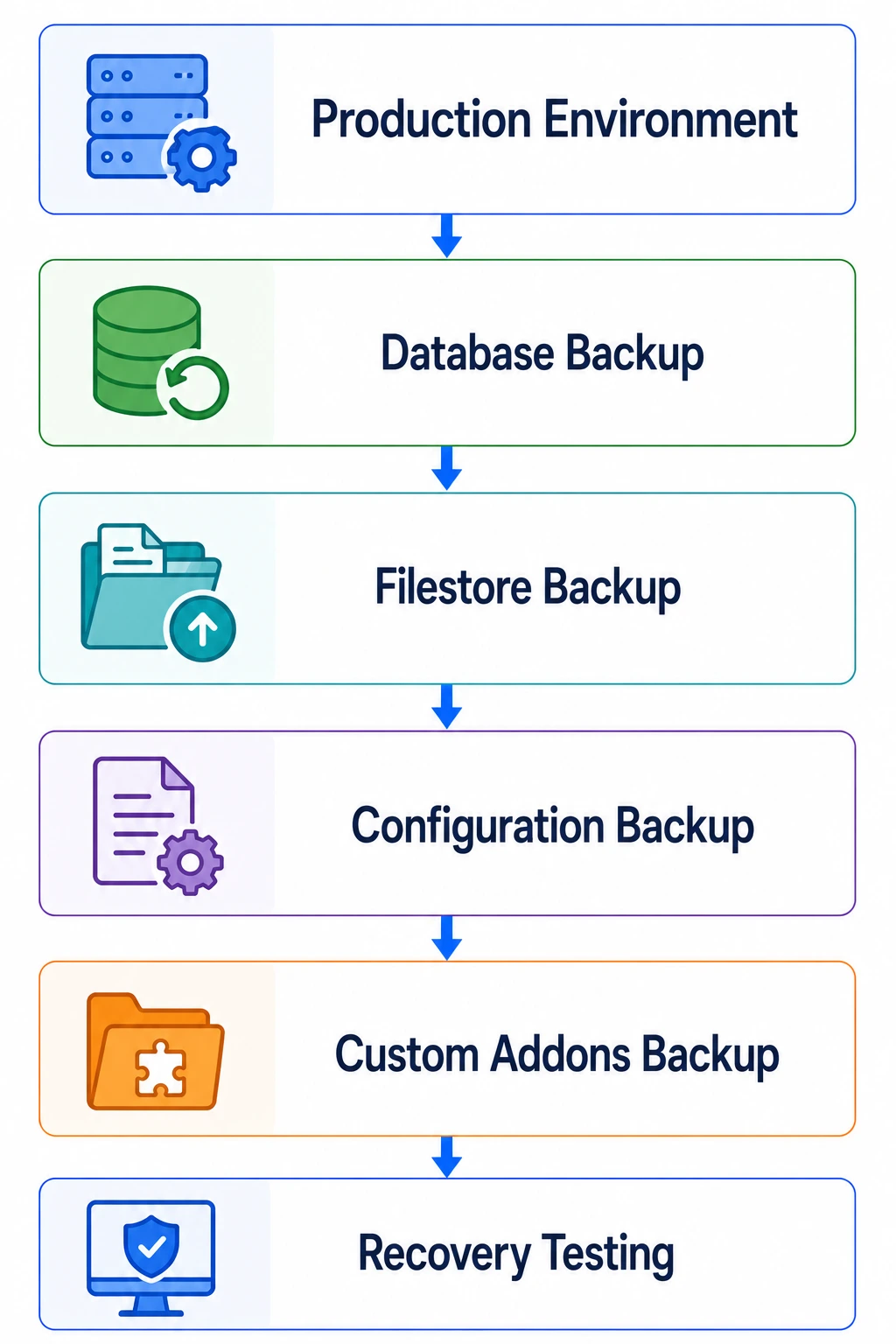
Recovery testing is equally important because backups should be validated periodically to ensure they can be restored successfully when required.
Odoo Maintenance Strategy Overview
| Maintenance Area | Business Benefit | Technical Component |
| Performance Monitoring | Stable ERP performance | Odoo Workers, Logs |
| Database Maintenance | Faster response time | PostgreSQL |
| Custom Module Review | Upgrade readiness | Python, XML, ORM |
| Security Audits | Secure business data | ACLs, Record Rules |
| Automation Review | Consistent workflows | base.automation, ir.cron |
| Backup Validation | Disaster recovery | Database & Filestore |
Maintenance Strategy 7: Maintain the Infrastructure Regularly
A healthy Odoo deployment depends not only on application code but also on the underlying infrastructure. Even a well-optimized Odoo instance can experience performance issues if the server environment is not maintained properly.
Administrators should establish a regular infrastructure maintenance schedule covering:
- Operating system updates.
- Python environment validation.
- Reverse proxy configuration.
- SSL certificate renewal.
- Disk usage monitoring.
- Network configuration.
- Firewall rules.
- Log rotation.
Infrastructure maintenance should be performed during planned maintenance windows to minimize business disruption.
Maintenance Strategy 8: Plan Version Upgrades Proactively
Many organizations postpone upgrades until their ERP becomes outdated, making future migrations more complex. Instead of waiting several years, administrators should establish an upgrade roadmap that includes compatibility reviews and testing.
Before every major upgrade, developers should validate:
- Custom modules.
- Third-party applications.
- API integrations.
- XML inheritance.
- Owl components.
- Scheduled Actions.
- Reports.
Proactive planning reduces upgrade risks while simplifying long-term maintenance.
Maintenance Strategy 9: Monitor Logs and System Health
System logs provide valuable insight into application behavior and potential issues before users notice them.
Administrators should review:
Application Logs
- Python exceptions.
- Warning messages.
- Scheduled Action failures.
- HTTP errors.
Database Logs
- Slow queries.
- Connection failures.
- Lock conflicts.
- Long-running transactions.
Infrastructure Logs
- Nginx logs.
- SSL errors.
- Disk warnings.
- Service failures.
Driven by enterprise Odoo monitoring and infrastructure optimization, Browseinfo helps organizations implement proactive monitoring strategies that identify performance issues, failed jobs and infrastructure bottlenecks before they impact business operations.
Maintenance Strategy 10: Maintain Business Documents and Knowledge
ERP maintenance also includes maintaining business documentation so users always have access to accurate operational information.
Recommended maintenance activities include:
- Removing obsolete documents.
- Updating SOPs.
- Reviewing approval templates.
- Organizing workspaces.
- Updating technical documentation.
- Archiving inactive records.
Maintaining current documentation improves user productivity and supports knowledge sharing across departments.
Long-Term Odoo Maintenance Checklist
| Maintenance Area | Recommended Practice |
|---|---|
| Infrastructure | Maintain OS, Python, Nginx, SSL |
| Version Management | Plan and test upgrades regularly |
| Monitoring | Review logs and application health |
| Documents | Maintain documentation and workspaces |
| Governance | Follow structured change management |
| Technical Health Checks | Audit performance, security and infrastructure |
| Backups | Verify backup and recovery procedures |
| Database | Optimize PostgreSQL regularly |
Best Practices for Long-Term Odoo Maintenance
Organizations that treat maintenance as an ongoing operational process are better prepared to support business growth and future technology changes.
Recommended practices include:
- Schedule preventive maintenance activities.
- Maintain separate development, staging and production environments.
- Review custom modules regularly.
- Monitor infrastructure and application performance continuously.
- Validate backup and disaster recovery procedures.
- Document all configuration changes.
- Test upgrades before production deployment.
- Conduct periodic security and performance audits.
These practices improve system reliability while reducing operational risks.
Common Odoo Maintenance Mistakes
Many long-term ERP issues result from inconsistent maintenance practices rather than software limitations.
Common mistakes include:
- Ignoring application logs.
- Delaying PostgreSQL maintenance.
- Running outdated custom modules.
- Skipping security audits.
- Not testing backups.
- Applying changes directly to production.
- Ignoring failed Scheduled Actions.
- Postponing version upgrades for several years.
Avoiding these issues helps organizations maintain a secure, efficient and scalable ERP environment.
Frequently Asked Questions
1. Why is regular Odoo maintenance important?
Regular maintenance improves system performance, strengthens security, reduces downtime, supports business growth and prepares the ERP environment for future upgrades.
2. How often should PostgreSQL maintenance be performed?
Database maintenance activities such as VACUUM, ANALYZE and performance reviews should be scheduled periodically based on transaction volume and database growth.
3. Why should organizations review custom modules regularly?
Custom modules evolve alongside business requirements and Odoo framework updates. Regular reviews help maintain compatibility, improve performance and reduce upgrade complexity.
4. Should backups be tested regularly?
Yes. Backup files should be restored periodically in a staging environment to verify that recovery procedures function correctly.
5. What should administrators monitor daily?
Administrators should monitor application logs, Scheduled Actions, worker utilization, database performance, infrastructure health and storage usage.
6. Why is change management important during maintenance?
Controlled change management ensures every configuration change is documented, tested, approved and deployed safely, reducing production risks.
7. How can organizations extend the lifespan of an Odoo implementation?
Continuous monitoring, proactive maintenance, regular upgrades, performance optimization, security reviews and structured governance all contribute to the long-term success of an Odoo environment.
8. How can Browseinfo help with long-term Odoo maintenance?
Browseinfo provides enterprise Odoo support, performance optimization, technical maintenance, upgrade services, infrastructure consulting and custom development to help organizations maintain secure, reliable and scalable ERP environments.
Conclusion
Long-term success with Odoo depends on adopting a proactive maintenance strategy rather than reacting to technical issues after they occur. Regular infrastructure maintenance, database optimization, custom module reviews, security audits, governance and continuous monitoring ensure that the ERP environment remains reliable, secure and capable of supporting evolving business requirements. Organizations that invest in preventive maintenance can reduce downtime, simplify future upgrades and maintain consistent operational performance.
Maintenance should also be viewed as an ongoing business process supported by technical best practices. Continuous health checks, structured change management, verified backups and performance optimization enable organizations to keep pace with business growth while protecting the stability of their ERP platform.
As a trusted enterprise technology partner specializing in Odoo support, ERP optimization, infrastructure management and long-term maintenance services, Browseinfo helps organizations maximize the value of their Odoo investment through proactive monitoring, structured maintenance methodologies and enterprise-grade technical expertise. By combining deep framework knowledge with practical operational experience, BrowseInfo enables businesses to build resilient, scalable and future-ready Odoo environments.
