Introduction
Manufacturing businesses need a lot of things to make products on time. They need materials and production orders but they also need machines, workstations and employees to do the work. These things are very important for making products. If they are not managed well it can cause problems like downtime, high costs and late orders. As manufacturing gets more complicated businesses need a system that shows them everything that is going on with their production.
Many manufacturers still use methods like spreadsheets, whiteboards or separate software to plan production. These methods often cause problems like production delays, equipment conflicts and poor use of resources. Without being able to see what is going on with their machines and workstations manufacturers cannot plan well. This affects their efficiency and profitability.
Odoo Manufacturing makes things easier with its Work Center Management. This feature helps manufacturers organize their production resources, plan operations, calculate costs, monitor machine performance and maintain equipment. Whether a business has one production line or many Odoo helps them manage their resources and support their growth.
What is a Work Center in Odoo?
A Work Center in Odoo is a place or team that does manufacturing work. It can be a machine, a production line, a workstation or a team of workers. Every manufacturing operation is assigned to a Work Center. When production starts Odoo creates work orders. Schedules them based on the availability and capacity of each Work Center.
Odoo breaks down manufacturing into tasks like cutting, welding and assembly. Each task is linked to a Work Center so manufacturers can see what is going on and control their production. For example a furniture maker might have Work Centers for cutting wood, drilling, polishing and assembly. As the production order moves along Odoo sends each task to the Work Center so everything gets done in the right order.

Why Work Center Management Matters in Manufacturing
Managing Work Centers well is crucial for manufacturing. It affects how efficient production is, the quality of the products the costs and how well orders are delivered. If Work Centers are not managed well it can cause delays, underutilized equipment and unexpected problems.
Good Work Center management helps businesses use their resources well avoid conflicts and keep production quality consistent. Some common problems that manufacturers face without Work Center management include:
- Machines remaining idle while production orders wait in queues
- Overloaded production stations causing bottlenecks
- Inaccurate production scheduling
- Lack of visibility into machine availability
- Difficulty calculating actual manufacturing costs
- Unexpected equipment failures due to poor maintenance planning
- Manual production scheduling errors
- Limited insight into employee productivity
Odoo helps with these problems by giving manufacturers a clear view of their production and helping them make informed decisions.
As demand for products grows manufacturers can use Odoo to make decisions, about expanding capacity balancing workload and optimizing processes. They can do this based on data rather than just guessing.
Key Features of Odoo Work Center Management
Odoo Work Center Management has a lot of features that help manufacturers organize production resources and make manufacturing operations better.
Centralized Work Center Configuration
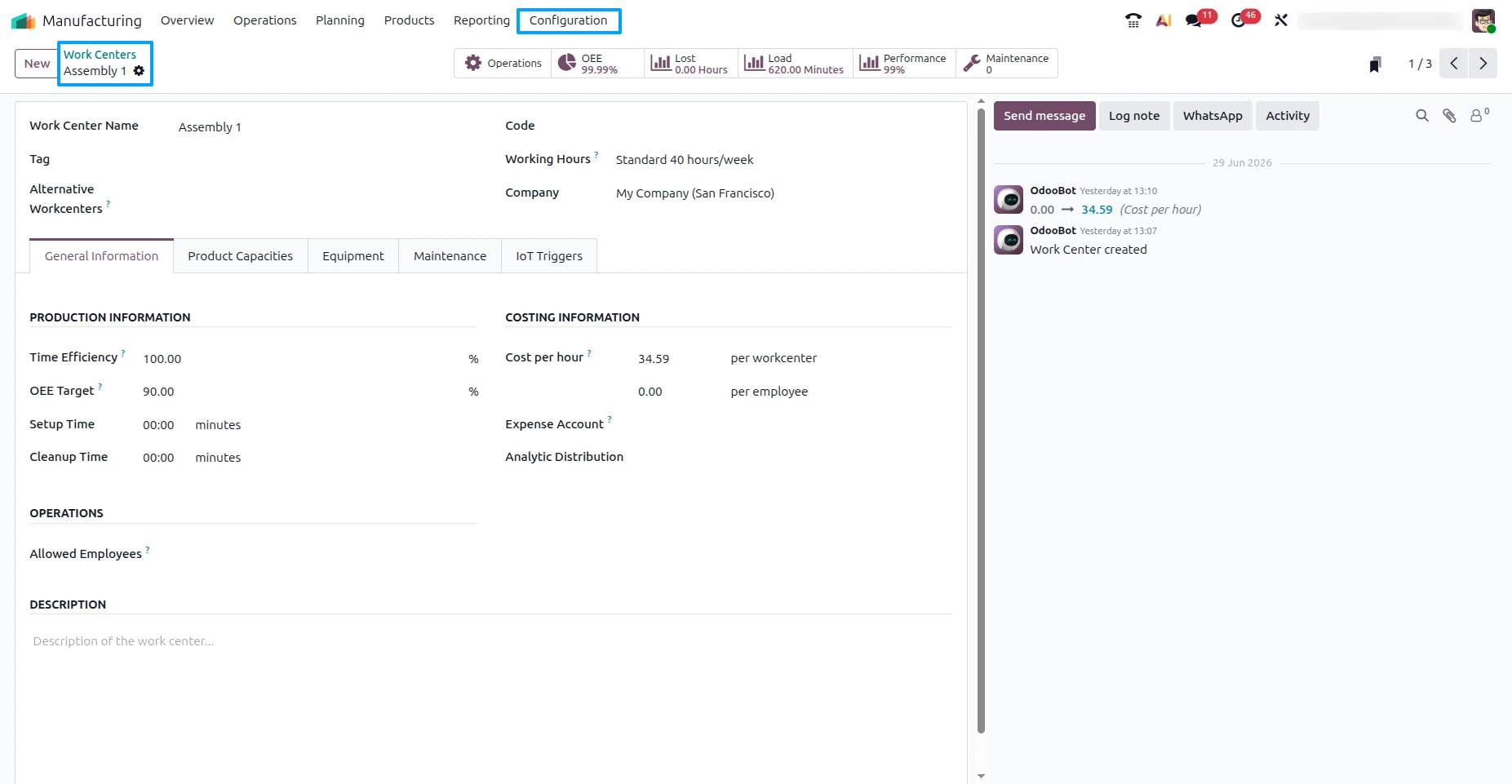
You can set up each work center with its production parameters like working hours, production capacity, hourly costs, efficiency and maintenance settings.
Manufacturers can set up each production resource one time. Use it in many different Bills of Materials and manufacturing routings. This makes production planning simpler. Ensures that everything is consistent across manufacturing processes.
Capacity Management
Odoo lets businesses decide how many work orders or production operations a work center can handle at the time.
Capacity settings help production planners give work to the people and prevent machines from getting too busy. When production demand goes up planners can look at what's available and give work orders to other work centers if they need to.
Capacity management also helps with production forecasting by giving a view of what manufacturing resources are available.
Working Hours and Calendars
Each work center can have its production schedule.
Manufacturers can configure:
- Daily working hours
- Weekly schedules
- Multiple shifts
- Weekend operations
- Public holidays
- Seasonal production calendars
These calendars make sure manufacturing orders are scheduled only when production hours are available which prevents unrealistic delivery estimates and scheduling conflicts.
Work Order Management
Odoo automatically makes work orders from manufacturing orders based on what's in the Bill of Materials.
Each work order has detailed production instructions, what work center to use how long it will. What is going on with it.
Production operators can start, stop and finish work orders from the shop floor and managers can watch progress in real time.
This gets rid of paperwork and makes production tracing better throughout the manufacturing process.

Time Tracking
Odoo keeps track of how long production's supposed to take and how long it actually takes for every work order.
Manufacturers can compare how long they thought production would take with how it really took to find out what is not working well and make production planning better.
Accurate time tracking supports:
- Labor cost calculation
- Machine utilization analysis
- Performance benchmarking
- Production forecasting
- Continuous process improvement
Performance Monitoring
Managers can look at how work centers are doing using numbers like:
- Production duration
- Completed work orders
- Machine utilization
- Downtime
- Overall Equipment Effectiveness
- Average production time
These insights help find bottlenecks and make resource use better across manufacturing operations.
Cost Calculation
Each work center can have a cost.
As work orders are finished Odoo automatically calculates manufacturing costs based on how it took at each work center.
Manufacturers get a view of production expenses without having to do manual cost calculations.
Maintenance Integration
Work Center Management works with Odoo Maintenance.
Businesses can plan maintenance based on use, operating hours or set times.
Maintenance planning stops equipment failures makes machines last longer and improves production reliability.
Alternative Work Centers
If a main work center is not available Odoo lets manufacturers define work centers.
Production planners can redirect work orders without disrupting the manufacturing process.
This flexibility improves production continuity. Reduces delays from equipment downtime.
How to Configure a Work Center in Odoo
Setting up work centers correctly is one of the important steps in making an efficient manufacturing environment.
A typical work center configuration involves defining production resources, operating schedules, capacity, costs and efficiency settings.
The general process includes:
- Navigate to Manufacturing → Configuration → Work Centers.
- Create a new work center and assign a descriptive name.
- Select the appropriate working schedule or resource calendar.
- Configure the work center capacity to indicate how many operations it can process simultaneously.
- Define the efficiency percentage to account for real production speed.
- Enter the hourly operating cost used for manufacturing cost calculations.
- Configure Overall Equipment Effectiveness targets if performance monitoring is required.
- Assign alternative work centers for backup production if necessary.
- Save the configuration and link the work center to manufacturing operations within Bills of Materials.
Once you have set up the work center it is ready, for production planning. Whenever a manufacturing order is confirmed Odoo automatically makes work orders. Schedules them according to the work center’s availability, capacity and calendar.
Key Work Center Configuration Fields
| Configuration | Purpose |
|---|---|
| Work Center Name | Identifies the production resource |
| Working Hours | Defines machine availability and production schedule |
| Capacity | Number of operations processed simultaneously |
| Time Efficiency | Adjusts estimated production duration |
| Cost Per Hour | Calculates manufacturing costs |
| Alternative Work Centers | Backup production resources |
| OEE Target | Measures operational performance |
| Resource Calendar | Controls shift schedules and holidays |
By configuring work centers accurately, manufacturers establish the foundation for efficient production planning, realistic scheduling, precise cost tracking and improved resource utilization. Combined with Odoo's integrated Manufacturing, Inventory, Quality and Maintenance applications, work centers become a critical component of a streamlined and data-driven production environment.
Managing Capacity and Working Hours
One of the problems that manufacturers have to deal with is finding a balance between how much they need to produce and what they have to work with. Some areas of the factory are really busy with orders while others are not doing much which causes problems with getting things made on time and using resources in the way. Odoo helps with these problems by giving businesses tools to manage how much work their machines and people can handle and when they are available to work.
With Odoo manufacturers can say how many jobs a machine or workstation can do at the time. It depends on what kind of work's being done. For example a big machine might only be able to do one job at a time. A packaging area with many workers might be able to do many jobs at once.
When there is much work and not enough machines or people to do it planners can quickly see which areas are too busy and move work to other machines or workstations. This helps prevent delays gets orders delivered on time and makes sure that machines and equipment are used much as possible. Odoo helps manufacturers manage their capacity and working hours in a way, which makes the whole production process more efficient.
Important Work Center Performance KPIs
| KPI | Description | Business Benefit |
|---|---|---|
| Overall Equipment Effectiveness | Measures availability, performance and quality | Improves production efficiency |
| Capacity Utilization | Percentage of available production capacity used | Balances workloads effectively |
| Machine Downtime | Time equipment remains unavailable | Reduces production interruptions |
| Production Cycle Time | Time required to complete operations | Identifies process inefficiencies |
| Work Order Completion Rate | Percentage of completed work orders | Improves delivery reliability |
| Cost Per Hour | Operating expense of each work center | Supports accurate cost analysis |
Managing Equipment Maintenance
Machine reliability is really important for keeping manufacturing operations running. When equipment breaks down unexpectedly it can mess up production schedules increase costs delay deliveries to customers and reduce productivity overall. Odoo helps with these issues by combining Work Center Management with the Maintenance application.
Of treating maintenance as something separate Odoo connects maintenance planning directly to production resources. Each work center can have a schedule for maintenance to reduce the chances of unexpected breakdowns.
You can schedule maintenance based on things like:
- Operating hours
- Number of production cycles
- Calendar intervals
- Manufacturer recommendations
- Equipment usage history
When maintenance is planned the people in charge of production can see when work centers are schedule manufacturing orders accordingly. This helps minimize disruptions to production and keeps equipment in condition.
If a machine breaks down unexpectedly the maintenance team can create a request for maintenance right in Odoo. The production managers can see the status of the affected work center. Redirect work orders to other resources if they are available.
The history of maintenance is kept for every work center so manufacturers can look at how reliable the equipment's over time. If something needs to be repaired a lot it might mean the machinery is getting old or it is not being used correctly or it might need to be replaced.
Integrating maintenance with manufacturing provides several operational benefits:
- Reduced unplanned downtime
- Improved equipment lifespan
- Better production scheduling
- Lower maintenance costs
- Increased production reliability
- Enhanced workplace safety
By taking care of production resources of time manufacturers can make sure equipment is available and reduce expensive production interruptions.

Cost Management Using Work Centers
It is really important to understand the cost of manufacturing so you can price products correctly analyze profitability and plan financially. A lot of manufacturers have trouble estimating production costs because they have to calculate labor expenses, machine usage and overhead costs by hand. Odoo makes this easier by incorporating work center costs into manufacturing operations.
Each work center can be given an operating cost that shows how much it costs to run that production resource. This cost can include things like machine depreciation, electricity, maintenance, labor, utilities and other expenses.
As work orders are completed Odoo automatically calculates production costs based on the time spent at each work center. Of just using estimated production times businesses get accurate cost information that reflects what is really happening in manufacturing.
For example if a machining center costs ₹2,000 per hour to run and a work order takes two hours to complete Odoo will record ₹4,000 as the machining cost for that operation. The same calculations are done for every work center involved in manufacturing so you get a picture of production expenses.
This automated cost calculation offers several advantages:
- Accurate product costing
- Better pricing decisions
- Improved profitability analysis
- Reduced manual calculations
- Greater financial transparency
- More reliable production budgeting
Managers can also compare estimated manufacturing costs with actual production costs to find inefficiencies. If there are differences it might mean there is too much machine downtime operators are not productive enough routing estimates are not accurate or there are unexpected maintenance expenses.
By monitoring work center costs manufacturers have better control over spending and can make informed decisions about improving processes investing in equipment and optimizing production.
Benefits of Odoo Work Center Management
Odoo Work Center Management gives manufacturers control over production resources and improves efficiency across the entire manufacturing process.
Some of the most significant benefits include:
- Improved production scheduling accuracy
- Better machine and workforce utilization
- Reduced production bottlenecks
- Lower equipment downtime through preventive maintenance
- Accurate manufacturing cost calculation
- Real-time visibility into shop floor operations
- Faster work order execution
- Better production planning across multiple facilities
- Improved on-time delivery performance
- Enhanced decision-making using real-time production data
Because Work Center Management is fully integrated with Manufacturing, Inventory, Maintenance, Quality and Planning applications businesses benefit from a unified platform that eliminates separate data systems and manual coordination between departments.
As manufacturing operations grow Odoo grows with the business making it suitable for manufacturers and large enterprises, with multiple production lines.
Manual vs Odoo Work Center Management
| Manual Process | Odoo Work Center Management |
|---|---|
| Spreadsheet-based production scheduling | Automated production scheduling |
| Manual machine allocation | Intelligent work center assignment |
| Separate maintenance records | Integrated maintenance management |
| Limited production visibility | Real-time shop floor monitoring |
| Manual manufacturing cost calculations | Automatic cost calculation |
| Difficult bottleneck detection | Live performance dashboards |
| Static production planning | Dynamic scheduling based on capacity |
| Disconnected manufacturing data | Fully integrated ERP system |
Frequently Asked Questions
1. What is a Work Center in Odoo?
A Work Center is where manufacturing operations are done. It can be a machine, production line, workstation, assembly area, packaging station or a team that does tasks.
2. How does Odoo calculate Work Center capacity?
Odoo looks at each Work Centers capacity to see how operations it can handle at once. This helps create manufacturing schedules.
3. Can multiple Work Centers be assigned to a manufacturing process?
Yes multiple Work Centers can be used. A manufacturing process can have operations and each one can be done at a different Work Center. Odoo creates work orders. Schedules them correctly.
4. How does Odoo track machine downtime?
Odoo tracks downtime through work orders and maintenance. When Odoo is connected to the Maintenance app it records equipment breakdowns, maintenance schedules and Work Center availability.
5. What is Overall Equipment Effectiveness?
OEE measures how well equipment is working. It looks at availability, performance and quality. This helps manufacturers see how well they are using their production resources.
6. Can Work Centers have operating costs?
Yes each Work Center can have its hourly cost. Odoo uses these costs to calculate manufacturing expenses based on the time spent on work orders at each Work Center.
7. How does preventive maintenance improve manufacturing?
Preventive maintenance helps prevent equipment failures reduces downtime makes machines last longer improves safety and keeps production on schedule. This is important, for Work Centers and manufacturing.
Conclusion
Making things in a factory is not about giving orders and keeping track of stock. Companies need to know what is going on with the machines, workstations and teams that turn materials into finished products. If you do not manage the work areas properly you can have problems with scheduling machines breaking down wrong costs and the factory not working well as it should.
Odoo Work Center Management is a tool that helps you organize the people and things that make products schedule the work check how things are going figure out costs and plan for machine maintenance. When you connect the work areas with the parts of the company that make things keep track of stock fix machines check quality and plan Odoo makes a system where everything works with up-to-date information.
Whether you have one production line or many factories Odoo helps companies use their resources better cut costs make things efficiently and get products to customers on time. For people who make things and want to make their factory work better and grow Odoo Work Center Management gives them the tools they need to be really good at what they do, for a time.
