Executive Summary
Explain how TallyPrime is used a lot for accounting and GST compliance.
Many businesses use TallyPrime for accounting and GST compliance. As they grow they often need more than just financial management.
As their inventory gets bigger they add warehouses. Departments want to see real-time updates.
That's when they start looking at ERP platforms like Odoo.
Odoo is a business management platform that does everything in one system.It combines Accounting, Inventory, CRM, Sales, Manufacturing, Purchase and HR.
This way all parts of the business can work together smoothly.
Odoo helps businesses manage their operations in a place. It provides real-time visibility across departments. With Odoo businesses can make decisions and grow efficiently.
TallyPrime and Odoo serve needs and businesses choose what works best for them.
They look for a system that meets their future needs.
Odoo is an option, for businesses that want a system.
It helps them streamline their operations and improve performance.
Why Companies Move from TallyPrime to Odoo
Growing Beyond Accounting
Lots of businesses start with TallyPrime because it helps with accounting, taxation, GST filing and financial reporting.. As the business gets bigger managing inventory becomes just as important as accounting.
Need for Real-Time Inventory Control
Businesses often struggle with:
- Inventory mismatches
- Delayed stock updates
- Limited warehouse visibility
- Manual stock reconciliation
Odoo helps businesses keep track of their inventory in time across all warehouses, locations and channels.
Unified Business Operations
Odoo is different, from systems that just focus on accounting. It connects all the parts of the business including:
through a single database.
Signs TallyPrime May No Longer Meet Your Operational Needs
Inventory Visibility Is Becoming a Challenge
Growing businesses often need:
- Real-time stock visibility
- Multi-warehouse tracking
- Accurate inventory valuation
Reporting Needs Are Expanding
Management requires more than accounting reports, including:
- Inventory insights
- Sales analytics
- Procurement visibility
Multiple Systems Are Being Used
Businesses may rely on separate tools for:
- Accounting
- CRM
- Inventory
- Manufacturing
This can create data silos and duplicate work.
Operations Are Becoming More Complex
Growth often brings:
- Multiple warehouses
- More products
- Additional sales channels
Manual Work Is Increasing
Teams spend more time on:
- Stock verification
- Purchase planning
- Data entry
This can reduce efficiency as the business scales.
TallyPrime vs Odoo Comparison Table
| Capability | TallyPrime | Odoo |
| Primary Focus | Accounting | Complete ERP |
| GST Compliance | Excellent | Excellent |
| Accounting | Strong | Strong |
| Inventory Management | Basic to Intermediate | Advanced Real-Time |
| Multi-Warehouse | Limited | Advanced |
| CRM | Not Native | Built-In |
| Manufacturing | Limited | Full MRP |
| Procurement | Basic | Advanced |
| Reporting | Finance Focused | Cross-Department Analytics |
| Barcode Operations | Limited | Native |
| eCommerce Integration | Limited | Native |
| Scalability | Small-Mid Business | SMB to Enterprise |
| Customization | Limited | Highly Flexible |
| Mobile Accessibility | Limited | Modern Mobile Experience |
ERP Migration Risks
Poor Data Quality
Common issues include:
- Duplicate customer records
- Incorrect stock balances
- Outdated product information
Incomplete Process Mapping
Migrating data without reviewing business processes often creates inefficiencies.
User Resistance
Employees accustomed to existing systems may require training and change management support.
Scope Expansion
Adding new requirements mid-project can increase costs and implementation timelines.
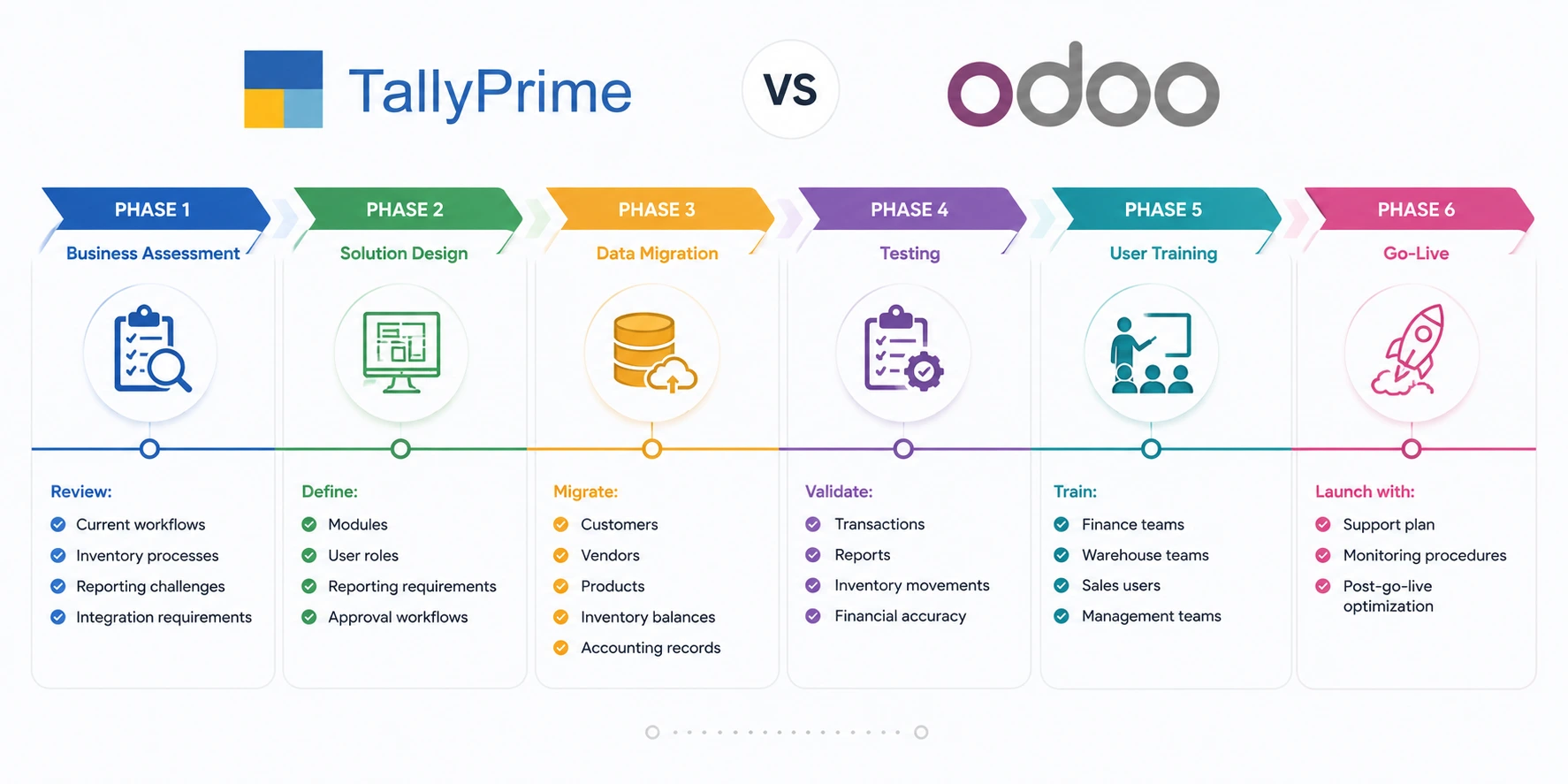
TallyPrime vs Odoo: ERP Migration Roadmap
Industry-Specific Considerations
Manufacturing
Manufacturers require:
- Bills of Materials
- Work Orders
- Production Planning
- Quality Control
Distribution
Distributors benefit from:
- Multi-warehouse inventory
- Demand forecasting
- Automated procurement
Retail
Retail businesses often require:
- POS integration
- Omnichannel inventory visibility
- Customer loyalty management
eCommerce
Growing online businesses need:
- Inventory synchronization
- Order automation
- Integrated fulfillment processes
Cost and ROI Considerations
Organizations should evaluate more than software licensing costs.
Potential ROI areas include:
| Area | Business Impact |
| Inventory Accuracy | Reduced stock losses |
| Automation | Lower manual effort |
| Reporting | Faster decisions |
| Procurement | Better purchasing control |
| Warehouse Operations | Increased efficiency |
| Customer Service | Improved fulfillment accuracy |
| Finance | Faster closing cycles |
Common ERP Migration Mistakes
1.Migrating Poor Data
Clean data before migration.
2.Over-Customization
Avoid rebuilding old processes unnecessarily.
3.Ignoring User Adoption
Successful ERP projects require user engagement.
4.Lack of Executive Sponsorship
Leadership support significantly improves project outcomes.
5.Underestimating Inventory Complexity
Inventory data often requires the most validation during migration.
How Browseinfo Supports ERP Modernization
Browseinfo helps organizations modernize operations through:
- Odoo Implementation Services
- Odoo Migration Services
- Odoo Customization
- Odoo Integration Services
- Odoo Support Services
- Inventory Management Consulting
- Manufacturing ERP Consulting
Our team helps businesses transition from accounting-focused systems to fully integrated ERP environments.
FAQs
1. Why do businesses switch from TallyPrime to Odoo?
2. Can Odoo do everything TallyPrime does?
3. How is Odoo better at managing inventory than TallyPrime?
4. What information can be moved from TallyPrime to Odoo?
5. Is Odoo good for businesses that make and sell products?
6. How long does it take to switch from TallyPrime to Odoo?
7. What benefits can businesses expect from moving to Odoo?
Odoo helps improve inventory visibility, automate processes, reduce manual work, and provide better business insights.
Final Thoughts
TallyPrime is still a choice for businesses that mainly focus on finance and following rules. But for companies that want to know whats happening with their inventory now automate tasks, connect with customer management manage manufacturing and get reports for the whole company they might need more than just accounting software.
Odoo offers an ERP system that helps businesses link up their inventory, accounting, sales, buying, making products and customer operations all, in one place. For businesses that are growing, like makers, distributors, shops and online sellers updating their ERP system can give them the view and ability to grow that they need for the long term.
