Managing products efficiently in a Point of Sale (POS) system is essential for modern retail businesses. As retail operations continue to expand, businesses handle thousands of products, multiple product variants, dynamic pricing structures, and continuous inventory updates throughout the day.
However, manually updating products inside the POS system often creates operational challenges. Retail businesses frequently experience synchronization delays, inconsistent product visibility, incorrect pricing information, inventory mismatches, and workflow interruptions.
Additionally, manual refresh operations consume valuable time for retail staff and reduce operational productivity. These issues can negatively affect customer experience, transaction speed, and inventory accuracy.
To overcome these operational limitations, businesses require an automated synchronization solution that ensures real-time communication between backend product management and POS interfaces.
Odoo POS provides an efficient and automated solution through the Auto Product Sync feature. This functionality automatically synchronizes products between the Odoo backend and POS screen without requiring manual refresh actions.
As a result, businesses can improve operational efficiency, maintain accurate product visibility, reduce manual workload, and streamline retail workflows effectively.
Understanding the Auto Product Sync Feature
The core functionality of the Auto Product Sync Odoo app revolves around enabling seamless synchronization of POS products without requiring manual intervention. This eliminates the need to refresh the POS screen repeatedly, ensuring a smooth and uninterrupted workflow for users.
To activate this feature, users simply need to access the Point of Sale configuration and enable the “Allow Sync Product” option. Once enabled, the system automatically manages product synchronization in the background, ensuring that all product updates are instantly available on the POS screen without additional effort.
Also Read: Odoo POS All in One features that every POS machine needs
Challenges in Manual POS Product Management
Retail businesses often face several operational difficulties while managing products manually inside POS systems.
Manual product synchronization delays can create workflow interruptions and reduce operational efficiency. Additionally, outdated product visibility on POS screens may lead to incorrect billing and customer dissatisfaction.
Businesses also frequently experience pricing inconsistencies, inventory mismatches between backend and POS systems, and time-consuming refresh operations. As retail operations continue to grow, these manual processes become increasingly difficult to manage efficiently.
Moreover, operational interruptions during billing, product availability inconsistencies, and dependency on manual updates can negatively impact transaction speed and retail productivity.
Streamlined Configuration for Sync
Configuring Auto Product Sync in Odoo POS is simple and user-friendly. Businesses can enable the synchronization feature directly from the Point of Sale configuration settings without requiring complex technical setup.
Users only need to activate the “Allow Sync Product” option to automate product synchronization between the backend and POS screen. Once enabled, the system automatically manages synchronization processes in real time.
Additionally, this automated configuration reduces manual effort, improves operational efficiency, and ensures continuous product visibility across POS terminals.
Effortless Management of POS Products
One of the most valuable advantages of the Auto Product Sync feature is its ability to synchronize POS products automatically without requiring manual screen refresh operations.
Whether businesses create new products, update pricing information, modify inventory details, or edit existing products through the Odoo backend, all changes instantly appear on the POS interface.
Moreover, the synchronization process runs seamlessly in the background, ensuring uninterrupted retail workflows and improved operational continuity.
As a result, businesses can reduce synchronization delays, minimize manual workload, improve inventory accuracy, and enhance the overall retail management experience.
Step-by-Step Guide for Configuration
Configuring "Allow Sync Product"
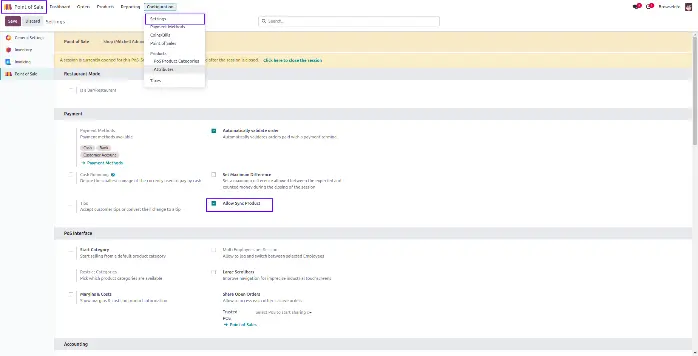
- Navigate to the Point of Sale configuration settings in the Odoo backend.
- Locate the “Allow Sync Product” option and enable the checkbox to activate automatic synchronization.
- Once enabled, the system immediately starts syncing product data in real time across POS interfaces without requiring manual refresh or reload actions.
This ensures continuous synchronization of product information and eliminates delays between backend updates and POS availability.
Creating or Editing Products for Sync: 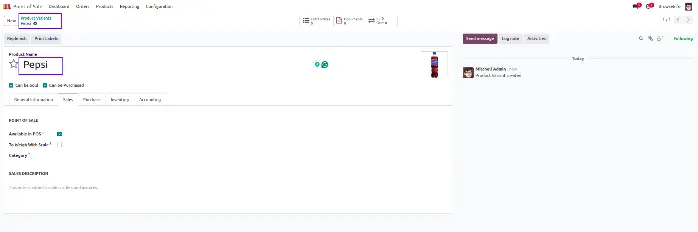
- When creating or updating products for POS usage, there is no requirement to manually refresh or reload the POS screen. The system automatically detects any changes made in the backend and updates the POS interface instantly.
- This real-time update mechanism ensures consistent data flow and eliminates discrepancies between backend product records and POS display information. It also improves operational reliability and reduces errors caused by outdated or mismatched product data.
Ease of Use in POS Configuration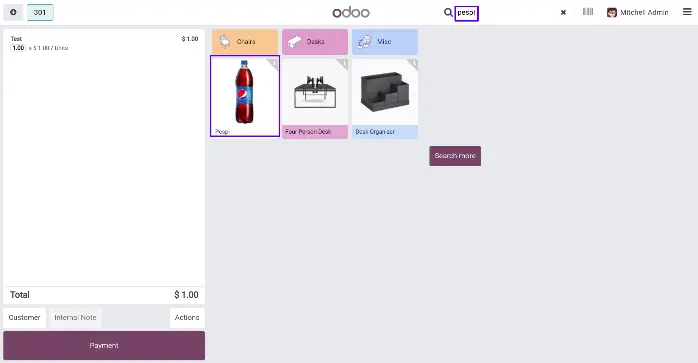
The POS configuration interface is designed to be simple, intuitive, and user-friendly, allowing users to enable or disable the “Allow Sync Product” feature with minimal effort.
This ease of configuration ensures that businesses can quickly adopt automation without requiring technical expertise. It also enhances usability by reducing manual dependency and improving the overall efficiency of POS operations.
Advantages of Auto Product Sync on POS Screen Odoo App
The implementation of this feature introduces multiple operational advantages, including:
- Time Efficiency: Reduces manual work by automating product synchronization in real time.
- Seamless Product Management: Ensures smooth handling of product creation and updates across POS.
- Improved Accuracy: Minimizes data mismatch and ensures consistent product information.
- Better Operational Flow: Enhances speed and reliability of POS transactions.
- Reduced Human Error: Eliminates dependency on manual refresh and updates.
Conclusion
Auto Product Sync on the POS screen in Odoo provides a powerful solution for modern retail businesses seeking faster, smarter, and more efficient product management.
By automating synchronization between the backend and POS interface, businesses can improve operational accuracy, reduce manual workload, and streamline retail workflows significantly.
Additionally, real-time synchronization improves inventory visibility, enhances customer experience, and supports faster transaction processing.
With Odoo POS automation, businesses can build a more scalable, reliable, and efficient retail management system capable of supporting long-term operational growth.
