Introduction
When businesses grow their finance teams have to deal with invoices, bills from suppliers, payments, taxes and financial reports. Doing all these tasks by hand takes up a lot of time can lead to mistakes and often causes delays in reporting. Businesses today need accounting processes that're quicker more accurate and don't rely so much on manual work.
Many companies still use accounting systems, spreadsheets and manual approval processes. As the number of transactions goes up tasks like entering data reconciling bank statements manually and reporting at the end of the month become more complicated. This reduces productivity. Leaves less time for analyzing financial data.
Odoo helps automate accounting, by linking up Sales, Purchase, Inventory, Banking, Payroll, Expenses and Financial Reporting in one ERP platform. Every transaction automatically creates accounting entries, which helps businesses cut down on work improve the accuracy of their finances and get a real-time view of how they're doing financially.
Why Accounting Automation Matters
Accounting automation is not just for companies. Businesses of all sizes want to get more done with work and have better financial controls.
Manual accounting can cause problems like entering the data twice slow approvals and issues with matching up accounts. It can also delay reports. Increase the risk of compliance issues. Automation helps accounting teams get rid of tasks and makes sure things are done the same way across the company.
Automation does not replace accountants. It helps them focus on tasks like budgeting, forecasting and making financial plans. They can analyze profitability. Make decisions.
How Accounting Automation Works in Odoo
Odoo automates accounting by connecting tasks directly to daily operations. Every customer order, purchase from suppliers, inventory movement, expense submission, payroll transaction and bank payment automatically creates accounting entries.
In Odoo accounting data is not entered after things happen. Instead it generates entries as part of the process. When customer invoices are sent Accounts Receivable is updated. When vendor bills are received Accounts Payable is updated. Payments update Bank Journals and financial reports are always up, to date.
All Odoo modules use the accounting database. This means information is always synchronized throughout the ERP system.

Real Odoo Accounting Automation Workflow
The automation process begins with operational transactions and continues until financial reports are updated.
| Step | Odoo Module | Automated Activity |
|---|---|---|
| 1 | Sales | Sales Order confirmed |
| 2 | Accounting | Customer Invoice created |
| 3 | Payment | Customer payment registered |
| 4 | Purchase | Vendor Bill generated |
| 5 | Accounting | Supplier payment processed |
| 6 | Bank | Bank reconciliation completed |
| 7 | Accounting | Journal Entries updated |
| 8 | Reporting | Financial reports refreshed |
Each step reduces manual intervention while maintaining complete accounting accuracy.
Automating Customer Invoicing
Creating invoices for every order by hand gets really hard as sales grow.
Odoo makes invoices automatically from confirmed sales orders based on the companys invoicing rules. It takes customer details, products, amounts, prices, discounts, taxes and payment terms into the invoice so no need to enter data twice.
When an invoice is posted it automatically makes the accounting entries. Accounts Receivable, revenue and tax accounts get updated away so financial records stay accurate.
This automation speeds up billing. Reduces mistakes.

Automating Accounts Receivable
Managing customer payments is another area where automation helps a lot.
After invoices are sent out Odoo tracks how much customers still owe automatically. It sends payment reminders makes reports on balances and gives customer statements to help finance teams keep track of collections better.
When customers pay users just register the payment in Odoo. The system updates what customers owe, accounting records and financial reports without needing entries.
As a result businesses get better at collecting payments. Have healthier cash flow.
Automating Vendor Bills and Accounts Payable
Processing supplier invoices often involves approvals, payment schedules and accounting updates.
Odoo simplifies this by making Vendor Bills from confirmed Purchase Orders when possible. Finance teams review invoices check amounts and approve payments using workflows they can set up.
Once payments are processed Odoo updates Accounts Payable, Bank Journals, General Ledger accounts and supplier balances automatically.
This workflow reduces work, for finance teams. Improves financial control.
Manual Accounting vs Accounting Automation with Odoo
| Accounting Activity | Manual Process | Odoo Automation |
|---|---|---|
| Customer Invoicing | Manual invoice creation | Automatic from Sales Orders |
| Vendor Bills | Separate data entry | Linked with Purchase Orders |
| Customer Payments | Manual journal entries | Automatic accounting updates |
| Supplier Payments | Manual payment tracking | Automated workflow |
| Financial Reports | Spreadsheet preparation | Real-time reporting |
| Bank Reconciliation | Manual matching | Automatic suggestions |
| Tax Calculation | Manual computation | Automated tax engine |
| Customer Statements | Manual preparation | Generated instantly |
Automating Journal Entries
It can make accounting journal entries automatically. This is one of the things about Odoo.
When we have transactions Odoo makes the debit and credit entries for us. We do not have to make these entries by hand.
For example:
Customer invoices update revenue and receivable accounts.
Vendor Bills update expense and payable accounts.
Customer payments update bank balances.
Inventory valuation updates stock accounts.
Payroll posts salary expenses.
Manufacturing costs update production accounts.
Because Odoo makes journal entries automatically our accounting records are always correct.
Automated Approval Workflows
Financial accuracy depends not only on automation but also on proper approval controls.
Odoo allows organizations to configure approval workflows for Vendor Bills, purchase requests, expenses, payments and other accounting activities. Approvals can be based on transaction value, department, or user roles.
Automated notifications ensure that approvals move quickly through the organization while maintaining strong financial governance.
This reduces delays and helps prevent unauthorized financial transactions.
Real-Time Financial Visibility
Automation provides immediate access to financial information.
Instead of waiting until month-end to prepare reports, finance managers can review revenue, expenses, outstanding receivables, payables, cash balances and profitability as transactions occur.
Dashboards update automatically because every accounting entry is generated in real time.
This allows management to respond quickly to financial changes and make informed business decisions based on current data rather than historical reports.
Automating Bank Reconciliation
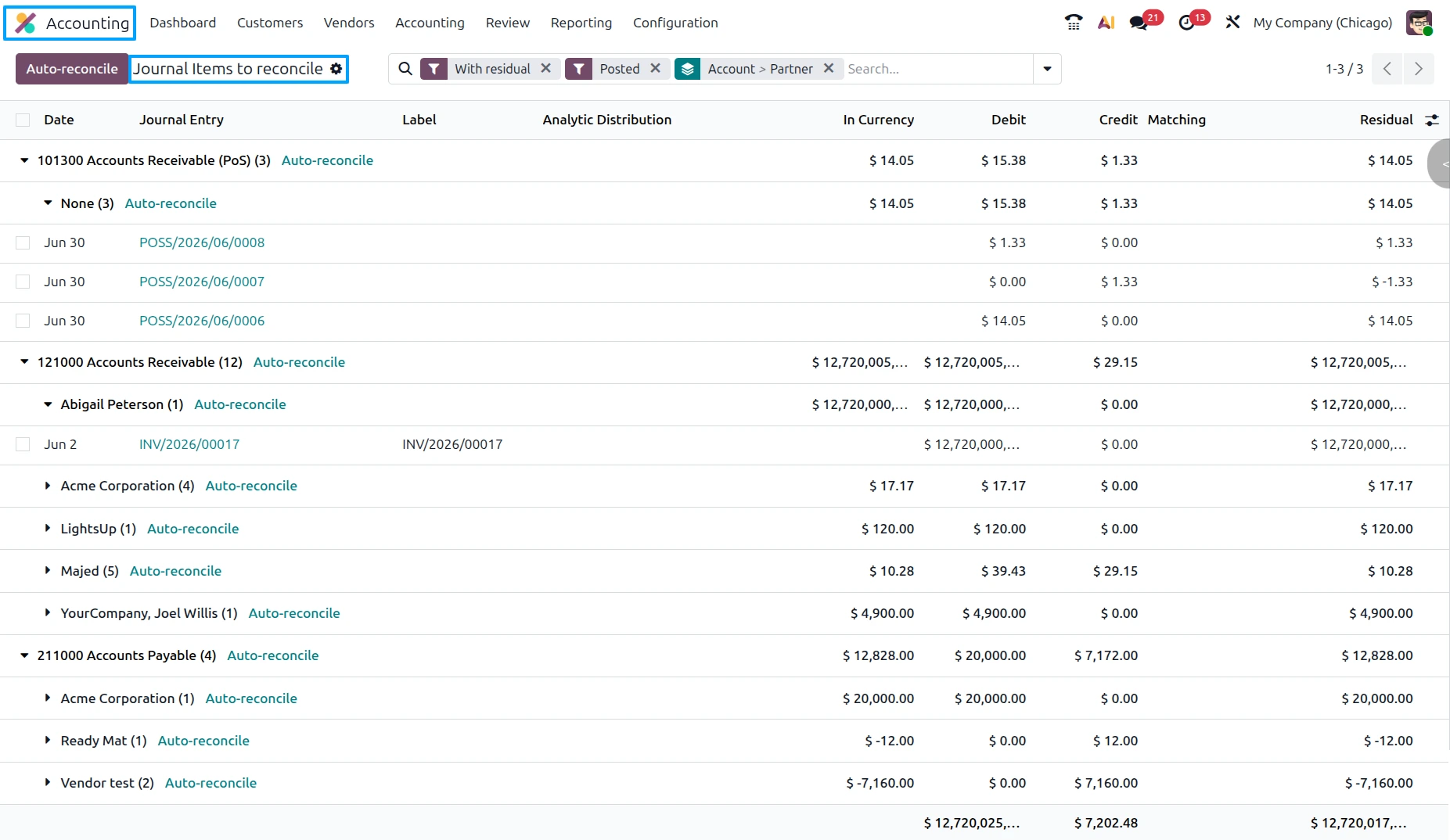
Bank reconciliation is one of the most repetitive accounting activities for finance teams. As transaction volumes increase, manually matching customer payments, supplier payments, bank transfers, service charges and refunds with accounting records becomes increasingly time-consuming.
Odoo simplifies this process through integrated Bank Journals and automated reconciliation features. Bank statements can be synchronized directly from supported banks or imported using formats such as CSV, CAMT, or OFX. Once transactions are available, Odoo analyzes payment references, partners, invoice numbers, transaction amounts and dates to suggest matching accounting entries.
For recurring transactions such as bank charges, payment gateway fees, interest income, or loan repayments, Reconciliation Models automatically propose the correct accounting treatment. Finance users only need to review and validate the suggestions, reducing reconciliation time while improving financial accuracy.
Automating Tax Management
Tax calculation is another area where automation significantly improves accounting efficiency.
Instead of calculating taxes manually for every customer invoice or Vendor Bill, Odoo applies predefined tax rules automatically during transaction processing. Product taxes, customer fiscal positions, vendor taxes and company tax configurations determine the correct tax amounts without requiring user intervention.
When invoices are posted, Odoo automatically updates tax accounts within the General Ledger and reflects those values in tax reports. Finance teams can review GST, VAT, Sales Tax, or other applicable tax reports at any time without consolidating data from multiple systems.
This automation reduces compliance risks while simplifying tax return preparation.
Automating Budget Management
Budget monitoring often becomes a manual exercise when businesses maintain financial plans in spreadsheets.
Odoo integrates budgeting with Analytic Accounting, allowing planned budgets to be compared automatically with actual financial transactions. Finance teams create Budgetary Positions, Analytic Plans and Budget Lines during the planning stage. As Vendor Bills, employee expenses, payroll entries and journal entries are posted, actual values update automatically against the relevant budgets.
Management can monitor budget utilization, identify overspending and review budget variances throughout the year without manually updating spreadsheets.
Automating Cash Flow Management
Healthy cash flow depends on timely customer collections, controlled supplier payments and accurate banking records. Odoo automates many of these activities by connecting Sales, Purchase, Accounting and Banking into one integrated workflow.
Customer payments update Accounts Receivable and Bank Journals automatically. Supplier payments reduce Accounts Payable while updating cash balances. Reconciled bank transactions immediately affect cash flow reports and financial dashboards.
Because every payment is linked to accounting records, finance managers can monitor liquidity continuously instead of preparing separate cash flow spreadsheets at the end of each reporting period.
Financial Reporting Automation
Preparing financial reports manually often requires exporting data from different systems, reconciling balances and verifying calculations before management can review business performance.
Odoo removes these manual steps by generating reports directly from accounting journal entries. Every posted invoice, Vendor Bill, payment, inventory valuation, payroll transaction and journal entry contributes automatically to financial reports.
Finance teams can generate:
Profit & Loss Statement
Balance Sheet
Cash Flow Statement
Trial Balance
General Ledger
Partner Ledger
Accounts Receivable Aging
Accounts Payable Aging
Tax Reports
Since reports are updated continuously, management always has access to current financial information.

Automated Payment Follow-Ups
Late customer payments can negatively affect working capital and business operations. Odoo helps finance teams automate payment follow-ups by tracking invoice due dates and outstanding balances.
Reminder emails and follow-up activities can be scheduled according to company policies, reducing the need for manual collection efforts. Customer statements and receivable aging reports also update automatically, enabling finance teams to prioritize overdue accounts more effectively.
This automation improves collection efficiency while strengthening customer payment discipline.
Automation Across Business Modules
One of Odoo's biggest advantages is that accounting automation extends beyond the Accounting application itself.
Sales automatically generates customer invoices.
Purchasing creates Vendor Bills.
Inventory updates stock valuation.
Manufacturing records production costs.
Expenses create employee reimbursement entries.
Payroll records salary expenses.
Banking reconciles payments.
Because every module contributes accounting entries to the same financial database, organizations avoid duplicate data entry while maintaining complete financial consistency.
Business Processes Automated by Odoo
| Business Process | Automation in Odoo |
|---|---|
| Customer Invoicing | Automatic invoice generation |
| Vendor Bill Processing | Linked with Purchase Orders |
| Customer Collections | Automated payment tracking |
| Supplier Payments | Integrated payment workflow |
| Tax Calculation | Automatic tax engine |
| Bank Reconciliation | Intelligent matching and reconciliation models |
| Budget Monitoring | Planned vs Actual updates |
| Financial Reporting | Live accounting reports |
| Payment Reminders | Automated customer follow-ups |
| Cash Flow Analysis | Real-time financial dashboards |
Benefits of Accounting Automation with Odoo
Accounting automation delivers measurable operational improvements across the finance department.
Key benefits include:
Reduced manual data entry
Faster invoice processing
Improved financial accuracy
Automated journal entries
Faster bank reconciliation
Better cash flow visibility
Simplified tax compliance
Real-time financial reporting
Stronger approval controls
Increased finance team productivity
These benefits allow organizations to scale their finance operations without proportionally increasing administrative workload.
Best Practices for Accounting Automation
Successful accounting automation begins with accurate system configuration. Businesses should maintain a well-structured Chart of Accounts, configure taxes correctly, establish approval workflowsand keep customer and supplier master data up to date.
Finance teams should reconcile bank statements regularly, review financial dashboards frequently and monitor outstanding receivables and payables throughout the month. Organizations should also automate recurring invoices, recurring journal entries and payment reminders wherever appropriate.
Regular reviews of automated workflows help ensure accounting processes continue to support changing business requirements.
Common Mistakes to Avoid
Automation is most effective when supported by disciplined accounting practices.
Some common mistakes include:
Maintaining accounting spreadsheets alongside the ERP.
Delaying invoice or Vendor Bill posting.
Ignoring bank reconciliation.
Using incorrect tax configurations.
Posting transactions without proper approvals.
Failing to review automated journal entries.
Not monitoring receivable aging reports.
Delaying month-end financial reviews.
Avoiding these issues helps organizations maximize the value of accounting automation.
Internal Linking Opportunities
Naturally link this article to:
Frequently Asked Questions
1. What is Accounting Automation in Odoo?
Accounting Automation in Odoo is when the system automatically makes accounting entries, invoices, payment records, tax calculations, bank reconciliation suggestions and financial reports as things happen in the business.
2. Does Odoo automatically generate accounting entries?
Yes. When you have customer invoices, vendor bills, payments and other things like inventory and payroll Odoo automatically makes accounting journal entries for these things.
3. Can Odoo automate bank reconciliation?
Yes. Odoo gets bank statements suggests which transactions match and helps with Reconciliation Models for things that happen a lot with banking.
4. How does Odoo automate tax management?
Odoo applies the tax rules you set up when you buy or sell things and updates the tax accounts and reports through accounting entries.
5. Can Odoo automate financial reporting?
Yes. Odoo makes reports like the Profit & Loss Statement, Balance Sheet, Cash Flow Statement and General Ledger automatically from the live accounting data.
6. Is Accounting Automation good for businesses?
Yes. Small businesses and businesses that are growing can benefit from having manual work, better financial accuracy and accounting processes that can grow with them.
7. Which industries benefit from Odoo Accounting Automation?
Lots of industries benefit from Odoo Accounting Automation, including Manufacturing, wholesale distribution, retail, healthcare, construction, logistics, education, hospitality and professional services.
8. Can Odoo automate recurring accounting activities?
Yes. Odoo can do recurring invoices, recurring journal entries, payment reminders, automated reconciliation models and scheduled financial processes.
Conclusion
Accounting automation is crucial for finance teams to work efficiently keep financial records and help the business grow. Manual accounting creates a lot of work increases errors and makes it difficult to get financial information.
Odoo automates accounting by integrating sales, purchasing, inventory, banking, payroll, expenses and financial reporting into one place. When a business creates customer invoices, vendor bills, payments, tax calculations, journal entries and bank reconciliation Odoo does it automatically. This reduces work and gives finance teams a clear view of the businesss financial performance.
By automating and integrating business processes Odoo helps finance teams focus on planning, analyzing and making decisions instead of just managing the books. This improves the finance teams productivity gives the business control and creates a foundation, for accounting that helps the business succeed in the long term. Odoo accounting automation helps businesses achieve their goals.
