Managing Point of Sale operations efficiently is essential for retail businesses, restaurants, supermarkets, cafés, pharmacies, and multi-store organizations. Daily sales reporting plays a critical role in monitoring store performance, evaluating cashier activities, tracking revenue, and making informed business decisions.
The Automatically Transmit POS Sale Report to Manager Odoo App helps businesses automate the process of sending Point of Sale session reports directly to managers via email whenever a POS session is closed.
This automation eliminates manual report sharing tasks and ensures that management receives timely, accurate, and structured sales information without delay. The module generates detailed sales reports that include session summaries, payment summaries, cash register information, and product-wise sales analysis.
By automating POS reporting workflows, businesses can improve operational visibility, simplify store management, reduce administrative workload, and enhance decision-making processes within Odoo ERP.
Importance of POS Reporting in Retail Operations
Point of Sale reporting is one of the most important operational activities for businesses managing daily sales transactions.
Managers rely on POS reports to:
- Monitor daily revenue
- Analyze store performance
- Track payment collections
- Verify cash register balances
- Evaluate product sales
- Review cashier activities
- Monitor operational efficiency
- Improve business planning
Without automated reporting systems, store managers often depend on manual communication and delayed reporting methods.
Business Challenges Without POS Report Automation
Manual POS reporting creates several operational problems.
Common Reporting Issues
| Operational Challenge | Business Impact |
|---|---|
| Delayed report sharing | Slow business decisions |
| Manual report preparation | Increased workload |
| Missing transaction details | Poor visibility |
| Human reporting errors | Inaccurate data |
| Manual email communication | Reduced productivity |
| Disconnected reporting | Inefficient management |
Automating POS reporting helps businesses reduce these operational inefficiencies significantly.
Challenges of Manual POS Reporting
Businesses using manual POS reporting commonly face operational difficulties.
Common Reporting Problems
| Challenge | Business Impact |
|---|---|
| Delayed reporting | Slow decision-making |
| Manual email sharing | Increased administrative work |
| Missing sales information | Poor operational visibility |
| Human reporting errors | Inaccurate data |
| Lack of centralized reports | Difficult management tracking |
| Time-consuming processes | Reduced productivity |
The Automatically Transmit POS Sale Report module helps solve these operational issues through workflow automation.
Centralized Store Monitoring
Businesses managing multiple stores or POS counters require centralized operational visibility.
The POS Report Automation module allows management teams to monitor sales performance without manually collecting reports from individual stores.
Centralized Reporting Benefits
Better Operational Visibility
Managers receive complete sales summaries automatically.
Faster Business Decisions
Immediate access to reports improves management response times.
Simplified Multi-Store Monitoring
Monitor all retail operations consistently.
Improved Data Accuracy
Automation minimizes manual reporting mistakes.
Features
1) Auto Send POS Sale Report to Manager
User can set the default point of sale manager and the report will be sent automatically on closing session.
2) Session Summary Details
User can see the session summary on the point of sale report.
3) Payment Detail Summary
User can see payment detail summary on the point of sale report.
4) Cash Register & Product Summary
User can see the cash register and product summary on point of sale report.
Default POS Manager Configuration
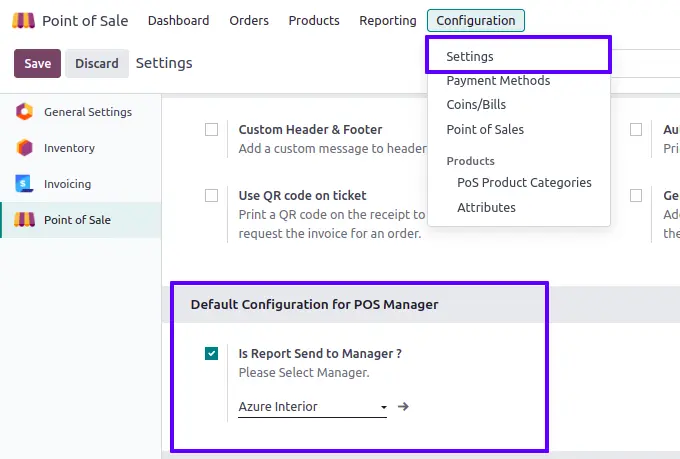
User need to enable the "Is Report Send to Manager ?" option and select default manager for point of sale.
Auto Sent POS Sale Report
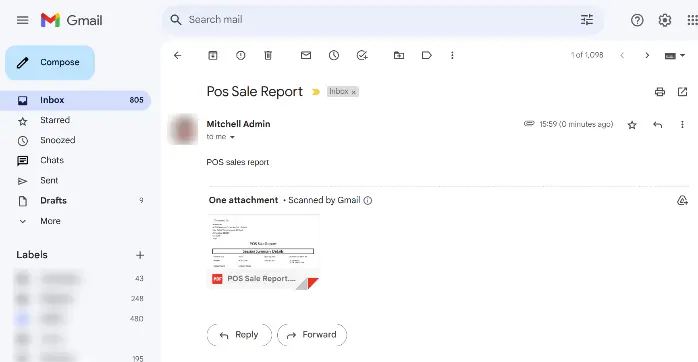
On closing point of sale session, default manager will get an email with the attached sale report.
POS Sale Report
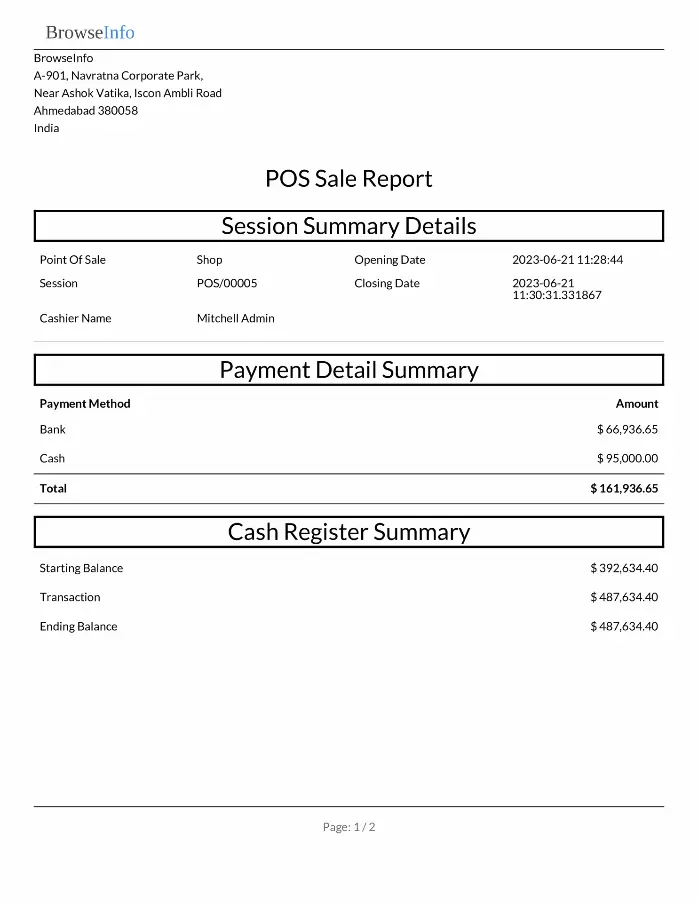
User can see session summary details, payment detail summary, cash register summary, and product summary report.
Benefits of Automatic POS Report Emails
Automated email reporting significantly improves operational efficiency.
Major Advantages
Faster Communication
Managers receive reports immediately after session closure.
Reduced Manual Work
Employees no longer need to send reports manually.
Better Operational Visibility
Management can monitor store activities more effectively.
Improved Decision-Making
Timely reports help managers respond quickly to business conditions.
Centralized Reporting
All sales reports remain organized and accessible.
Benefits for Business Owners
Business owners require operational visibility to manage profitability and business growth.
The module helps business owners:
- Monitor sales performance
- Track daily revenue
- Analyze branch operations
- Improve reporting consistency
- Simplify retail management
- Improve operational control
Automated reporting supports better strategic decision-making.
ERP-Based Retail Automation
The module integrates directly with Odoo ERP and POS workflows.
ERP Automation Advantages
| ERP Capability | Business Improvement |
| Automated Reporting | Reduce manual operations |
| Centralized Management | Manage reports from ERP |
| Real-Time Visibility | Faster operational insights |
| POS Integration | Seamless workflow automation |
ERP automation improves operational consistency and store management efficiency.
Importance of Real-Time POS Monitoring
Real-time sales monitoring helps businesses react quickly to operational changes.
Managers can:
- Monitor sales performance
- Review store productivity
- Analyze payment collections
- Verify transaction accuracy
- Improve operational control
Real-time reporting improves retail management significantly.
Multi-Store Business Benefits
Businesses operating multiple stores or branches benefit greatly from automated POS reporting.
Multi-Branch Advantages
Centralized Reporting
Managers can monitor all stores efficiently.
Consistent Operations
Standardized reporting across branches.
Better Management Visibility
Review branch performance quickly.
Faster Financial Analysis
Monitor revenue trends across locations.
Industries That Benefit from POS Report Automation
The module is useful for multiple industries using Point of Sale systems.
Supported Industries
| Industry | Usage |
| Retail Stores | Daily sales monitoring |
| Restaurants | Session sales tracking |
| Supermarkets | Payment reporting |
| Cafés | Cash register management |
| Pharmacies | Product sales analysis |
| Fashion Stores | Revenue tracking |
| Electronics Shops | POS management |
| Multi-Branch Retail | Centralized reporting |
Manual Reporting vs Automated Reporting
| Manual POS Reporting | Automated POS Reporting |
| Manual email sending | Automatic report delivery |
| Delayed communication | Instant reporting |
| Human errors | Improved accuracy |
| Time-consuming process | Faster operations |
| Limited visibility | Better monitoring |
Automation improves both operational speed and reporting reliability.
Operational Efficiency Improvements
Automated reporting significantly improves operational efficiency.
Efficiency Benefits
Reduced Administrative Work
Employees no longer manually prepare reports.
Faster Report Delivery
Managers receive reports instantly.
Better Workflow Consistency
Automated processes improve operational stability.
Improved Productivity
Teams focus more on operations instead of reporting tasks.
Manual Reporting vs Automated Reporting
| Manual Reporting | Automated Reporting |
| Manual email sending | Automatic report delivery |
| Delayed reports | Instant communication |
| Human errors | Better accuracy |
| Time-consuming process | Faster workflows |
| Limited operational visibility | Real-time monitoring |
Automation improves both productivity and reporting quality.
Financial and Accounting Advantages
The module improves financial reporting and accounting workflows.
Accounting Benefits
Better Revenue Visibility
Monitor daily sales accurately.
Faster Financial Tracking
Reports are generated instantly.
Improved Cash Monitoring
Track register balances efficiently.
Simplified Auditing
Maintain organized transaction records.
Improved Management Decision-Making
Managers rely on operational data for strategic decisions.
The POS reporting module helps management:
- Monitor sales performance
- Identify top-performing products
- Analyze payment trends
- Improve store productivity
- Review cashier performance
- Optimize business operations
Accurate reporting supports stronger business growth strategies.
Customer Service Improvements
Better operational monitoring indirectly improves customer service quality.
Businesses can:
- Reduce billing errors
- Improve cashier performance
- Ensure faster service
- Maintain better operational consistency
Improved store operations enhance customer experience.
Why Businesses Choose This Module
Businesses implement this module to simplify retail reporting workflows and improve operational visibility.
Main Reasons
| Reason | Benefit |
| Automated Reports | Reduce manual work |
| Faster Reporting | Improve visibility |
| POS Session Monitoring | Better management |
| Payment Analysis | Financial transparency |
| Product Reporting | Better sales analysis |
Long-Term Operational Benefits
Businesses implementing automated POS reporting gain several long-term advantages.
Long-Term Improvements
- Reduced reporting workload
- Faster operational visibility
- Improved management tracking
- Better retail analytics
- Enhanced financial monitoring
- Stronger ERP automation
- Improved productivity
- Better business scalability
Final Conclusion
The Automatically Transmit POS Sale Report to Manager Odoo App helps businesses automate POS reporting workflows by sending detailed session reports directly to managers whenever POS sessions are closed.
With automatic email reporting, session summaries, payment analysis, cash register tracking, and product sales reporting, the module improves operational visibility, reduces administrative workload, and enhances retail management efficiency.
By integrating directly with Odoo Point of Sale operations, businesses can simplify store monitoring, improve decision-making, and strengthen retail workflow automation across single-store and multi-branch environments.
