Introduction
Maintaining the right inventory levels is one of the biggest challenges for businesses that manage physical products. Ordering too late can result in stock shortages, delayed customer deliveries, and interrupted production, while ordering too early increases storage costs and ties up valuable working capital. Finding the right balance requires accurate inventory visibility and efficient replenishment processes.
Many growing businesses still use stock checks or spreadsheets to decide when to reorder products. As the number of products, suppliers and warehouses grows this approach gets harder to manage. Often leads to buying mistakes.
Odoo Reordering Rules helps by automating stock replenishment. It watches stock levels. Suggests when to buy more based on set limits. This way businesses do not have to check stock every day. They can use automation to keep the stock levels make buying easier and reduce stock risks with Odoo Reordering Rules.
Odoo Reordering Rules makes it easier to manage stock and make buying decisions.Using Odoo Reordering Rules helps businesses save time and money.
Why Inventory Replenishment Matters
Inventory directly affects sales, production, customer satisfaction, and cash flow. A product that is unavailable when customers need it may result in lost revenue, while excessive inventory increases carrying costs and warehouse space requirements.
A good replenishment plan helps businesses keep inventory to meet demand without buying too much stock. Inventory replenishment also makes it easier to manage hundreds or thousands of products.
As businesses grow automating inventory replenishment becomes more important for keeping operations running. Inventory automation helps businesses maintain efficiency. Inventory management is crucial, for businesses.
What Are Odoo Reordering Rules?
Odoo Reordering Rules help you manage your stock. They are, like automated alerts that check your inventory levels. When your stock gets low they suggest that you restock.
Instead of waiting until products run out, Odoo continuously compares available inventory against minimum stock levels. When inventory reaches the reorder point, the system generates a replenishment recommendation or creates procurement activities based on business configuration.
Depending on the product configuration, replenishment may result in:
- A purchase order
- A manufacturing order
- An internal warehouse transfer
This flexibility allows businesses to automate inventory replenishment according to their operational requirements.
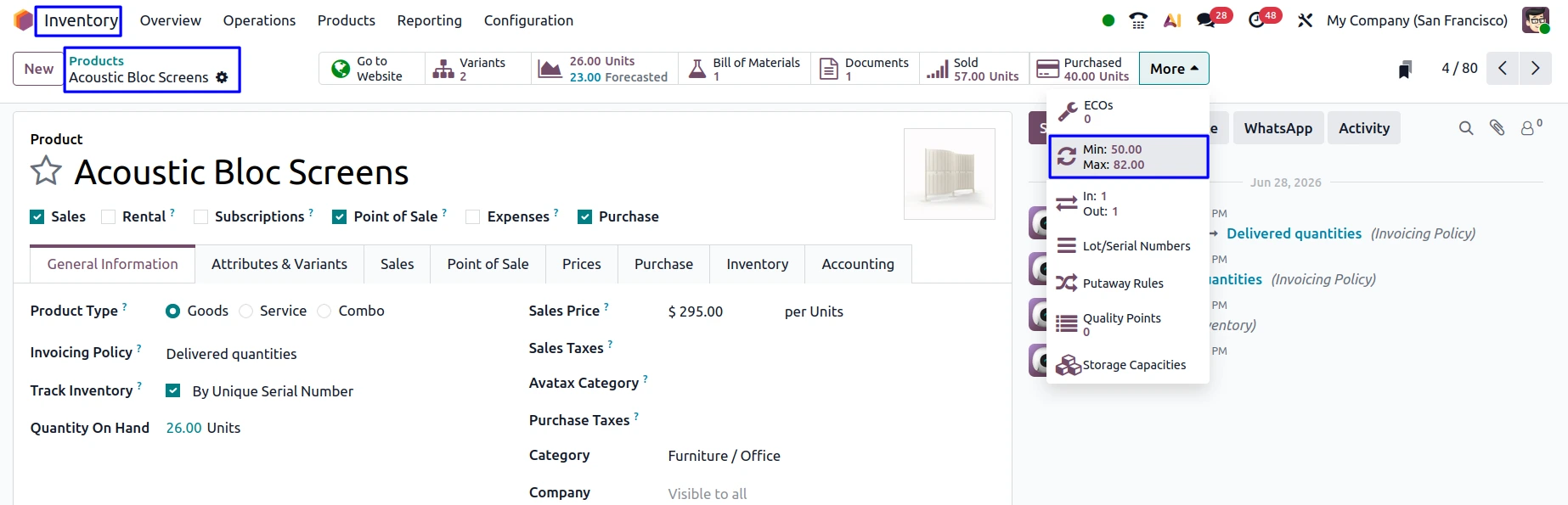
How Odoo Reordering Rules Work
Each reordering rule consists of inventory parameters that determine when and how stock should be replenished.
The most important settings include:
- Minimum Quantity: The inventory level that triggers replenishment.
- Maximum Quantity: The stock level Odoo attempts to restore after replenishment.
- Multiple Quantity: The quantity increment used when creating replenishment orders.
- Warehouse or Location: The warehouse where the rule applies.
For example, if a product has a minimum quantity of 20 units and a maximum quantity of 100 units, Odoo will recommend replenishment whenever available inventory falls below 20 units. The system will calculate the required quantity to restore inventory to the defined maximum level.

This automated process helps eliminate manual inventory monitoring while improving purchasing consistency.
Reordering Rule Parameters
| Parameter | Purpose |
|---|---|
| Minimum Quantity | Triggers replenishment |
| Maximum Quantity | Defines target inventory level |
| Multiple Quantity | Orders products in predefined multiples |
| Warehouse | Specifies where the rule applies |
| Product | Identifies the item being monitored |
| Route | Determines procurement method |
Benefits of Using Reordering Rules
One of the advantages of Odoo Reordering Rules is that it helps automate routine buying decisions. This means procurement teams do not have to check inventory every day. They can focus on managing suppliers and finding sources.
Businesses also gain from having accurate inventory plans. Since buying decisions are based on set stock levels purchasing becomes more steady. Relies less, on individual employees. Reordering Rules make inventory planning better. Reordering Rules help make buying consistent.
Some of the key business benefits include:
- Reduced stock shortages
- Lower inventory carrying costs
- Automated purchasing workflows
- Better inventory planning
- Improved warehouse efficiency
- More accurate procurement decisions
Reordering Rules vs Manual Inventory Monitoring
A lot of companies still use spreadsheets. They check their stock every now and then to figure out when they need to order more products. This way of doing things might be okay, for companies that do not have a lot of products.. When a company has a big inventory this method does not work very well.
| Manual Inventory Management | Odoo Reordering Rules |
|---|---|
| Manual stock reviews | Automated inventory monitoring |
| Higher risk of stockouts | Continuous replenishment |
| Time-consuming purchasing | Automated procurement suggestions |
| Spreadsheet tracking | Real-time inventory visibility |
| Inconsistent decisions | Standardized replenishment rules |
| Delayed purchasing | Faster procurement planning |
Automation reduces the likelihood of human error while improving consistency across purchasing operations.
Integration with Purchasing
Reordering Rules work closely with the Purchase module.
When inventory reaches the minimum threshold, Odoo can generate procurement recommendations that purchasing teams can review before confirming purchase orders. This integration reduces manual data entry while improving procurement accuracy.
This helps organization in a way. We get coordination, between managing our inventory and buying things from suppliers.

Integration with Manufacturing
Manufacturers usually make more products to restock their inventory of buying them.
When a product follows a manufacturing route, Reordering Rules can automatically generate Manufacturing Orders instead of Purchase Orders. This ensures production begins before inventory shortages occur.
The connection, between inventory and manufacturing helps keep production going without any breaks. It also makes it easier to plan resources.
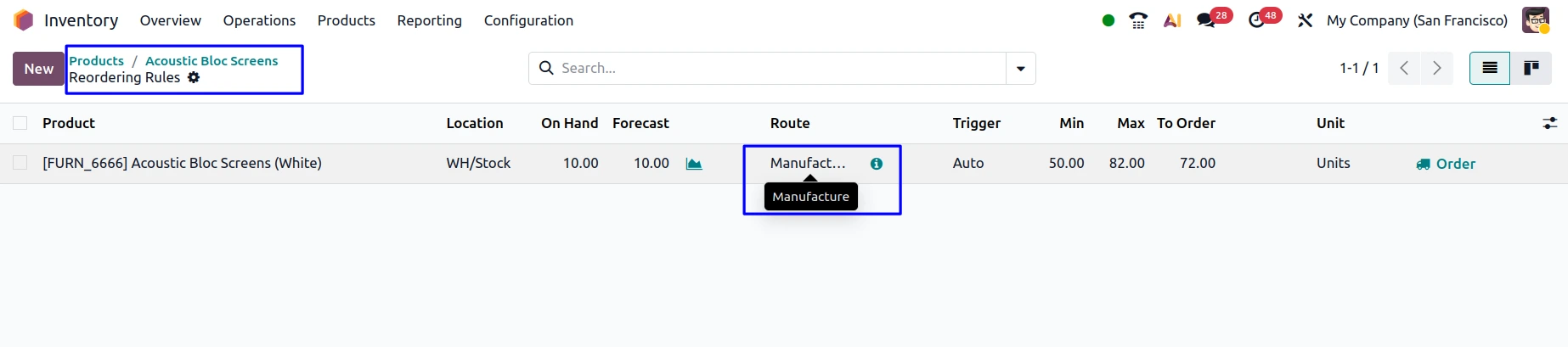
Managing Reordering Rules Across Multiple Warehouses
Businesses that have multiple warehouses often see different demand patterns at each warehouse.
Odoo allows separate Reordering Rules to be configured for individual warehouses or storage locations. This flexibility enables businesses to maintain different inventory policies depending on customer demand, warehouse capacity, or regional sales volumes.
Setting up Reordering Rules for each warehouse helps get the inventory to the place and cuts down on moving stock around when it is not needed. This is really helpful, for managing Reordering Rules across warehouses.
Common Mistakes When Configuring Reordering Rules
Although Reordering Rules are straightforward to implement, incorrect configuration can reduce their effectiveness.
Some common mistakes include:
- Setting minimum quantities too low
- Ignoring supplier lead times
- Using outdated demand forecasts
- Applying identical rules to every product
- Not reviewing rules periodically
Regular evaluation helps ensure replenishment policies continue supporting changing business requirements.
Common Inventory Challenges and Odoo Solutions
| Inventory Challenge | Odoo Solution |
|---|---|
| Frequent Stockouts | Automated reordering |
| Overstocking | Maximum quantity limits |
| Manual Purchasing | Automated procurement suggestions |
| Delayed Replenishment | Continuous inventory monitoring |
| Multi-Warehouse Complexity | Warehouse-specific rules |
| Purchasing Errors | Standardized replenishment policies |
| Inventory Visibility Issues | Real-time stock tracking |
| Production Interruptions | Manufacturing replenishment |
Best Practices for Odoo Reordering Rules
To get the results businesses should review their Odoo reordering rules often. This helps make sure the rules match what customers really want.
When setting minimum and maximum inventory levels consider the following:
- Sales data
- How long suppliers take to deliver
- Changes in demand due to seasons
Also keep an eye on how suppliers are doing. Adjust how often you replenish stock as your business needs change.
Some products have demand. They may need inventory rules, than products that are seasonal or sell quickly.
Check replenishment reports regularly. This ensures that automation is still helping you buy what you need and keeping inventory levels right.
Reviewing reports helps with reordering rules and keeps inventory optimization on track. It also helps with making purchasing decisions.
How Odoo Reordering Rules Support Business Growth
As your business grows managing inventory gets harder. You have products, suppliers, warehouses and customer orders to handle. This makes it tough for procurement teams to keep everything running smoothly.
Odoo Reordering Rules provide a scalable automation framework that helps organizations manage inventory efficiently without increasing administrative workloads. Because replenishment is integrated with purchasing, manufacturing, and warehouse management, businesses maintain accurate inventory while supporting continued growth.
With Odoo Reordering Rules your procurement team can focus on things that matter. They can spend time checking stock levels and more time building better relationships, with suppliers and finding new ways to improve procurement. Odoo Reordering Rules make it all possible.
Frequently Asked Questions
1. What are Odoo Reordering Rules?
Odoo Reordering Rules are really useful because they keep an eye on the inventory levels and tell you when you need to restock when the levels go down below the minimum amount that you set for the Odoo Reordering Rules.
2. How do Reordering Rules prevent stock shortages?
The Odoo Reordering Rules system is always checking how stock you have and it tells you to get more before you run out of the products that are managed by the Odoo Reordering Rules.
3. Can Reordering Rules create purchase orders automatically?
Yes. The Odoo Reordering Rules can do that depending on how you set them up. The Odoo Reordering Rules can suggest that you buy more or they can just go ahead and make a purchase order for the products that are managed by the Odoo Reordering Rules.
4. Can manufacturers use Reordering Rules?
Yes. Companies that make things can use the Odoo Reordering Rules to tell them when to make more of their products of buying them from someone else. The Odoo Reordering Rules can help these companies by generating orders to make the products.
5. Do Reordering Rules support multiple warehouses?
Yes. Businesses can define different replenishment policies for individual warehouses or storage locations.
Conclusion
Odoo Reordering Rules automate inventory replenishment by monitoring stock levels and triggering procurement actions when needed. This helps businesses prevent stockouts, reduce excess inventory and improve operational efficiency.
By using accurate inventory data and automated replenishment processes, organizations can optimize stock management, streamline purchasing and build a more reliable supply chain for long-term growth.
